
⚠️Not updated in over a year ⚠️Below average rating
Description
Sticky notes extension for chrome. Stick notes onto websites for remembering and collecting information. Quickly jot down ideas and save time. Best way to annotate webpages.
Key features:
Sticky Notes: Place sticky notes on x, y coordinates. Notes are autosaved using chromes local storage and are never sent over the internet unless you choose to share them with others.
Share Notes: Share your notes with others by optionally uploading them. Copy the invitation link and send to friends so they can view notes on the site you've shared.
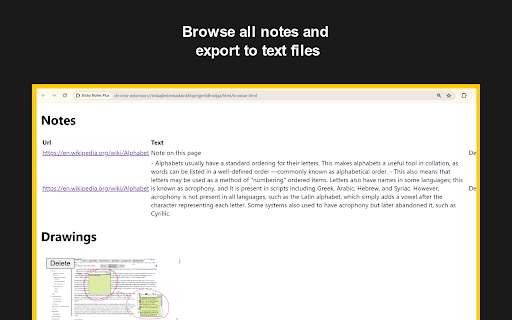
Browse Notes: View all notes you've saved across websites for easy access.
Create a new note by clicking the extension icon
The sticky notes are semi-transparent, making them perfect for annotating webpages.
Next Update Planned Features
- Persistent highlights
- Add comments sticking to element / highlight
- Improved YouTube notes
11/15/24
- Added dragging and dropping notes
- Added resizable notes
- Now take unlimited notes on the free version
9/19/24
- Improved functionality and installation page
7/31/24
- Removed installation page showing up every update, instead added changelog
- Removed drawings and canvas element overlay
- Note content now wraps instead of scrolling on the x axis
6/7/24
- Fixed canvas rendering issues on large pages
6/1/24
- Share notes with link
- Redesigned navigation bar and added icons
5/29/24
- https://stickynoteplus.com/ website and share links
5/22/24
- Take notes and stick them to an x, y coordinate (auto-saved locally)
- Draw on webpages
- Browse your collection of notes and drawings with page previews
- Download notes as txt files
- Minimalistic full page text editor


Reviews (6 cached)
★☆☆☆☆2026-02-15
Jose Silva
Doesn't work collaborative
★☆☆☆☆2025-12-11
Shankar Davis
how do u place down a note did i miss something?? very frustrating. dont use unless u like to be confused
★☆☆☆☆2025-05-06
D'Amaurie
it's been said, but this is broken
★☆☆☆☆2025-04-30
mehrdad
Doesn't work at all.
★☆☆☆☆2025-02-28
Shantell Oyadina
Does not work when clicked on.
★★☆☆☆2026-01-21
Ivey Williams
I cant see my previous notes
Permissions (5)
Permissions
activeTabℹ Can access the current tab when you click the extension contextMenusℹ Can add items to the right-click menu identityℹ Can use your Google account identity storageℹ Can store data locally in your browser unlimitedStorage
Details
| Version | 1.1.0 |
| Updated | Nov 21, 2024 |
| Size | 379KiB |
| First Seen | Mar 24, 2026 |
Popular in workflow

Adobe Acrobat: PDF edit, convert, sign tools
by Adobe Inc.
322M
★ 4.40
workflow
322M
★ 4.40
workflow

AdBlock — block ads across the web
by AdBlock
62M
★ 4.48
workflow
62M
★ 4.48
workflow

迅雷下载支持
by Shenzhen Xunlei Network Technology Co., Ltd.
59M
★ 2.77
workflow
59M
★ 2.77
workflow

Adblock Plus - free ad blocker
by eyeo GmbH
40M
★ 4.39
workflow
40M
★ 4.39
workflow

Chrome Remote Desktop
by Chrome Remote Desktop Release Managers
37M
★ 3.13
workflow
37M
★ 3.13
workflow
Popular Extensions
Adobe Acrobat: PDF edit, convert, sign tools
by Adobe Inc.
322M
★ 4.40
workflow
322M
★ 4.40
workflow
AdBlock — block ads across the web
by AdBlock
62M
★ 4.48
workflow
62M
★ 4.48
workflow
迅雷下载支持
by Shenzhen Xunlei Network Technology Co., Ltd.
59M
★ 2.77
workflow
59M
★ 2.77
workflow

Grammarly: AI Writing Assistant and Grammar Checker App
by Grammarly
42M
★ 4.50
communication
42M
★ 4.50
communication
Adblock Plus - free ad blocker
by eyeo GmbH
40M
★ 4.39
workflow
40M
★ 4.39
workflow