
⚠️Not updated in over 2 years
Description
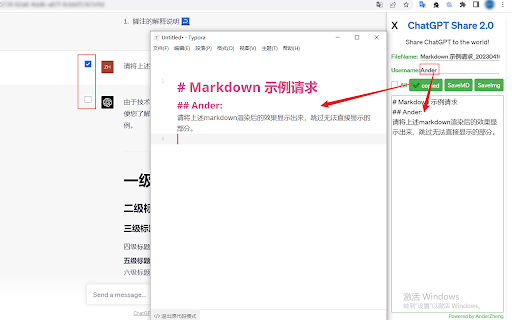
ChatGPT Share is a powerful extension that can save your ChatGPT conversations as Markdown and PNG image files. Designed to help you save, manage, and share your ChatGPT conversations effortlessly.
Main features:
1. Convert ChatGPT conversations into Markdown format, support one-click copy and one-click download;
2. Convert ChatGPT conversations into PNG image format, support one-click download;
3. When saving as Markdown, it supports custom user name to enhance privacy;
4. When saving Markdown or pictures, it supports custom file's name;
5. Support choosing part of the conversations and converting it into Markdown or PNG images;
Supported sites:
✔ https://chat.openai.com/
✔ https://freegpt.one/
✔ https://medium.com/
and other sites like openai.
ChatGPT Share is the perfect companion for ChatGPT enthusiasts, with ChatGPT Share, you can store your valuable conversations more conveniently, making it a breeze to revisit and share them as needed.
Embrace the power of ChatGPT interactions with ChatGPT Share, allowing you to make the most of your AI-generated conversations and never lose those important exchanges again!
Notice:
1. If there is no response when clicking the icon, please refresh the page and try again;
2. It will take some times to generate the picture. It is best to avoid converting long chat into picture. You can select part of the content through the checkbox;
3. Currently, it only supports saving the current page of conversation. The conversation generated after opening the extension, will not be selected. Just reopen it to get the whole content;
4. When switching conversation after opening the extension, it is also need to reopen the extentsion to obtain the new conversation;
Support:
If you have any suggestions or comments, please contact [anderzheng86@gmail.com]
ChangeLog:
v2.0.2: 2023/5/21 fix the problem that cannot get the context from the new chatgpt page.
---------------------------------------------------------------------------
ChatGPT Share是一款功能强大的插件,可以将ChatGPT对话以 Markdown 和 PNG 图像文件的形式保存。旨在帮助您轻松保存、管理和共享您的 ChatGPT 对话。
主要功能:
1. 将ChatGPT对话转成Markdown格式,支持一键复制,一键下载;
2. 将ChatGPT对话转成PNG图片格式,支持一键下载;
3. 保存为Markdown时,支持自定义用户名,增强隐私性;
4. 保存Markdown或图片时,支持自定义文件名;
5. 支持选择部分对话内容,并转换为Markdown或PNG图片;
支持的站点:
✔ https://chat.openai.com/
✔ https://freegpt.one/
✔ https://medium.com/
以及其他类似openai的站点。
ChatGPT Share是 ChatGPT 爱好者的完美伴侣,借助 ChatGPT Share,您可以更方便存储和管理宝贵的聊天记录,以便根据需要轻松重新访问和分享它们。
使用 ChatGPT Share拥抱 ChatGPT 互动的力量,让您充分利用由人工智能生成的对话,再也不会失去那些重要的交流!
注意:
1,如果点击图标无效,请刷新一下页面后再试;
2,保存图片需要一定的时间,尽量避免将长对话内容转换为图片,可以通过checkbox选择部分内容,再进行保存;
3,暂时只支持保存当前对话内容,打开插件后,新生成的对话内容将不会被获取,重新打开插件即可;
4,切换对话时,也需要重新打开插件才能获取对话内容;
支持:
有任何建议或意见,请联系【anderzheng86@gmail.com】
修改履历:
v2.0.2:2023/5/21 修正无法获取新版本chatgpt页面内容的bug。


Reviews
Loading reviews...
Permissions (1)
Permissions
activeTabℹ Can access the current tab when you click the extension
Details
| Version | 2.0.2 |
| Updated | May 22, 2023 |
| Size | 93.42KiB |
| First Seen | Mar 24, 2026 |
Popular in workflow

Adobe Acrobat: PDF edit, convert, sign tools
by Adobe Inc.
322M
★ 4.40
workflow
322M
★ 4.40
workflow

AdBlock — block ads across the web
by AdBlock
62M
★ 4.48
workflow
62M
★ 4.48
workflow

迅雷下载支持
by Shenzhen Xunlei Network Technology Co., Ltd.
59M
★ 2.77
workflow
59M
★ 2.77
workflow

Adblock Plus - free ad blocker
by eyeo GmbH
40M
★ 4.39
workflow
40M
★ 4.39
workflow

Chrome Remote Desktop
by Chrome Remote Desktop Release Managers
37M
★ 3.13
workflow
37M
★ 3.13
workflow
Popular Extensions
Adobe Acrobat: PDF edit, convert, sign tools
by Adobe Inc.
322M
★ 4.40
workflow
322M
★ 4.40
workflow
AdBlock — block ads across the web
by AdBlock
62M
★ 4.48
workflow
62M
★ 4.48
workflow
迅雷下载支持
by Shenzhen Xunlei Network Technology Co., Ltd.
59M
★ 2.77
workflow
59M
★ 2.77
workflow

Grammarly: AI Writing Assistant and Grammar Checker App
by Grammarly
42M
★ 4.50
communication
42M
★ 4.50
communication
Adblock Plus - free ad blocker
by eyeo GmbH
40M
★ 4.39
workflow
40M
★ 4.39
workflow