Bookmark Shortcuts Extension icon

Bookmark Shortcuts Extension

by Potato Extensions

v1.3.0 Updated Mar 3, 2023 10.04KiB
CWS
3K
Users
★ 3.36
22 reviews
#13243
of 207.6K
workflow
#3719 of 31.9K
⚠️Not updated in over 2 years

Description

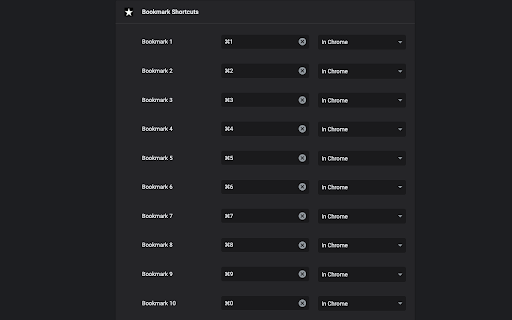
This extension allows you to add 10 keyboard shortcuts for 10 of your bookmarks. When a shortcut is pressed the url for your bookmark (assigned to that shortcut) is opened in your browser. The first 10 bookmarks in your bookmarks list are the bookmarks assigned to the 10 shortcuts you've specified. Go to chrome://extensions/shortcuts and scroll down to "Bookmark Shortcuts Extension" to choose your shortcut key combinations. A better explanation of how to use this extension: (originally written by Miguel Garza in a review of this extension, so all credits for this great explanation goes to Miguel) You get up to 10 bookmarks that you can load by keyboard shortcut. The bookmarks *must* be in your bookmarks bar. The first bookmark in your bookmarks bar is the first bookmark you can assign a keyboard shortcut to, the 2nd bookmark in your bookmarks bar is the 2nd bookmark you can assign a keyboard shortcut to, etc. To assign the keyboard shortcuts to the bookmarks, depending on your browser, type one or the other of the following web addresses in your browser's address bar--for Chrome, type "chrome://extensions/shortcuts" and press Enter. For Microsoft Edge, type "edge://extensions/shortcuts" and press Enter. Scroll down to "Bookmark Shortcuts Extension." There will be 10 slots there for 10 bookmarks, labeled "Bookmark 1" to "Bookmark 10." Click in the box next to any label, and then press the keyboard shortcut you want that bookmark to have (such as Alt-1 for Bookmark 1, Alt-2 for Bookmark 2, etc.). The combination you typed will be listed in the box. That's it! Now if you press the keyboard shortcut you assigned to a bookmark (such as Alt-1), that bookmark will be opened in a new tab.
Bookmark Shortcuts Extension screenshot 1

Reviews (8 cached)

★☆☆☆☆2026-02-22
Ross Vassev

does nothing.

★☆☆☆☆2024-08-16
Frank Utne

Doesn't work worth a damn.

★☆☆☆☆2024-06-09
M C

Does not work at all. I installed the extension, went to chrome://extensions/shortcuts, assigned "Bookmark 1" with a hotkey of Alt-1, closed the tab and went back to it to confirm the settings took effect and were saved. I confirmed that I have bookmarks IN my actual bookmark bar. I go to any of my tabs, press Alt-1 and nothing at all happens. I tried other key combinations. Same things. I even tried deleting the bookmarks from my bookmark bar and recreating them, then recreating the shortcuts. Nothing. Pressing hotkeys with this extension does absolutely nothing in Chrome. If I'm being a complete idiot, by all means, please correct me and I will update my review!

★☆☆☆☆2023-01-20
Some Guy Online

How does this work; I don't see a dashboard or right-click on the existing bookmark' anyone?

★☆☆☆☆2022-05-30
DTP [Production] SQBL

does not work?

★★★☆☆2026-03-10
Ben Bradley

Just a note to the developer that this doesn't seem to be working in Chrome anymore as of March 2026. Hoping for an update soon! Thank you!

★★★☆☆2024-01-12
Joanne Sheppard

I followed the instructs and tips from dev. Linus, Miguel Garza and Rob Penfold. When it didn't work I removed the extension, turned my 3 other extensions off, started again and followed it to the letter. Still, no. I'm certain it's user error. First, I renamed my bookmark bar items - Calendar is Cal1 for bookmark 1, Translate2 for bookmark 2, etc., up to 10. I used ALT 1 for Bookmark 1 (it enters as ALT + 1, yes?), etc., chose "In Chrome" in the dropdown. I closed out Bookmark Shortcuts Extension, went back in. It's installed w/ the keyboard shortcuts I used...ALT + 1... Could it be something in my site settings? Also, I allowed incognito, for luck. I don't know why.

★★★☆☆2023-09-13
Thomas Downie

It does what I need but why does the extension need to read by browsing history?

Permissions (2)

Permissions

bookmarks Can read and modify your bookmarks tabs Can see your open tabs and their URLs

Details

Version 1.3.0
Updated Mar 3, 2023
Size 10.04KiB
First Seen Mar 25, 2026