Signspaces - Sign Language Learning icon

Signspaces - Sign Language Learning

by Signspaces

v1.8.31 Updated Mar 27, 2026 1.01MiB
CWS
4K
Users
★ 4.29
14 reviews
#10981
of 193K
accessibility
#569 of 6K
Recently updated

Description

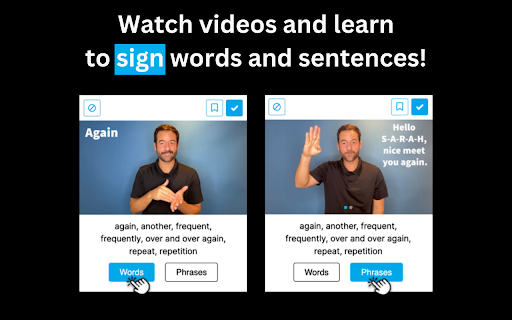
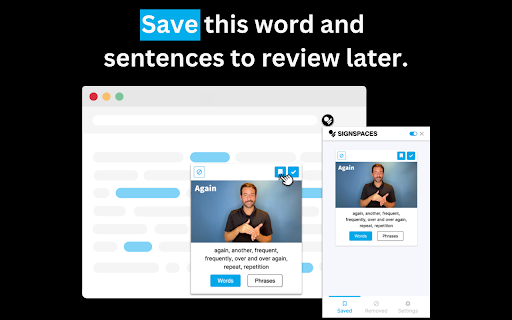
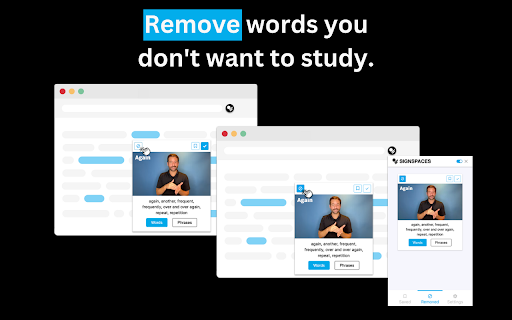
Learn ASL and boost your English—just by browsing the web! Signspaces is a simple Chrome extension that supports ASL and English literacy for Deaf and Hard of Hearing users, ASL students, and anyone interested in learning American Sign Language. It works by translating English words on any webpage into ASL videos. Just click a highlighted word, and a pop-up video will show the sign! Learning ASL is literally as easy as clicking and watching—all in one place. ✨ Try Signspaces today — add it to Chrome for free! 🤟🏾 Available Language American Sign Language (ASL) 📚 What's Inside 11,000+ English words translated into ASL 11,000+ visual aids paired with English text and ASL videos Works with Google Classroom, Google Docs, Google Slides, Canva, and Canvas — perfect for K–12 learning 🌟 Free Features Signspaces Basic — Free ✅ Learn while browsing ✅ Works on any website with English text ✅ Watch videos and learn how to sign words ✅ Learn sign synonyms ✅ Take a break from studying ASL — highlighted words will disappear ✅ Request word translations ✅ More colors for highlighted words ✅ Drag and pin video anywhere on your screen ✅ Search dictionary ✅ Access the first two categories of the dictionary for free ✅ Enable Dark Theme ✅ Right-click to toggle "View in Signspaces" ✅ Shortcut key: PC Alt + A, Mac Command + A ✅ Image & visual aids paired with English text and ASL videos ✅ Resize ASL videos (Zoom + / –) for comfortable viewing 💎 Premium Features Signspaces Premium — $6.99/month or $69.99/year (Save 20%) 🎁 Try it free for 7 days ✅ Everything in the free plan, plus... ✅ Learn how to sign full sentences ✅ Save words and sentences to review later ✅ Control video playback speed ✅ Choose how many words to translate per webpage ✅ Remove words you don't want to study ✅ Full access to all dictionary categories ✅ Select your reading grade level — suggested websites will match your level ✅ Image & visual aids paired with English text and ASL videos 🏫 Signspaces Education For schools and districts — custom pricing available 📩 Request a quote https://docs.google.com/forms/d/179iJ0EPPZkG4HmmmLTohgDWAxIPRYZVI1f2oYi3DNTA/viewform?edit_requested=true ✅ Full access for all staff and students ✅ All features included 📧 Not ready for a quote? Email us at: support@signspaces.com 🏨 Signspaces Business For businesses and organizations — custom pricing available 📩 Request a quote https://docs.google.com/forms/d/1OaXDnsKoZWDD5wox_OoFU-eo0od-79G0w-ei9TqU6LA/viewform?edit_requested=true ✅ Full access for all employees ✅ All features included 📧 Not ready for a quote? Email us at: support@signspaces.com 💻 How It Works 1) Install the Signspaces Extension 2) Browse any website 3) Click highlighted words — an ASL video will pop up 4) Watch and learn how to sign words and sentences while surfing the web 🔐 Privacy You'll see a message saying the extension can "read and change all your data on the websites you visit." This is required so Signspaces can access webpage text and show the correct ASL signs. 🛡️ We never track your activity or collect personal data. 🧑‍🏫 Signspaces is COPPA-compliant and student-privacy focused. 📖 Read our Privacy Policy 🆘 FAQ & Contact 📖 FAQ: https://signspaces.com/ 📬 Email: support@signspaces.com 📲 Follow Us Facebook: https://facebook.com/signspaces LinkedIn: https://www.linkedin.com/company/signspaces Instagram: https://www.instagram.com/signspaces/ 🧏🏽‍♂️ Deaf-Owned and Built with Purpose Signspaces is proudly founded by a Deaf-owned business committed to making ASL learning accessible, empowering, and engaging for all.
Signspaces - Sign Language Learning screenshot 1Signspaces - Sign Language Learning screenshot 2Signspaces - Sign Language Learning screenshot 3Signspaces - Sign Language Learning screenshot 4Signspaces - Sign Language Learning screenshot 5

Reviews (3 cached)

★☆☆☆☆2023-03-06
Pedro Morales

Complete copy of the Sign Learner extension

★★☆☆☆2023-03-31
Arthur Zey

I love the concept, and I was very excited to try it out, but it started getting very intrusive in terms of my being able to interact with page elements on various sites by blocking my ability to click on things, so I turned off the functionality while leaving the extension enabled. Then I found that, despite being turned off, while enabled, the extension interfered with the basic functionality of numerous sites, including an LMS we use for compliance training at work (and I couldn't even launch the courses), Confluence, and JIRA. The text editing functionality in Confluence was completely disrupted and resulted in inscrutable errors that were extremely infuriating as they resulted in lost work. Now, that could be a combination of problems with this extension and bad coding by Atlassian (the company that develops Confluence), since it didn't interfere with Google Docs, for instance, but sadly, it means that I had to completely disable the extension, thereby severely limiting its value to me. I was also a bit dismayed to find on the "Manage Extensions" page that "This extension is not trusted by Enhanced Safe Browsing."...that doesn't exactly inspire confidence! I'm looking forward to some indication that these issues have been fixed, so that I can reenable this extension and continue making slow progress learning ASL!

★★☆☆☆2023-03-19
Brad Mathewson

Technically, it works in the way the description says it does. But I'm really astonished by the lack of vocabulary it covers. It's mostly prepositions and similar words; "what" "before" and "in" will be highlighted dozens of times in a Wikipedia article, but virtually zero nouns, verbs or adjectives will be highlighted?? Even simple signs like "cat," "smell," and "house" are not given translations, not even to mention any signs rarer than "also," making this application virtually useless for anyone with even a very basic knowledge of ASL. (Even some of the words highlighted on the SignSpaces website itself aren't actually words the extension can translate...) I was really excited to learn about this extension, but it simply has too limited a vocabulary to be anywhere near useful. Context: I have taken one semester of ASL at university.

Permissions (5)

Permissions

alarms Can schedule periodic background tasks commands contextMenus Can add items to the right-click menu scripting Can inject scripts into web pages storage Can store data locally in your browser

Details

Version 1.8.31
Updated Mar 27, 2026
Size 1.01MiB
First Seen Mar 25, 2026


