
Letterboxd Text Formatter
v0.7.1 Updated Jan 8, 2025 27.99KiB
⚠️Not updated in over a year
Description
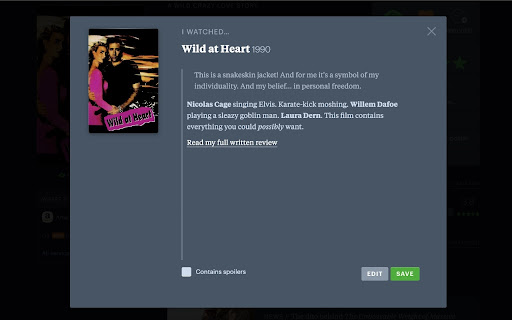
Minimal, light-weight, open-source extension for implementing the somewhat "hidden" formatting options in Letterboxd, similar to those in the official mobile app. It also implements the ability to preview your formatted post before submitting.
The formatting tags can be inserted using the on-screen buttons, or using the following keyboard shortcuts:
- Bold: (Cmd/Ctrl) + b
- Italic: (Cmd/Ctrl) + i
- Hyperlink: (Cmd/Ctrl) + Shift + l
- Quote: (Cmd/Ctrl) + Shift + k
Formatting tags will automatically wrap a selected area of text. Otherwise, the tags will be inserted at the caret position. Keyboard shortcuts can be disabled in the extension options.
Check out the project on GitHub:
https://github.com/SAMPPLUS/letterboxd-review-formatter
###########
Change Log:
v0.7.1 (01/07/2025)
- made preview scrollable when too tall
v0.7.0 (01/07/2025)
- fixed UI irregularities with new Letterboxd UI
- fixed extension breaking the trailer modal
v0.6.1 (01/06/2025)
- quick fix for the format bar not showing up in the review modal with the recent changes to Letterboxd's UI
v0.6.0
- made format buttons disappear while preview active
- reduced size of icon
- various visual and bug fixes
v0.5.0
- added option to disable keyboard shortcuts
- fixed modal opening animation
- sanitizing preview output for improved security
- various fixes and improvements
v0.4.0
- made styling and layout more consistent across different text areas
- performance improvements
v0.3.0
- added support for comments, list descriptions, and reviews accessed via the "Diary" page
- changed default keyboard shortcuts
- fixed the review modal becoming scrollable on Windows
v0.2.1
- decreased file size
v0.2.0
- support for the profile bio
- renamed to "Letterboxd Text Formatter"
- new icon
- various small fixes
v0.1.0
- implemented support for the undo stack. All changes can now be undone using Cmd+z (mac) or Ctrl+z (PC)
- limited the URL patterns on which the extension script loads

Reviews (5 cached)
★★☆☆☆2025-03-01
Walker Leonard
When it works, it's great. But it has been busted for 2 weeks now, and essentially does nothing.
★★☆☆☆2025-01-01
Liam
I love this extension but the formatting is no longer working for reviews. Please fix!!
★★★☆☆2024-12-25
Jeff Light
Used to be 5 stars, basically adds functionality that LB itself has been too lazy to include. Unfortunately, it seems LB has updated or something and now these format controls no longer pop up when you write reviews, only when making comments. So this needs an update as well.
★★★☆☆2024-10-29
Ryan Lee
Does what it says on the tin, which is helpful, but as mentioned in other reviews, it also absolutely bricks the ability to watch trailers on movies' pages. Please fix that!
★★★☆☆2024-05-22
Aaron Ball
this makes it so you cant watch trailers on movie pages
Permissions (1)
Permissions
storageℹ Can store data locally in your browser
Details
| Version | 0.7.1 |
| Updated | Jan 8, 2025 |
| Size | 27.99KiB |
| First Seen | Mar 26, 2026 |
Popular in social

Cisco Webex Extension
by cisco.chromestore
23M
★ 2.34
social
23M
★ 2.34
social

LINE
by LY Corporation
4M
★ 3.51
social
4M
★ 3.51
social

vidIQ Vision for YouTube
by vidIQ
3M
★ 4.48
social
3M
★ 4.48
social

7TV
by 7TV
3M
★ 4.55
social
3M
★ 4.55
social

Google Mail Checker
by Chrome Developer Relations
2M
★ 4.12
social
2M
★ 4.12
social
Popular Extensions

Adobe Acrobat: PDF edit, convert, sign tools
by Adobe Inc.
322M
★ 4.40
workflow
322M
★ 4.40
workflow

AdBlock — block ads across the web
by AdBlock
62M
★ 4.48
workflow
62M
★ 4.48
workflow

迅雷下载支持
by Shenzhen Xunlei Network Technology Co., Ltd.
59M
★ 2.77
workflow
59M
★ 2.77
workflow

Grammarly: AI Writing Assistant and Grammar Checker App
by Grammarly
42M
★ 4.50
communication
42M
★ 4.50
communication

Adblock Plus - free ad blocker
by eyeo GmbH
40M
★ 4.39
workflow
40M
★ 4.39
workflow