OptiPie TradingView Optimizer icon

OptiPie TradingView Optimizer

by OptiPie

v1.5.0 Updated Mar 15, 2026 5.92MiB
CWS
3K
Users
β˜… 3.77
40 reviews
#13235
of 207.5K
workflow
#3717 of 31.9K
βœ…Recently updated

Description

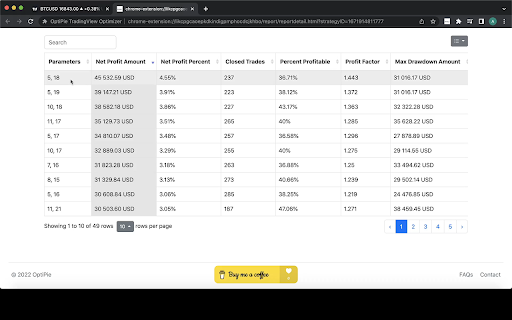
OptiPie is an open source strategy optimizer automation tool for TradingView. Easily optimize strategies, store optimization reports and make analysis via simple UI. Download as Chrome Extension Now! Features Optimize Strategies Up to 5 Parameters Optimize any TradingView Strategy you want up to 5 Parameters. Limitless Parameter Input Range Unless your Internet or TradingView is broken, you can optimize with any input range you want. Find, Sort, View & Analyze Reports Easily find your report in Reports tab with table search and sorts. Open report detail view to make a deep analysis. Reports Stored βš™οΈ All optimization reports are saved locally thus can be viewed or deleted any time within 'Reports' tab. Last Entered Parameter Inputs Stored In State During your Chrome Session, last entered parameter inputs are per unique strategy - switch strategies freely. OptiPie Plus, The Ultimate Input Optimizer πŸ“’ Join the OptiPie Plus Membership, discover amazing features, go beyond the limits! - Multi-Timeframe Optimization - Selectable Parameters - Stoppable Optimization with Partial Report - Extended Report Data - Optimize Strategies Up to 20 Parameters Try now! https://buymeacoffee.com/optipieapp/membership Latest Updates πŸ“’ (v1.5.0) New Feature: Save & Restore Your Optimizations! No more re-entering parameters - switch strategies freely. β€’ Auto-save per strategy: OptiPie remembers your optimization parameters per strategy, symbol, and interval. β€’ Auto-restore on switch: parameters are automatically restored when you switch back to a strategy. β€’ Reset Parameters button to clear inputs and start fresh. β€’ Saved configs are automatically cleaned up after 30, 60, or 90 days β€” configurable in Settings. New Feature: Real-time Report Monitoring & Instant Analysis! > No delays. No data loss. Analyze instantly. Checkout news for the latest updates here! optipie.app/news Visit optipie.app for more!
OptiPie TradingView Optimizer screenshot 1OptiPie TradingView Optimizer screenshot 2OptiPie TradingView Optimizer screenshot 3OptiPie TradingView Optimizer screenshot 4

Reviews (8 cached)

β˜…β˜†β˜†β˜†β˜†2025-06-17
PΓ©dro Aime les sacs

Does not detect the correct parameter imputs... Simply does not work

β˜…β˜†β˜†β˜†β˜†2024-07-24
Ben G.

It works really badly unfortunately. But I found another solution called the TradingView Input Optimizer which I have been using since.

β˜…β˜†β˜†β˜†β˜†2024-05-24
Carlo Salpietro

It works bad. It doesn't respect the step, nor the start

β˜…β˜†β˜†β˜†β˜†2024-04-23
Jaime

please fix it,tradingview change the code, this does not work anymore

β˜…β˜†β˜†β˜†β˜†2024-04-07
Carol ye

Random bugs may occur; sometimes clicking the optimize button doesn't prompt any response on the page

β˜…β˜…β˜†β˜†β˜†2023-11-27
Moss Doerksen

Nice idea, but it ignores the step size and only sometimes kind of follows the start and end ranges, and frequently behaves erratically in other ways. There is no pause or cancel button, you just have to refresh the page if you want to stop it. And if you do interrupt it then it doesn't report anything. It's bizarre. It successfully does the hard part of manipulating the parameters in TradingView but it can follow the simple instructions it is given.

β˜…β˜…β˜…β˜†β˜†2025-11-03
Titon H

It's okay, not user friendly. It's fast, but there are definitely some missing features. I think quanttradingpro's strategy optimizer is the new meta. It's op.

β˜…β˜…β˜…β˜†β˜†2025-10-23
one cloud

its not working today, i tried in multiple devices.

Permissions (7)

Permissions

activeTabβ„Ή Can access the current tab when you click the extension identityβ„Ή Can use your Google account identity identity.email notificationsβ„Ή Can show desktop notifications scriptingβ„Ή Can inject scripts into web pages storageβ„Ή Can store data locally in your browser unlimitedStorage

Details

Version 1.5.0
Updated Mar 15, 2026
Size 5.92MiB
First Seen Mar 29, 2026
