
Get YouTube Transcript by CakeAI - Free icon

Get YouTube Transcript by CakeAI - Free

by CakeAI

v0.3.0 Updated Aug 7, 2024 56.37KiB
CWS
3K
Users
★ 1.91
33 reviews
#13228
of 207.5K
workflow
#3716 of 31.9K
⚠️Not updated in over a year ⚠️Below average rating

Description

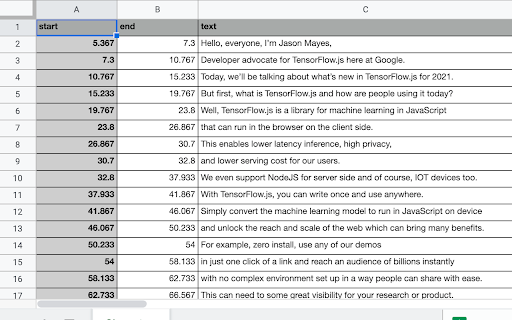
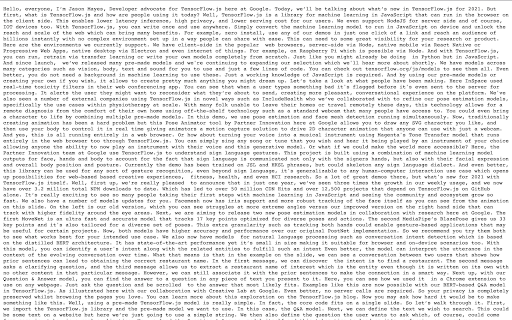
Download transcripts, captions and subtitles for YouTube videos and download them as a CSV, SRT or text file. Do you ever want to just get the text transcript of the video rather than watch the whole video. With this extension you can download the complete transcript of any YouTube video in text, CSV or SRT formats. See image for samples of transcripts in different file formats. ✨Features ✔️Fast, lightweight and private by default ✔️Download subtitles, captions and transcripts from YouTube 👨🏻‍💻️Use cases - Download a video's transcript and quickly search through transcript text to see if it contains the information you are looking for. Use CSV format to know exactly which part of the video you want to watch. - Download your own video's transcript and then use it as a starting point to make your video transcripts even better. - It will help you save time and improve comprehension. You can also use these transcripts to learn new languages - You can use the transcripts for educational or business purposes as well 🎁Pricing It's totally free for 1 video a day! You can donate to us at https://buy.stripe.com/bIY3et4Iw6lqeQgbII. For unlimited use, you can subscribe using https://buy.stripe.com/eVa02h7UIbFK6jK14f ❓How to use 1. Install the extension from Chrome Web Store. 2. Simply open a YouTube video and you will see the download transcript icon close to the video publish date. 3. Transcript will be downloaded Limitations - It doesn't work for livestream videos, yet. If you have any issues or have feedback for us, feel free to reach out to us on twitter at https://twitter.com/CakeAI_
Get YouTube Transcript by CakeAI - Free screenshot 1Get YouTube Transcript by CakeAI - Free screenshot 2Get YouTube Transcript by CakeAI - Free screenshot 3Get YouTube Transcript by CakeAI - Free screenshot 4Get YouTube Transcript by CakeAI - Free screenshot 5

Reviews (18 cached)

★☆☆☆☆2025-02-04
Bogdan M

Not free

★☆☆☆☆2024-09-13
Rosina P

paid

★☆☆☆☆2024-08-21
Haley

F this, not free

★☆☆☆☆2024-07-15
daniel sinclair

link to download does not show

★☆☆☆☆2024-04-05
Daniel Wager (Momo)

Not free immediately tries to get you in with a trial that they have that's 1 day then they charge $5. I'm sure they hide where to cancel or say you have to email and wont get back for 3 days and will take the $5 and say there are no refunds. Report this.

★☆☆☆☆2024-02-24
Victoria Lawson

it not free, you are a liar.

★☆☆☆☆2024-01-22
zakaria

Its not free

★☆☆☆☆2023-12-20
Nico Ding

It's not free, liar

★☆☆☆☆2023-11-30
Andrew Daniele

not free

★☆☆☆☆2023-11-16
Esteban Alicea

i do not recomend paying for this subcription it doesend work

★☆☆☆☆2023-11-08
Juan van Wyk

What a joke. Not only do I subscribe and it doesn't work, I can't even unsubscribe since the system doesn't recognize my email. If this payment goes off tomorrow I will be reporting you to Stripe.

★☆☆☆☆2023-10-18
Florian Rücker

Got the plugin to do a simple job. Extract the transcript (that I can access easily anyway!) in a more convenient way. It makes you pay for this incredibly simple job (you get 1 per day for free, ok. So 1 star at least, there you go). Sorry, not ok. Found another plugin. Wasted time though.

★☆☆☆☆2023-06-30
Alex Lee

not useful

★☆☆☆☆2022-08-07
Jay Peek

1. To all users: The download button appears on the bottom left of my YouTube view....IF you don't see the inscripton, "No transcript." Which is the case with too many videos that clearly provide a transcript. https://imgur.com/J3IIUr5 This is my YouTube video: https://www.youtube.com/watch?v=_CzAKKIQFv4 2. To developers: I resent that you leave no other denomination to bargain with other than a $10 amount. btw you would do better to leave a faster micro payment option even if you object to PayPal. https://imgur.com/Sz5lMFt https://imgur.com/UI9wlYZ

★☆☆☆☆2022-01-30
Kumara Velu

Installed the extension and is activated but the transcript to download the transcript doesn't appear. Wonder if the developer has really tested the plugin before offering it here. Hope you can improve on this plugin.

★☆☆☆☆2021-09-06
ce ce

Does NOT work! Also what is the purpose for required permissions to monitor google analytics sites?

★★☆☆☆2023-07-05
Zachare Sylvestre

Subscribed, and it didn't send me an email. Finally figured out that you just have to put in the email in the options. However, now I can't delete or cancel my subscription. Fortunately, I used a card that I can pause payments pretty easily. Make an option to cancel your subscription.

★★★☆☆2021-12-11
Wendy Dong

I installed this extension for many days, but until today I haven't seen that download button. Is it possible that the button is not compatible with the current version of youtube?

Permissions (4)

Permissions

notifications Can show desktop notifications scripting Can inject scripts into web pages storage Can store data locally in your browser tabs Can see your open tabs and their URLs

Details

Version 0.3.0
Updated Aug 7, 2024
Size 56.37KiB
First Seen Mar 28, 2026
