
⚠️Not updated in over a year ⚠️Requests 1 sensitive permission
Description
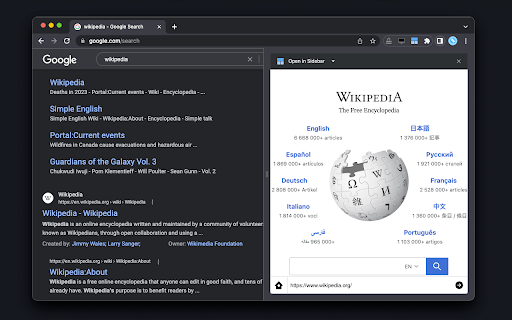
The "Open in Sidebar" extension revolutionizes browsing by allowing you to load any webpage in a convenient sidebar view. Access web content while reading without switching tabs with a click or keyboard shortcut. Drag and drop links or use the built-in address bar for seamless navigation. Enhance productivity by opening online tools like text editors or dictionaries in the sidebar. Reset the view with a single click or load new pages by pasting URLs. Note that some pages with CSP headers may have limitations, but future updates aim to address these.
Features:
Loads any webpage in a convenient sidebar view
Activate the sidebar with a click or assigned keyboard shortcut
Drag and drop links or use the built-in address bar for seamless navigation
Access web content while reading without switching tabs
Enhance productivity by opening online tools like text editors or dictionaries in the sidebar
Intuitive interface with an address bar for easy URL tracking
Reset the view with a single click
Load new pages by pasting URLs into the address bar
Search for dropped text with your preferred search engine (e.g. Google, Bing, or DuckDuckGo)
Supports split view (two panes)

Reviews (5 cached)
★☆☆☆☆2025-01-12
callanyonefrompc
The navigation bar is on the bottom instead of the top and I didn't like that. The navigation buttons to go back and forward do not work on some websites. The extension adds extra vertical and horizontal scrollbars when the sidebar is too small, which makes it look messy. I recommend using the "Page Sidebar | Open any page in side panel" extension instead and to be sure to visit the extension options page for that extension.
★☆☆☆☆2024-07-25
Eugene M.
This does not work! It's not clear how to use it!
★☆☆☆☆2024-04-28
Zachary A. Hampton
Garbage. Does not work. All links bring up the error "google refused to connect".
★★☆☆☆2025-10-07
Utku Dalmaz
x.com and instagram.com won't load
★★★☆☆2024-09-13
Charles Zhu
My company website requires a plugin to provision security tokens, and it does not open in this sidebar.
Permissions (6)
Permissions
contextMenusℹ Can add items to the right-click menu declarativeNetRequestWithHostAccessfaviconsidePanel storageℹ Can store data locally in your browser webRequestℹ Can observe and analyze network traffic
Details
| Version | 0.1.5 |
| Updated | Apr 28, 2024 |
| Size | 107KiB |
| First Seen | Mar 27, 2026 |
More by chandler.stimson

Live Stream Downloader
by chandler.stimson
400K
★ 4.28
workflow
400K
★ 4.28
workflow

The Runner Game
by chandler.stimson
90K
★ 4.64
games
90K
★ 4.64
games

Caffeine - Keep Awake
by chandler.stimson
70K
★ 4.23
developer
70K
★ 4.23
developer

FlashPlayer - SWF to HTML
by chandler.stimson
60K
★ 3.48
developer
60K
★ 3.48
developer

Audio Player
by chandler.stimson
30K
★ 4.10
workflow
30K
★ 4.10
workflow
Popular in workflow

Adobe Acrobat: PDF edit, convert, sign tools
by Adobe Inc.
331M
★ 4.40
workflow
331M
★ 4.40
workflow

AdBlock — block ads across the web
by AdBlock
63M
★ 4.48
workflow
63M
★ 4.48
workflow

迅雷下载支持
by Shenzhen Xunlei Network Technology Co., Ltd.
59M
★ 2.77
workflow
59M
★ 2.77
workflow

Adblock Plus - free ad blocker
by eyeo GmbH
41M
★ 4.39
workflow
41M
★ 4.39
workflow

Chrome Remote Desktop
by Chrome Remote Desktop Release Managers
39M
★ 3.14
workflow
39M
★ 3.14
workflow
Popular Extensions
Adobe Acrobat: PDF edit, convert, sign tools
by Adobe Inc.
331M
★ 4.40
workflow
331M
★ 4.40
workflow
AdBlock — block ads across the web
by AdBlock
63M
★ 4.48
workflow
63M
★ 4.48
workflow
迅雷下载支持
by Shenzhen Xunlei Network Technology Co., Ltd.
59M
★ 2.77
workflow
59M
★ 2.77
workflow

Grammarly: AI Writing Assistant and Grammar Checker App
by Grammarly
42M
★ 4.50
communication
42M
★ 4.50
communication
Adblock Plus - free ad blocker
by eyeo GmbH
41M
★ 4.39
workflow
41M
★ 4.39
workflow