
⚠️Not updated in over a year
Description
Easily annotate screenshots, prioritize comments, and export feedback.
Tired of losing context and tracking multiple documents?
Screen Capture is the all-in-one tool for all your audit and review needs.
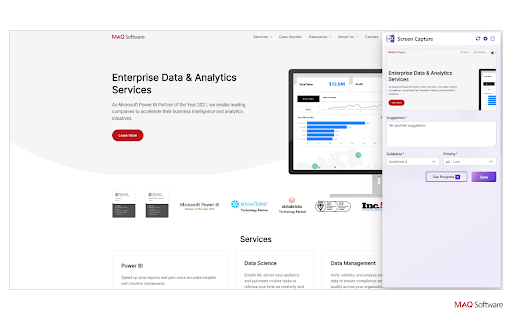
Add screenshots of review elements, provide comments, and categorize your feedback—all using Screen Capture.
You can even prioritize your findings to manage them more effectively. Easily download your findings in a sharable PDF file when you’re done, ensuring everyone is on the same page.
Use cases
• Auditors and reviewers – Screenshot elements and easily include relevant context, suggestions, guideline violations, and priority levels. Effectively communicate findings to the team.
• Development teams – Get properly documented bugs and issues to fix in the product. Effortlessly document and provide updates to the review and design teams.
• Product owners – Understand what issues and bugs are affecting the product and track their progress to help plan upcoming features.
How to use Screen Capture
1. Take a screenshot with your preferred tool (e.g., Windows Snip, Greenshot, etc.). Copy the screenshot to your clipboard.
2. Activate the Screen Capture extension from the toolbar or the context menu. Click on the screenshot loading area, as directed on the interface, to paste the screenshot.
3. Add comments and details as desired. Click Save to save your changes.
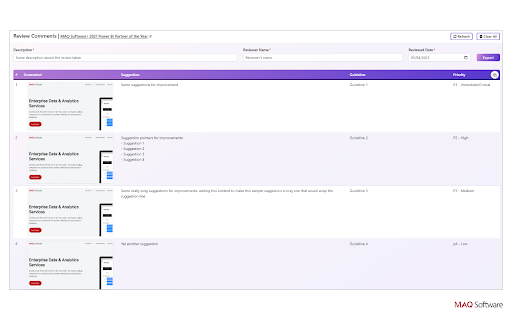
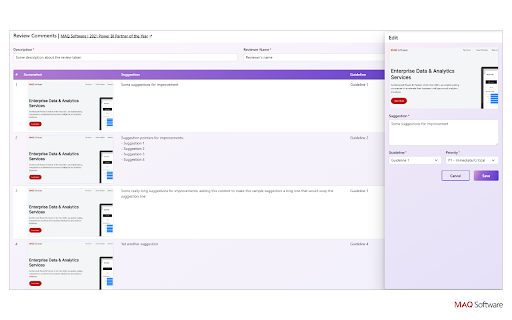
4. Click See Progress to view, edit, or delete screenshots and added details. Provide metadata of the reviewed items (description of the report, the reviewer, and the review date) on this page as well.
5. Click Export to download a report of your screenshot and its details as a PDF file.
Features
• Easily add review comments and feedback to your screenshots using the text field.
• Categorize your feedback with drop-down lists.
• By default, the text field is titled Suggestion, and the feedback can be categorized based on Priority and Guideline (violation).
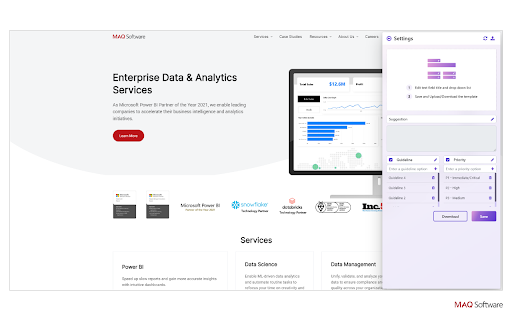
• Rename and customize all the sections, categories, and drop-down options as per your requirements.
• Easily download and share your customized section and category settings for a unified team experience.
• Edit and delete screenshots and added details at any point prior to exporting.
• Export your report in a PDF file or just copy it to paste anywhere you want.
• Privacy is one of our core values. All your data stays with you on your local machine except the exported document that you share with other folks.
Streamline your audit and review processes with Screen Capture, making it easier than ever to identify and resolve issues. Try it today!

Reviews
Loading reviews...
Permissions (4)
Permissions
activeTabℹ Can access the current tab when you click the extension contextMenusℹ Can add items to the right-click menu scriptingℹ Can inject scripts into web pages tabsℹ Can see your open tabs and their URLs
Details
| Version | 3.0.0 |
| Updated | Jun 11, 2024 |
| Size | 117KiB |
| First Seen | Mar 22, 2026 |
More by MAQ Software

Popular in workflow

Adobe Acrobat: PDF edit, convert, sign tools
by Adobe Inc.
322M
★ 4.40
workflow
322M
★ 4.40
workflow

AdBlock — block ads across the web
by AdBlock
62M
★ 4.48
workflow
62M
★ 4.48
workflow

迅雷下载支持
by Shenzhen Xunlei Network Technology Co., Ltd.
59M
★ 2.77
workflow
59M
★ 2.77
workflow

Adblock Plus - free ad blocker
by eyeo GmbH
40M
★ 4.39
workflow
40M
★ 4.39
workflow

Chrome Remote Desktop
by Chrome Remote Desktop Release Managers
37M
★ 3.13
workflow
37M
★ 3.13
workflow
Popular Extensions
Adobe Acrobat: PDF edit, convert, sign tools
by Adobe Inc.
322M
★ 4.40
workflow
322M
★ 4.40
workflow
AdBlock — block ads across the web
by AdBlock
62M
★ 4.48
workflow
62M
★ 4.48
workflow
迅雷下载支持
by Shenzhen Xunlei Network Technology Co., Ltd.
59M
★ 2.77
workflow
59M
★ 2.77
workflow

Grammarly: AI Writing Assistant and Grammar Checker App
by Grammarly
42M
★ 4.50
communication
42M
★ 4.50
communication
Adblock Plus - free ad blocker
by eyeo GmbH
40M
★ 4.39
workflow
40M
★ 4.39
workflow