
Split Screen for Google Chrome
Description


Reviews (71 cached)
Does not work with more screens. Jumps to primary screeen even though actual screen is selected.
It doesn't split a tab. It creates more tabs and arranges them in new windows on the screen. And it doesn't have the option for a simple two screens, one above the other (even though it shows it in the help doc). I just wanted to be able to view the top and bottom of a long page at the same time.
useless it doesn't split screen it creates two new windows
Doesn't do anything the OS doesn't already do. Doesn't split screen in Chrome - arranges chrome windows across your whole monitor, just like windows will if you want to. Pointless.
the extension name is misleading, it doesn't split the tab/browser page it just create a new tab.
DEPRECATED. AS SOON AS YOU INSTALL IT YOU'RE REDIRECTED TO A SPAM SITE. DON'T INSTALL. AVOID.
It just split te windows,just creating a new windown, I could just do that with the split window on windows
It doesn't split the screen or windows, instead creating a new window
Low effort extension. Dragging tabs does the same thing. I was wanting ONE chrome window, with two browser views... not a separate window, no one needs an extension for that because it's a native feature.
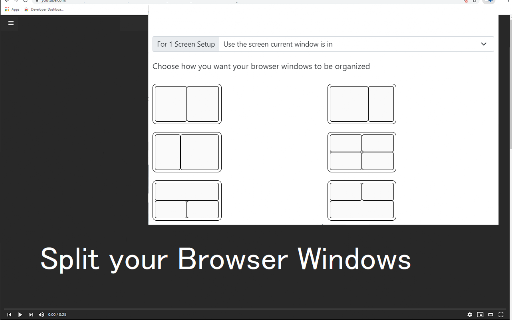
This is NOT split screen. This is arranging windows
It just switches to another window that it allows you to position, and minimises the one I click from. What good is that? NiftySplit extension is much better, where also any clicks on the left window open in the right window. But Edge has implemented it the best.
It's extremely frustrating that Chrome doesn't have it's own built in functionality for a true split screen with multiple tabs open in a single window. Particularly when you realize that Microsoft Edge (built on Chromium) has it. It gets worse when extensions pretend to offer this then magically open up multiple windows as if the user was incapable of doing that themselves in under a second. The fact that so many people seem to think this is revolutionary though.... I have no words for that 🤦🏻♂️
Uselses since it just makes multiple windows. I can do this without an extension. Also I would like to split in one window but not in another on a different monitor. Can't do that.
This is just silly. We need ONE browser window which can divide into multiple. I can resize multiple windows myself. Also, the maker tries to dupe you into downloading other software. At least give us something usable if youre going to try and scam us too
This is not what we are asking for. Need inside of 1 Window/Tab, 2 or more Pages.
Useless, there is no point of this extension if Windows do this already. Split screen is needed inside of 1 window not many.
This does not do what I expected; it just co-opts the OS's window manager to resize browser *windows*. I already know how to do that. IMO the extensions page deliberately misleads by not showing what the extension does. I uninstalled it immediately after I realized this.
Why does it need my BROWSING HISTORY ??
But it's useless. I thought it would be like tab tiling in Vivaldi browser
Useless. We can same job manually better.
It's Boring, this extension only can opens a new window. for that i can open with out any requirement of extension.
Useless. Windows does this better natively.
Window does better job of arranging windows than this, Extension is called splitscreen? more like an aid to arrange windows which absolutely anybody can do. And look at those fake reviews, I cant believe I wasted 5 minutes of my time on this useless piece of extension.
Useless
This extension does not split a browser window to show two pages within the same window. It just arranges and resizes separate windows next to each other, which is not what I wanted.
This does not split the browser, it just creates a new one next to it. Which you can do natively.
waste of time...
I give this Zero, 0, Zilch Stars. Actually, Negative Stars. This does nothing more than open extra windows. Windows already does this. That is why it is called "Windows".
SO bad
This does not split a browser window, it just splits your computer screen, which can already be done natively. This is not helpful at all.
Other people have said the same. This extension categorically does NOT split anything. It simply opens ADDITIONAL windows. Misleading title and close to being pointless. Uninstalled.
Doesn't seem to do what it purports - no splitting of a tab, just pulls all my separate windows (each with numerous tabs) out of full screen mode on their various desktops, and spreads them out - some on top of others - onto my primary and secondary screen views. Not sure what it was trying to do, but "easily split ... tabs" wasn't it.
Doesn't even work on Mac. All it did was pull my windows from full screen to quarter screen. I was expecting it to split two tabs on one window. Nope.
Useless. Does not split tabs, but split windows of Chrome. You can do that by hand.
how can i use custom setting???????? why i can't it from today????? it's terrible!! please come back or add again custom window setting!! i want 3(height)x4(width) and more!
Literally, yes literally, useless. It does NOT open two pages in one window, it just OPENS ANOTHER WINDOW. And it RESIZES THEM INCORRECTLY. It makes a solved problem worse.
IT just gets too split browsers, you can do it already with just opening chrome twice...
Shortcuts doesn't work except first one (activate extension). :-(
Not what I expected. I wish to have different viewports inside one chrome instance, not create many chrome instances. I was hoping this would be a fix to that problem.
This just places some chrome windows next to each other - I was looking for an actual split screen in one browser window. At least the current browser windows size could be split instead of capturing the entire screen.
SO hard to understand and tricky to use please simplify also Windows can already do this.
terrible, every time i use it, it crashes my web pages.
Useless, literally just drags the windows to the left and right side of the screen. Works fantastic.
This 'extension' simply opens other instances and aligns them. Newsflash: Windows can do this already without additional software.
It only works for the main monitor, I am trying to do vertical split for a vertical secondary monitor.
it's just opens another instance of Chrome. i can do it without extension
It doesn't split the tabs, it just opens a new window. So if you are trying to compare it, your need to copy and paste the old tab into the new window. Not as neat as its made out to be
There are so many ads in the instructions that you can't tell if you have to click on them to make the extension work or not. To distracting just trying to use it. Not for me.
I thought it would be like the one in Microsoft Edge
I use the chrome extension -- keeper security. When I divide the window I have to sign in twice each window.
Permissions (3)
Permissions
Details
| Version | 3.0.0 |
| Updated | Oct 17, 2023 |
| Size | 471KiB |
| First Seen | Mar 27, 2026 |
More by Free Software Extensions


Popular in tools




Popular Extensions




