
Sundial: Google Calendar Reimagined for Enterprise Schedulers
by Sundial
v2.5.7 Updated Apr 3, 2026 551KiB
✅Recently updated
Description
Here's how Sundial works:
After installing and signing up, Sundial appears in the left column of Google Calendar.
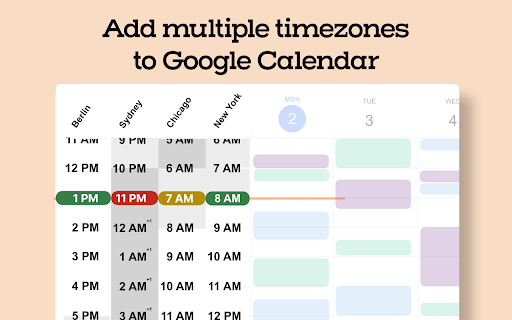
1️⃣ Add Multiple Timezones to Google Calendar
Search for a place or timezone and Sundial adds that timezone to Google Calendar. Add as many as you need. Rename them as you'd like. Reorder them whenever.
2️⃣ Share Times From Time Blocks
Turn "Share times" on in the sidebar. Then drag time blocks on your calendar. Sundial turns them into copyable text, and can adjust it to any timezone. No more timezone mistakes. Here's an example of the text:
Mon: Jan 2: 9-11am EST
Tue, Jan 3: 8-9am EST
Need to adjust to another timezone? Search for a place or timezone in the Sundial, and your copyable text updates instantly. Here’s how it looks:
Mon, Jan 2: 3-5pm CET / 9-11am EST
Tue, Jan 3: 2-3pm CET / 8-9am EST
3️⃣ Bulk Create Calendar Holds
Turn "Share times" on in the sidebar. Then drag the time blocks on your calendar where you want the holds to be placed and click "Create holds". Add your event details as normal and once ready, click "Save holds". Sundial will save the calendar holds for each selected time all at once.
4️⃣ Bulk Delete Calendar Holds
Click on any existing event with the word "Hold" in the title. Then click "Select holds to delete." Sundial displays all holds with the matching title, allowing you to quickly select and delete the ones you want.
5️⃣ Reusable Workspaces
Save your commonly used calendar setups (calendars, timezones, and layout) as reusable workspaces. Open them with one click. Name them to stay organized.
6️⃣ Highlight Events with Issues
Instantly highlight calendar events for missing video links, rooms, guests not attending, etc.
7️⃣ Export Events to Google Sheet (Calendar Audit)
Export events to a Google Sheet in a single click – formatted for a calendar audit and instantly ready for your customization and review.
8️⃣ See Proposed Times Overlaid on Your Calendar
Give Sundial dates and times mentioned in text and it visually displays them on your calendar. No more remembering proposed times or timezone conversions.
➡️ Sundial Pricing
- Free Plan: 75 credits per month. That's about 10 meetings. Most actions use 1 credit.
- See paid plans at www.trysundial.ai/pricing
Thank you for trying Sundial. I hope you find it helpful!
➡️ Terms and Conditions
We collect your email address after you sign up. There is no other personal information that we collect. We never share or sell your information. We also track which features you use and how often you use them, solely to improve the extension and enhance your experience.
By installing the extension, you agree to and acknowledge:
www.trysundial.ai/terms-of-service
www.trysundial.ai/privacy


Reviews (1 cached)
★★☆☆☆2026-03-26
Sam A
This is quite unintuitive, but very nicely integrated into GCal. The bulk deletion isn't really what i expected. I think It could have integrated more with GCal menus per event or auto detect events based on advanced filters.
Permissions (4)
Permissions
activeTabℹ Can access the current tab when you click the extension background scriptingℹ Can inject scripts into web pages storageℹ Can store data locally in your browser
Details
| Version | 2.5.7 |
| Updated | Apr 3, 2026 |
| Size | 551KiB |
| First Seen | Mar 31, 2026 |
Popular in workflow

Adobe Acrobat: PDF edit, convert, sign tools
by Adobe Inc.
331M
★ 4.40
workflow
331M
★ 4.40
workflow

AdBlock — block ads across the web
by AdBlock
62M
★ 4.48
workflow
62M
★ 4.48
workflow

迅雷下载支持
by Shenzhen Xunlei Network Technology Co., Ltd.
59M
★ 2.77
workflow
59M
★ 2.77
workflow

Adblock Plus - free ad blocker
by eyeo GmbH
41M
★ 4.39
workflow
41M
★ 4.39
workflow

Chrome Remote Desktop
by Chrome Remote Desktop Release Managers
39M
★ 3.14
workflow
39M
★ 3.14
workflow
Popular Extensions
Adobe Acrobat: PDF edit, convert, sign tools
by Adobe Inc.
331M
★ 4.40
workflow
331M
★ 4.40
workflow
AdBlock — block ads across the web
by AdBlock
62M
★ 4.48
workflow
62M
★ 4.48
workflow
迅雷下载支持
by Shenzhen Xunlei Network Technology Co., Ltd.
59M
★ 2.77
workflow
59M
★ 2.77
workflow

Grammarly: AI Writing Assistant and Grammar Checker App
by Grammarly
42M
★ 4.50
communication
42M
★ 4.50
communication
Adblock Plus - free ad blocker
by eyeo GmbH
41M
★ 4.39
workflow
41M
★ 4.39
workflow