
⚠️Not updated in over a year ⚠️Requests 1 sensitive permission
Description
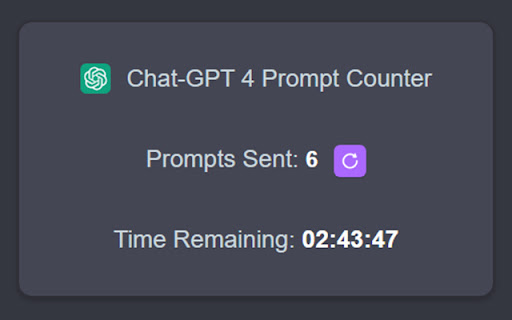
This Chrome extension provides a prompt counter and timer for OpenAI's ChatGPT-4 model. It's especially useful for users who need to track the number of prompts sent to the model and the remaining time for the current session. The current maximum limit for regular ChatGPT Plus users is 40 prompts per 3 hours.
(**its suspect by the developer that the new limit may be silently 20 prompts per 3 hours...)
The new Open AI Teams plan has 100 prompt/3 hour limit per user with a minimum of 2 users per team.
Features 🚀
- Counts the number of prompts sent to the ChatGPT-4 model
- Displays the remaining time for the current 3-hour session
- Allows resetting the count and timer
- Displays data in an easy-to-access popup
How It Works 🤖
The extension listens for HTTP POST requests sent to OpenAI's ChatGPT backend API. Each prompt sent to the model is counted and the time is tracked. The data is updated every second and is displayed in a popup that can be accessed by clicking the extension icon in the Chrome toolbar. The estimated time remaining is a rolling estimate made to match Open AIs token limits.
Privacy 🔒
This extension does not collect, store, or transmit any personal data or browsing activity. It solely functions to count prompts and track session time for you only. Rest assured, your prompts remains completely private.
-- May 8th update
*URLs changed to align with OpenAI domain change
-- Jan 27th update
*OpenAI rolls out Team Plans with prompt limit of 100 per 3 hours per use
-- Nov 18th update
*OpenAI changes prompt limit to 40 per 3 hours*
Reviews
Loading reviews...
Permissions (2)
Permissions
storageℹ Can store data locally in your browser webRequestℹ Can observe and analyze network traffic
Details
| Version | 1.1 |
| Updated | May 9, 2024 |
| Size | 42.38KiB |
| First Seen | Mar 31, 2026 |
More by acadian.eth

Freebird - X (Twitter) Logo Replacer
by acadian.eth
5K
★ 4.73
accessibility
5K
★ 4.73
accessibility

TikTok Ad Block
by acadian.eth
30
★ 1.00
tools
30
★ 1.00
tools

Twitter/X AutoScroll
by acadian.eth
22
★ 0.00
social
22
★ 0.00
social

ENS App Favorites Exporting Tool
by acadian.eth
0
★ 5.00
accessibility
0
★ 5.00
accessibility
Popular in accessibility

Read&Write for Google Chrome™
by Texthelp
19M
★ 3.44
accessibility
19M
★ 3.44
accessibility

360 Internet Protection
by qihoosafe
17M
★ 4.54
accessibility
17M
★ 4.54
accessibility

Screenshot reader™
by Texthelp
7M
★ 2.57
accessibility
7M
★ 2.57
accessibility

OrbitNote
by Texthelp
7M
★ 2.95
accessibility
7M
★ 2.95
accessibility

Volume Master
by Peta Sittek
6M
★ 4.81
accessibility
6M
★ 4.81
accessibility
Popular Extensions

Adobe Acrobat: PDF edit, convert, sign tools
by Adobe Inc.
331M
★ 4.40
workflow
331M
★ 4.40
workflow

AdBlock — block ads across the web
by AdBlock
62M
★ 4.48
workflow
62M
★ 4.48
workflow

迅雷下载支持
by Shenzhen Xunlei Network Technology Co., Ltd.
59M
★ 2.77
workflow
59M
★ 2.77
workflow

Grammarly: AI Writing Assistant and Grammar Checker App
by Grammarly
42M
★ 4.50
communication
42M
★ 4.50
communication

Adblock Plus - free ad blocker
by eyeo GmbH
41M
★ 4.39
workflow
41M
★ 4.39
workflow