
⚠️Not updated in over 2 years
Description
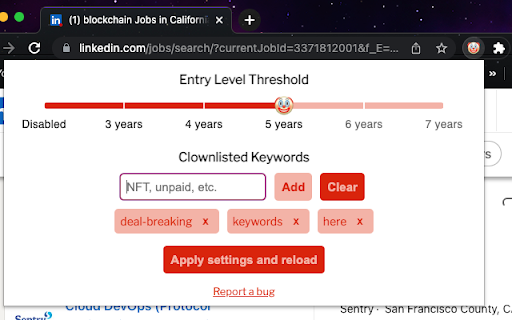
Tired of reading through "entry level" LinkedIn job posts, only to see that mid to senior levels of experience are required? How about getting halfway through a job description before spotting that one, deal-breaking keyword you want to avoid? If so, Clown Detector can help you out!
Clown Detector will flag any LinkedIn job that meets your criteria with a clown emoji and the keyword(s) found.
There are two settings: Entry Level and Clownlist.
Entry Level will flag any job explicitly labeled as "entry level", yet requires mid to senior level experience. Jobs not explicitly listed as "entry level" will not be flagged for years of experience required. The threshold can be set between 3+ to 7+ years, with 7+ years being the default. This setting can be disabled as well.
Clownlist will flag any job containing keywords that you specify. This works for all LinkedIn jobs, regardless of experience level required.
Known Compatibility Issues:
Ad blocking extensions will cause issues if run alongside Clown Detector. Disabling your ad blocker on LinkedIn will prevent the issues. It does not need to be disabled for all sites.
Disclaimer:
Clown Detector is only meant to save people time by flagging LinkedIn jobs that will likely waste their time, per their specified criteria. I do NOT condone any form of harassment toward companies flagged by Clown Detector or their employees. Please be cool!
Clown Detector should be taken with a grain of salt, particularly with the entry level settings. Not every entry level job flagged is worth skipping over. There are many factors to consider when you come across these posts and they may be worth checking out - go with your gut!
Clown Detector does not collect, use, or disclose any personal user information.


Reviews
Loading reviews...
Permissions (4)
Permissions
activeTabℹ Can access the current tab when you click the extension scriptingℹ Can inject scripts into web pages storageℹ Can store data locally in your browser tabsℹ Can see your open tabs and their URLs
Details
| Version | 1.1.6 |
| Updated | Jan 17, 2024 |
| Size | 646KiB |
| First Seen | Mar 31, 2026 |
Popular in workflow

Adobe Acrobat: PDF edit, convert, sign tools
by Adobe Inc.
322M
★ 4.40
workflow
322M
★ 4.40
workflow

AdBlock — block ads across the web
by AdBlock
62M
★ 4.48
workflow
62M
★ 4.48
workflow

迅雷下载支持
by Shenzhen Xunlei Network Technology Co., Ltd.
59M
★ 2.77
workflow
59M
★ 2.77
workflow

Adblock Plus - free ad blocker
by eyeo GmbH
40M
★ 4.39
workflow
40M
★ 4.39
workflow

Chrome Remote Desktop
by Chrome Remote Desktop Release Managers
37M
★ 3.13
workflow
37M
★ 3.13
workflow
Popular Extensions
Adobe Acrobat: PDF edit, convert, sign tools
by Adobe Inc.
322M
★ 4.40
workflow
322M
★ 4.40
workflow
AdBlock — block ads across the web
by AdBlock
62M
★ 4.48
workflow
62M
★ 4.48
workflow
迅雷下载支持
by Shenzhen Xunlei Network Technology Co., Ltd.
59M
★ 2.77
workflow
59M
★ 2.77
workflow

Grammarly: AI Writing Assistant and Grammar Checker App
by Grammarly
42M
★ 4.50
communication
42M
★ 4.50
communication
Adblock Plus - free ad blocker
by eyeo GmbH
40M
★ 4.39
workflow
40M
★ 4.39
workflow