
Auto-confirm for ChatGPT Actions
v1.1.1 Updated Nov 14, 2024 79.71KiB
⚠️Not updated in over a year
Description
✨ Automatically confirms actions in your ChatGPT sessions! Perfect for advanced users and power users who want to streamline interactions and save time by reducing clicks.
🔹 What It Does
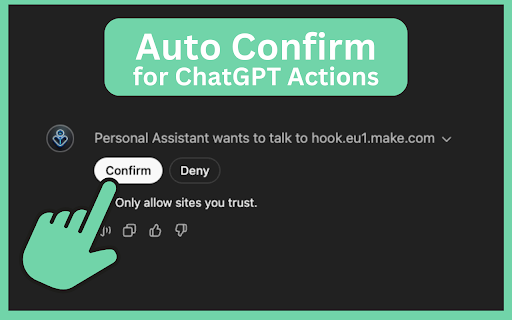
Auto-confirm for ChatGPT Actions is a helpful extension that automatically confirms actions in your ChatGPT and custom GPT sessions. By enabling auto-confirmation, you can eliminate repetitive clicking, allowing smoother, faster interactions in ChatGPT.
💡 Features:
✅ One-Click Automation: Instantly confirms actions without repeated clicking, making ChatGPT interactions more seamless.
🎛️ Toggle Control: Enable or disable auto-confirmation easily through the extension popup, so you’re always in control.
🟢 Dynamic Icon Display: See at a glance if auto-confirm is active (green icon) or inactive (red icon).
🚨 Important Disclaimer
This extension is not affiliated with or endorsed by OpenAI or ChatGPT. It’s an independent tool designed for users looking to improve their ChatGPT experience. Use it at your own risk — while active, the extension will automatically confirm all detected actions, so only enable it when needed.
⚙️ How to Use
- Install the Extension from the Chrome Web Store.
- Pin the Extension to your toolbar for easy access.
- Open the popup and toggle Enable Auto-Confirmation to activate.
- Green icon means active, red means inactive — switch it on or off anytime.
⚠️ Disclaimer
Auto-confirm for ChatGPT Actions automates the clicking of confirmation actions in ChatGPT, including custom GPTs. Please use responsibly. This tool is meant for power users who understand its functions, and it operates entirely within your browser without collecting any data.
Reviews
Loading reviews...
Permissions (1)
Permissions
storageℹ Can store data locally in your browser
Details
| Version | 1.1.1 |
| Updated | Nov 14, 2024 |
| Size | 79.71KiB |
| First Seen | Mar 30, 2026 |
More by Jens.Marketing

Pixel Helper for LinkedIn
by Jens.Marketing
20K
★ 5.00
accessibility
20K
★ 5.00
accessibility

Follower Insights for LinkedIn
by Jens.Marketing
3K
★ 4.13
social
3K
★ 4.13
social

XING Transfer to LinkedIn
by Jens.Marketing
1K
★ 3.75
accessibility
1K
★ 3.75
accessibility

Instant Search for LinkedIn
by Jens.Marketing
456
★ 5.00
accessibility
456
★ 5.00
accessibility

Search Inspector for ChatGPT
by Jens.Marketing
198
★ 0.00
tools
198
★ 0.00
tools
Popular in tools

Zotero Connector
by Zotero
8M
★ 3.96
tools
8M
★ 3.96
tools

Browsec VPN - Free VPN for Chrome
by Browsec
7M
★ 4.44
tools
7M
★ 4.44
tools

AnyDoc Translator - Translate Web and PDF
by www.wps.com
7M
★ 4.59
tools
7M
★ 4.59
tools

Video DownloadHelper
by Aclap
5M
★ 4.43
tools
5M
★ 4.43
tools

Microsoft Bing Homepage & Search for Chrome
by Microsoft Corporation
4M
★ 3.72
tools
4M
★ 3.72
tools
Popular Extensions

Adobe Acrobat: PDF edit, convert, sign tools
by Adobe Inc.
331M
★ 4.40
workflow
331M
★ 4.40
workflow

AdBlock — block ads across the web
by AdBlock
62M
★ 4.48
workflow
62M
★ 4.48
workflow

Grammarly: AI Writing Assistant and Grammar Checker App
by Grammarly
42M
★ 4.50
communication
42M
★ 4.50
communication

Adblock Plus - free ad blocker
by eyeo GmbH
41M
★ 4.39
workflow
41M
★ 4.39
workflow

Chrome Remote Desktop
by Chrome Remote Desktop Release Managers
38M
★ 3.14
workflow
38M
★ 3.14
workflow