

Glean icon

Glean

by Glean Work

v1.2026.205.5000 Updated Feb 9, 2026 295KiB
CWS
600K
Users
★ 4.41
51 reviews
#350
of 164K
tools
#52 of 50.8K
⚠️Requests 1 sensitive permission

Description

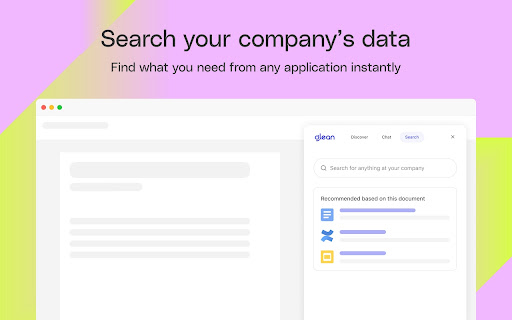
The Glean browser extension unlocks your company’s knowledge and enables powerful work AI for everyone. Just hit Command + J or Alt + J on Windows to instantly access Glean from anywhere: 💡 Know what your company knows, instantly with the Glean sidebar * Discover: Glean delivers personalized content recommendations tailored to your current work context, surfacing relevant insights without you having to search. * Chat: Ask questions and get instant answers from an AI Assistant that understand both your current content and your entire company knowledge base. * Search: Find exactly what you need with intelligent search that understands context, connects related information, and identifies relevant experts. * With a simple Command + J on Mac or Alt + J on Windows - instantly summarize information from any work application ⚡️ Get quick access to the work resources you need. * Glean’s new tab page puts all of your company’s knowledge at your fingertips * See recommended documents, notifications from across applications, access calendar events, and more. * Use Glean’s Go Links feature to instantly access even the most complex URLs — Glean connects with dozens of popular workplace apps like Google Drive, Jira, Confluence, Slack, and more. Use this extension if you have an account created by your company admin. Questions? Visit https://help.glean.com or learn more at https://www.glean.com Learn more about the permissions we ask for: https://help.glean.com/en/articles/3643260-why-does-the-chrome-extension-ask-for-those-permissions
Glean screenshot 1Glean screenshot 2Glean screenshot 3Glean screenshot 4Glean screenshot 5

Reviews (8 cached)

★☆☆☆☆2026-02-23
Zo H.

Please stop asking me to get the extension, I just want to use the web app. There's no option to 'Not ask again' as well. It's really annoying

★☆☆☆☆2025-06-05
Adam Azarchs

This is trash. It makes the browser unbearably slow, particularly if you have a large number of tabs open. If your workplace has force-installed it into all chrome profiles, as mine has, you have an additional problem that its hostile takeover of the new tab page is impossible to disable, because you can't access the settings for the extension without logging in, and logging in in those profiles would defeat the point of having separate profiles. Meanwhile the new tab page is of course worthless because all it shows is a login page. This also exposes one of the reasons _why_ it makes the browser unbearably slow - it makes a blocking web request to their servers to at least check settings during all kinds of time-critical things like, say, opening a new tab. This is completely unacceptable.

★☆☆☆☆2025-05-21
ShanQuan NongFu

Forced to install, uncomfortable

★☆☆☆☆2024-08-05
Yanye Li

The "new tab" with glean is always frozen for mins

★☆☆☆☆2024-06-07
Tingting Zhang

I'm a corporate user and the experience is so frustrated, somehow I just can't login to Glean, tried so many times and my credential not changed (being used for so many other company stuff), and it also block all my bookmarks everytime I open a new tab. And I have to go to settings to find my bookmark.

★☆☆☆☆2023-05-01
Ana Young

Horrible tool! It messed up all my bookmarks and it does not help at all finding tools. Keyboard itself does a better work!

★★☆☆☆2023-10-04
Chris Lee

Useful extension, but it hijacks your chrome startup page and there is no way to disable this. I would like to use it only when I deliberately click on this extension, don't want it every time I startup a new tab.

★★★☆☆2026-03-11
Emmanuel Fontan

I can not disable the white tooltip that appears when selecting any text in chrome, and it's super annoying

Permissions (12)

Permissions

activeTab Can access the current tab when you click the extension alarms Can schedule periodic background tasks bookmarks Can read and modify your bookmarks contextMenus Can add items to the right-click menu declarativeNetRequestWithHostAccessfavicon history Can read and modify your browsing history offscreen scripting Can inject scripts into web pages search storage Can store data locally in your browser tabs Can see your open tabs and their URLs

Details

Version 1.2026.205.5000
Updated Feb 9, 2026
Size 295KiB
First Seen Mar 30, 2026


