
⚠️Not updated in over a year
Description
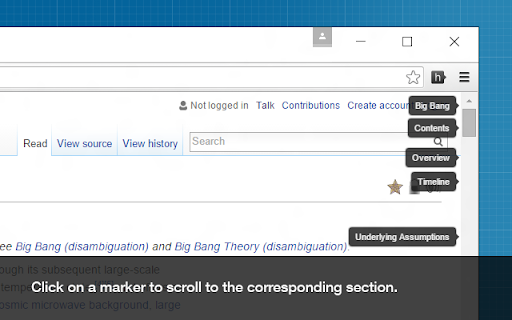
This extension creates clickable markers for all the headings on a page and places them proportionately on the scrollbar.
The markers enable you to jump between different sections of the page and help to quickly find what you are looking for. They are especially useful when navigating long webpages.
Featured in CNET, Lifehacker and Mashable.
How to use:
• After a page is loaded, click on the extension icon on the toolbar to display the heading markers.
• Click on a marker to scroll to the corresponding section.
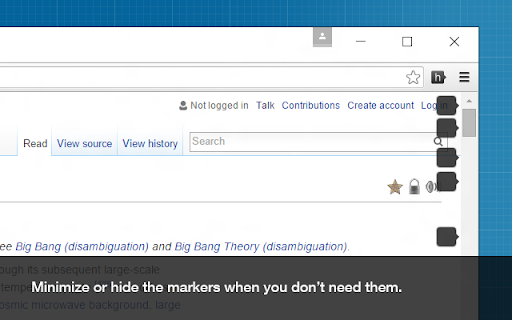
• You can minimize, hide, or show the markers using these keyboard shortcuts:
⁃ show/hide ( Shift + Alt + v )
⁃ minimize/maximize ( Shift + Alt + b )
• You can customize the behavior of this extension on the options page.
View the source code, contribute, report issues, or request new features here:
github.com/mlijanto/scrollbar-of-contents
Thanks for your comments and suggestions, keep them coming!
Reviews (1 cached)
★★★☆☆2013-07-03
lyra
Good, but: => I'd like to show the full marker when clicking on the icon; => I don't like the blur and shadow, a flatter style would be nicer; => All the heading words have caps. Why that? Please add an option to turn off that.
Permissions (2)
Permissions
activeTabℹ Can access the current tab when you click the extension storageℹ Can store data locally in your browser
Details
| Version | 0.4.1 |
| Updated | Jun 19, 2024 |
| Size | 44.25KiB |
| First Seen | Mar 30, 2026 |
Popular in tools

Zotero Connector
by Zotero
8M
★ 3.96
tools
8M
★ 3.96
tools

Browsec VPN - Free VPN for Chrome
by Browsec
7M
★ 4.44
tools
7M
★ 4.44
tools

AnyDoc Translator - Translate Web and PDF
by www.wps.com
7M
★ 4.59
tools
7M
★ 4.59
tools

Video DownloadHelper
by Aclap
5M
★ 4.43
tools
5M
★ 4.43
tools

Microsoft Bing Homepage & Search for Chrome
by Microsoft Corporation
4M
★ 3.72
tools
4M
★ 3.72
tools
Popular Extensions

Adobe Acrobat: PDF edit, convert, sign tools
by Adobe Inc.
331M
★ 4.40
workflow
331M
★ 4.40
workflow

AdBlock — block ads across the web
by AdBlock
62M
★ 4.48
workflow
62M
★ 4.48
workflow

Grammarly: AI Writing Assistant and Grammar Checker App
by Grammarly
42M
★ 4.50
communication
42M
★ 4.50
communication

Adblock Plus - free ad blocker
by eyeo GmbH
41M
★ 4.39
workflow
41M
★ 4.39
workflow

Chrome Remote Desktop
by Chrome Remote Desktop Release Managers
38M
★ 3.14
workflow
38M
★ 3.14
workflow