
⚠️Not updated in over a year
Description
Open a new tab to write down your thoughts and keep track of your agendas!
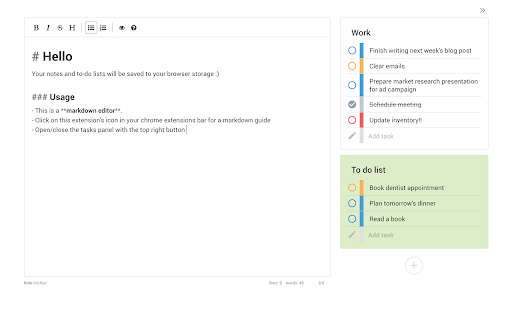
Replace a new tab page with a markdown text editor and an organised task manager. Your data is saved to your browser storage and will be synced across different tabs. (Clearing your browser cache will also clear your data.) This extension works offline though some styles may be affected.
Features:
** To-do lists **
➝ Add, delete & update tasks
➝ Categorise your to-do lists into stay organised
➝ Colour-code your lists
➝ Set different priority levels for each task
➝ Clear completed tasks to keep your list clean
➝ Toggle to hide/show the task panel
** Text editor **
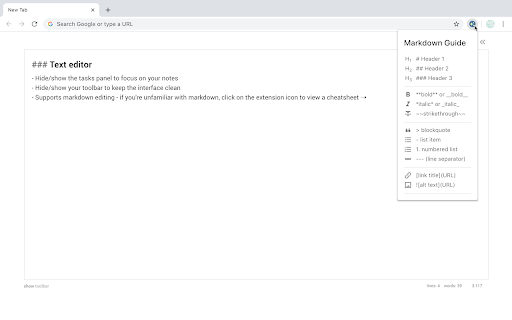
➝ Choose to hide/show your toolbar to keep the interface clean
➝ Notes are immediately saved to your local storage
➝ Supports markdown editing - if you're unfamiliar with markdown, you can click on the extension icon to view a cheatsheet :)

Reviews
Loading reviews...
Details
| Version | 1.0.0 |
| Updated | Apr 16, 2024 |
| Size | 579KiB |
| First Seen | Mar 30, 2026 |
Popular in workflow

Adobe Acrobat: PDF edit, convert, sign tools
by Adobe Inc.
331M
★ 4.40
workflow
331M
★ 4.40
workflow

AdBlock — block ads across the web
by AdBlock
63M
★ 4.48
workflow
63M
★ 4.48
workflow

迅雷下载支持
by Shenzhen Xunlei Network Technology Co., Ltd.
59M
★ 2.77
workflow
59M
★ 2.77
workflow

Adblock Plus - free ad blocker
by eyeo GmbH
41M
★ 4.39
workflow
41M
★ 4.39
workflow

Chrome Remote Desktop
by Chrome Remote Desktop Release Managers
39M
★ 3.14
workflow
39M
★ 3.14
workflow
Popular Extensions
Adobe Acrobat: PDF edit, convert, sign tools
by Adobe Inc.
331M
★ 4.40
workflow
331M
★ 4.40
workflow
AdBlock — block ads across the web
by AdBlock
63M
★ 4.48
workflow
63M
★ 4.48
workflow
迅雷下载支持
by Shenzhen Xunlei Network Technology Co., Ltd.
59M
★ 2.77
workflow
59M
★ 2.77
workflow

Grammarly: AI Writing Assistant and Grammar Checker App
by Grammarly
42M
★ 4.50
communication
42M
★ 4.50
communication
Adblock Plus - free ad blocker
by eyeo GmbH
41M
★ 4.39
workflow
41M
★ 4.39
workflow