
⚠️Not updated in over 2 years
Description
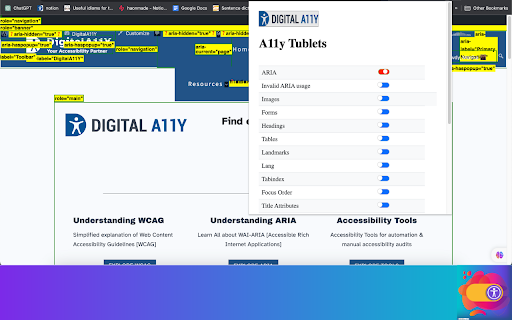
Introducing DigitalA11Y Tublets, your go-to companion for swiftly identifying accessibility flaws in code semantics. Whether you're a developer, accessibility expert, or any professional in the accessibility sphere, this extension is tailor-made for you!
What sets DigitalA11Y Tublets apart?
It empowers you to:
1.Illuminate semantic structures like tables, landmarks, headings, and lists.
2.Pinpoint form fields and relevant defects.
3.Highlight images with or without alt text, aiding in evaluating the meaningfulness of alt text values.
4.Spotlight CSS background images, enabling you to assess the necessity for text alternatives.
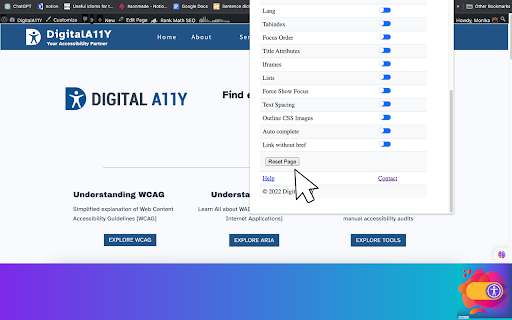
5.Assist in conducting keyboard testing with focus highlights.
6.Highlight anchor tags lacking href attributes.
7.Identify elements utilizing the tabindex attribute.
8.Recognize elements employing the HTML title attribute.
9.Facilitate testing for WCAG 2.1 SC 1.3.5 Autocomplete, ensuring proper autocomplete attributes in form fields.
10.Aid in testing WCAG 2.2 SC 2.5.8 Target Size (Minimum).
11.Support testing for WCAG 2.1 SC 1.4.12: Text Spacing.
12.Simplify evaluating the focus order of web pages with intuitive ease.
13.Identify the language of the page and its segments.
What more does it offer?
It's absolutely free! This tool is a time-saver during manual accessibility audits. For novices and non-screen reader a11y testers, it's the ideal starting point!
Remember, DigitalA11Y Tublets is here to streamline your accessibility analysis process, making it efficient and accessible for all.

Reviews (1 cached)
★★★☆☆2025-02-14
Carlos Lantigua
It has some really great features but the extension itself is extremely buggy. For one, after using it a few times to gain an understanding of my companies accessibility on a page, I still don't know when something is toggled on or off. For an accessibility extension you would think they would put more thought into this. Is Blue on and red off? I honestly don't know because once I toggle something, it stays on even if I toggle it again until I hit the reset page button. There also aren't any descriptions to tell you what you're looking at so I think this assumes you have great accessibility knowledge before using it. Admittedly I do not so I tend to feel a bit lost with some of the options or what they tell me about our page.
Permissions (3)
Permissions
activeTabℹ Can access the current tab when you click the extension scriptingℹ Can inject scripts into web pages storageℹ Can store data locally in your browser
Details
| Version | 1.2 |
| Updated | Nov 20, 2023 |
| Size | 162KiB |
| First Seen | Mar 30, 2026 |
More by DigitalA11Y.com

Popular in accessibility

Read&Write for Google Chrome™
by Texthelp
19M
★ 3.44
accessibility
19M
★ 3.44
accessibility

360 Internet Protection
by qihoosafe
17M
★ 4.54
accessibility
17M
★ 4.54
accessibility

Screenshot reader™
by Texthelp
7M
★ 2.57
accessibility
7M
★ 2.57
accessibility

OrbitNote
by Texthelp
7M
★ 2.95
accessibility
7M
★ 2.95
accessibility

Volume Master
by Peta Sittek
6M
★ 4.81
accessibility
6M
★ 4.81
accessibility
Popular Extensions

Adobe Acrobat: PDF edit, convert, sign tools
by Adobe Inc.
331M
★ 4.40
workflow
331M
★ 4.40
workflow

AdBlock — block ads across the web
by AdBlock
62M
★ 4.48
workflow
62M
★ 4.48
workflow

迅雷下载支持
by Shenzhen Xunlei Network Technology Co., Ltd.
59M
★ 2.77
workflow
59M
★ 2.77
workflow

Grammarly: AI Writing Assistant and Grammar Checker App
by Grammarly
42M
★ 4.50
communication
42M
★ 4.50
communication

Adblock Plus - free ad blocker
by eyeo GmbH
41M
★ 4.39
workflow
41M
★ 4.39
workflow