Mindful Browsing icon

Mindful Browsing

by Ink and Feet

v2.0.0 Updated Mar 17, 2026 287KiB
CWS
5K
Users
★ 4.44
52 reviews
#10755
of 207.6K
workflow
#3103 of 31.9K
Recently updated

Description

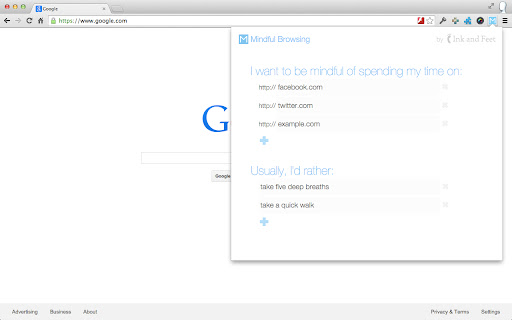
Entirely in your control. You specify which sites you'd like to be mindful about your time on, and provide a list of things you'd generally rather do instead. Mindful Browsing doesn't block you from visiting sites - it simply asks if you'd like to visit, and if so, reminds you 10 minutes later. Beautiful. Mindful Browsing features stunning photographs from some of the world's best landscape photographers. If you're a photographer and are interested in having your work featured, email steven@mindfulbrowsing.org. Free. Open. Safe. Mindful Browsing was built by me, Steven Skoczen, to help with my own mindless browsing. Friends liked it, so I made it available for free on the chrome store. Mindful Browsing doesn't track any of your activity, and the code is open-source so that you (or a geeky friend) can verify nothing sneaky is going on. I hope you Mindful Browsing makes your life a bit better. If you have ideas, I'd love to hear from you. Note: If you're looking for a way to block sites entirely, there are a host of other extensions out there. Do a search for stay focused, or block site, or study blocker. A lot of people have built ways to completely block sites for a period of time. Mindful Browsing isn't one of them - we believe that it's better to learn to be mindful about browsing than relying on a computer to enforce it. Think of it this way: if you hurt your leg, in the long run, would you rather do rehab and build your muscles, or use crutches for the rest of your life? :) ---------------------------------------------------- Version 2.0.0 - Rewritten to use the new Chrome Web Store Standards, reduce third-party libraries and make the extension faster, pre-load smaller images, and reduce resource usage overall. Also fixed a number of sticky bugs with saving. It's been a long time coming, but it's finally updated! Version 1.2.6 - Updates to Chrome Extension V3 permissions. This means the extension no longer needs the tabs or webNavigation permissions. Hooray for fewer permissions! Version 1.2.4 - Adds new images. Version 1.2.2: - Updates all images to SSL, so no warning appears on secured sites. Version 1.2.1: - Fixed a bug that was causing images not to load. Version 1.2: - Lots of new images, now changing daily - Hides the confirmation for small popups (like Facebook and Twitter's "Authorize this app" screens.) - Saves the daily image locally, for much faster and prettier responses. - A few odds and ends, like better fonts support, some tweaked spacing, and other beauties. Version 1.1: - Fixes a couple bugs, including close button and empty lists. - Makes edit popup easier to read. - Even better credit of the incredible photographers we feature. Version 1.0: - Initial release.
Mindful Browsing screenshot 1Mindful Browsing screenshot 2Mindful Browsing screenshot 3Mindful Browsing screenshot 4

Reviews (7 cached)

★☆☆☆☆2023-06-19
redacted

nothing against the extension but hate the idea of relying on external factor to control your impulses or conditioning

★☆☆☆☆2020-02-08
Dmitrii Kotov

It doesn't work. I added some sites and nothing happend.

★★☆☆☆2018-06-19
Dianne DeSha

Sadly, I spoke too soon. After closing down and reopening Chrome, it has duplicated everything from the fourth entry down (erasing every other URL I put in) and does this even after restarts and reinstalls. --so I'd have to call it broken at this point. Such a shame!) ======================= It works nicely--I don't want to be forced off a page like many extensions do, I just want to be reminded that I'm getting distracted. This does it nicely. Two requests: 1) I second the option to have a shorter time limit on the reminder--5 or even 3 minutes. 2)An option on the button to turn it on and off, for those times when I'm actually doing something important on one of those inbetween sites--amazon, for instance--that can sometimes be necessary and sometimes just be a distraction. The first is more important to me--10 minutes is too much time to wander off mentally. But this is a beautiful, well-crafted reminder (not force-block!) system. :-)

★★★☆☆2020-08-19
Kiln

Lovely concept and works well, I wish we can adjust the amount of time we can spend on a website, and be able to turn on and off the extension whenever we need to. Maybe have it prompt us to input a duration between 1-10 minutes so that we can think about how long we wanna spend on it, and after that amount of time we get asked to go back to work. :) Sometimes it 'remembers' URLs that I've asked it to remove. Which is a bother, since we can't even turn off the extension for a period of time.

★★★☆☆2020-07-20
Xico Caio

It is the type of self-control tool I wanted, simple and not annoying. However, it takes to long to block the website, and it is not instantaneous as some other extensions. Also, the motivation placeholder web page could be more open to customization, as the motivation sentence is on a small font and with a transparency that makes it difficult to read.

★★★☆☆2019-09-10
Sarah Mac

This is a beautiful extension, and is actually terrifically helpful. My only problem is that both the lists tend to delete items or replace them with duplicates, which is not ideal when you suddenly check the clock and wonder why it hasn't flagged the website for half an hour. I've found that adding one. option. at. a. time. keeps them on for a short period of time, but eventually they get mucked up again. This is admittedly beautifully simple, but I also second some of the comments that it would benefit greatly from having an on/off option, and a way to control the time limit.

★★★☆☆2019-05-16
Dottie Blyth

great idea, but photo and text/button contrast makes it hard to read.

Permissions (3)

Permissions

alarms Can schedule periodic background tasks storage Can store data locally in your browser unlimitedStorage

Details

Version 2.0.0
Updated Mar 17, 2026
Size 287KiB
First Seen Mar 30, 2026
