
⚠️Not updated in over a year
Description
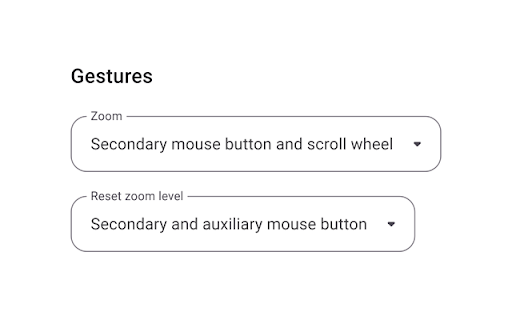
Scroll Zoom is a browser extension which lets you zoom web pages by holding the left or right (default) mouse button and moving the scroll wheel. The mouse gestures can be configured from the extension's options, and the customization of zoom levels is also supported.
The continued development of Scroll Zoom is made possible thanks to the support of awesome backers. If you'd like to join them, please check out https://armin.dev/go/patreon
Due to browser restrictions the extension does not work on the Chrome Web Store website or local browser and extension pages, such as chrome://extensions.
The "Allow access to file URLs" option must be enabled to zoom saved web pages opened in a tab. Visit the chrome://extensions page and open the extension's details to find the option.
Relevant browser bugs:
• On macOS and Linux the secondary (right) mouse button gesture does not zoom pages as expected, the context menu is shown
The extension is also available for Edge and Firefox: https://github.com/dessant/scroll-zoom#readme
Reviews are not monitored for bug reports, please use GitHub for issues and feature requests.
https://github.com/dessant/scroll-zoom

Reviews (2 cached)
★☆☆☆☆2020-09-26
John Lakatos
Does not work
★☆☆☆☆2019-08-04
Michael Winn
Rubbish, when zooming with the scroll wheel the page also scrolls up/down at the same time as zooming!
Permissions (2)
Permissions
scriptingℹ Can inject scripts into web pages storageℹ Can store data locally in your browser
Details
| Version | 4.0.0 |
| Updated | Feb 22, 2025 |
| Size | 292KiB |
| First Seen | Mar 30, 2026 |
More by Armin Sebastian

Buster: Captcha Solver for Humans
by Armin Sebastian
700K
★ 3.85
tools
700K
★ 3.85
tools

Search by Image
by Armin Sebastian
400K
★ 4.06
tools
400K
★ 4.06
tools

Web Archives
by Armin Sebastian
60K
★ 4.87
tools
60K
★ 4.87
tools

Clear Browsing Data
by Armin Sebastian
20K
★ 4.06
developer
20K
★ 4.06
developer

Video Quality Settings for YouTube™ (HD/4K)
by Armin Sebastian
10K
★ 3.89
tools
10K
★ 3.89
tools
Popular in accessibility

Read&Write for Google Chrome™
by Texthelp
19M
★ 3.44
accessibility
19M
★ 3.44
accessibility

360 Internet Protection
by qihoosafe
17M
★ 4.54
accessibility
17M
★ 4.54
accessibility

Screenshot reader™
by Texthelp
7M
★ 2.57
accessibility
7M
★ 2.57
accessibility

OrbitNote
by Texthelp
7M
★ 2.95
accessibility
7M
★ 2.95
accessibility

Volume Master
by Peta Sittek
6M
★ 4.81
accessibility
6M
★ 4.81
accessibility
Popular Extensions

Adobe Acrobat: PDF edit, convert, sign tools
by Adobe Inc.
331M
★ 4.40
workflow
331M
★ 4.40
workflow

AdBlock — block ads across the web
by AdBlock
62M
★ 4.48
workflow
62M
★ 4.48
workflow

迅雷下载支持
by Shenzhen Xunlei Network Technology Co., Ltd.
59M
★ 2.77
workflow
59M
★ 2.77
workflow

Grammarly: AI Writing Assistant and Grammar Checker App
by Grammarly
42M
★ 4.50
communication
42M
★ 4.50
communication

Adblock Plus - free ad blocker
by eyeo GmbH
41M
★ 4.39
workflow
41M
★ 4.39
workflow