
⚠️Not updated in over 2 years ⚠️Requests 1 sensitive permission
Description
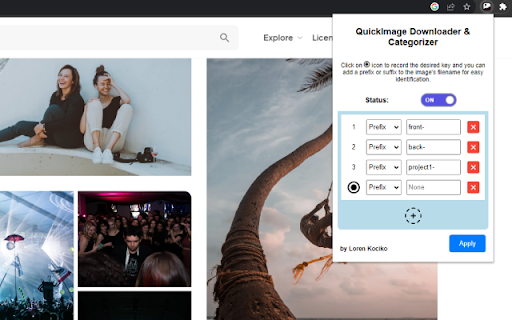
1. Set up keys and the designated prefixes or suffixes that will be appended to the images names.
2. Hover over the photos you want to download, and press one of the assigned keys
3. Enjoy
(works better if chrome is setup to auto-save files without a confirmation prompt)
Reviews
Loading reviews...
Permissions (5)
Permissions
activeTabℹ Can access the current tab when you click the extension downloadsℹ Can manage and monitor downloads storageℹ Can store data locally in your browser tabsℹ Can see your open tabs and their URLs
Host Permissions
<all_urls>ℹ Can access and modify all websites you visit
Details
| Version | 1.0 |
| Updated | Aug 28, 2023 |
| Size | 63.28KiB |
| First Seen | Mar 26, 2026 |
More by LorenKociko


Popular in workflow

Adobe Acrobat: PDF edit, convert, sign tools
by Adobe Inc.
331M
★ 4.40
workflow
331M
★ 4.40
workflow

AdBlock — block ads across the web
by AdBlock
63M
★ 4.48
workflow
63M
★ 4.48
workflow

迅雷下载支持
by Shenzhen Xunlei Network Technology Co., Ltd.
59M
★ 2.77
workflow
59M
★ 2.77
workflow

Adblock Plus - free ad blocker
by eyeo GmbH
41M
★ 4.39
workflow
41M
★ 4.39
workflow

Chrome Remote Desktop
by Chrome Remote Desktop Release Managers
38M
★ 3.14
workflow
38M
★ 3.14
workflow
Popular Extensions
Adobe Acrobat: PDF edit, convert, sign tools
by Adobe Inc.
331M
★ 4.40
workflow
331M
★ 4.40
workflow
AdBlock — block ads across the web
by AdBlock
63M
★ 4.48
workflow
63M
★ 4.48
workflow
迅雷下载支持
by Shenzhen Xunlei Network Technology Co., Ltd.
59M
★ 2.77
workflow
59M
★ 2.77
workflow

Grammarly: AI Writing Assistant and Grammar Checker App
by Grammarly
42M
★ 4.50
communication
42M
★ 4.50
communication
Adblock Plus - free ad blocker
by eyeo GmbH
41M
★ 4.39
workflow
41M
★ 4.39
workflow