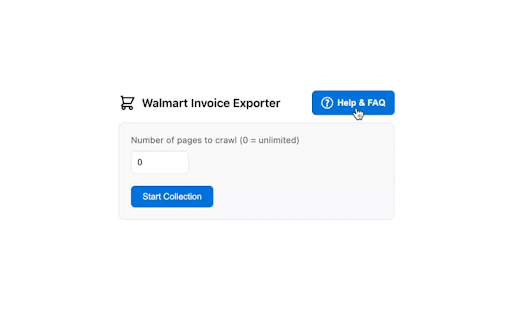
Transform your Walmart order management experience with the Walmart Invoice Exporter, a powerful Chrome extension that now allows you to download multiple orders at once in Excel format. Perfect for expense tracking, business records, and personal finance management.
★ Key Features:
• Batch Download: Select and download multiple orders at once, compatible with Walmart's built-in filters (date range, order status, returns, and search).
• Order History Crawler: Automatically collect order numbers from your purchase history.
• Order Description Tooltips: Hover over order numbers to see delivery date.
• Comprehensive FAQ: Built-in help guide with troubleshooting tips and setup instructions
• Detailed Excel Export: Get comprehensive order information including:
- Product details (name, quantity, price)
- Delivery status tracking
- Product links for easy reference
- Complete order information (number, date)
- Shipping address and payment method
- All charges (delivery, tax, tip - accurately parsed)
- Order subtotal (before fees and taxes)
- Order total (final amount)
• Export Mode Selector: Choose between:
- Multiple Files: One XLSX per order
- Single Combined File: All selected orders in a single XLSX workbook for easier management
• Caching: Invoice data is cached locally after the first download. Subsequent downloads automatically use cached data when available, speeding up repeat downloads.
• Privacy-Focused: Runs only on Walmart order pages with minimal permissions.
• Open Source: Available on GitHub for transparency and community contributions.
★ Usage Instructions:
☆ Single Order Download
1. Navigate to a specific Walmart order page
2. Click the extension icon
3. Check the box with order number
4. Click "Download Invoice"
☆ Batch Download
1. Go to your Walmart order history page (https://www.walmart.com/orders)
2. Click the extension icon
3. Set the number of pages to crawl (0 = unlimited)
4. Click "Start Collection"
5. Wait for the order numbers to load (may take a few seconds)
6. Hover over order numbers to see their descriptions (delivery date, status) if needed
7. Select the orders you want to download
8. Choose your Export Mode in the side panel:
- Multiple Files: downloads one XLSX per order
- Single Combined File: downloads all selected orders in a single XLSX workbook
9. Click "Download Selected Orders"
10. Wait for the download to complete (may take a few minutes)
⚠️ IMPORTANT NOTE FOR BULK DOWNLOADING ⚠️
Required Chrome Settings for Bulk Downloads:
1. Update Download Settings:
• Turn OFF "Ask where to save each file before downloading"
• Turn OFF "Show downloads when they're done"
These settings can be found in Chrome's download settings (chrome://settings/downloads)
2. Enable Automatic Downloads (Method 1):
• Paste this link in a new Chrome tab:
chrome://settings/content/siteDetails?site=https%3A%2F%2Fwww.walmart.com#:~:text=Automatic%20downloads
• Find "Automatic downloads" option
• Set it to "Allow" (instead of Ask or Block)
Alternative Method (if above link doesn't work):
• Paste this link in a new Chrome tab:
chrome://settings/content/automaticDownloads
• Under "Allowed to automatically download multiple files", click Add
• Enter "[*.]walmart.com" and click Add
☆ Need help? Click the "Help & FAQ" button in the extension side panel for detailed guides and troubleshooting tips.
☆ Need to merge multiple Excel files? Visit: https://hppanpaliya.github.io/excel-merger
☆ Pro Tip: When batch downloading, use Walmart's order page filters (search, date range, order status, returns) before clicking "Start Collection" to download exactly the orders you need!
★ Privacy & Security:
• No data collection
• Local processing only
• Minimal permissions required
• No external server communication
• Storage permission used only for temporary caching of your order numbers on your device
• Cached data automatically expires after 24 hours
★ Open Source:
• This extension is open source and available on GitHub: https://github.com/hppanpaliya/Walmart-Invoice-Exporter
★ Perfect For:
• Expense tracking
• Business accounting
• Budget management
• Purchase history organization
★ What's New:
✦ Version 6.3 - March 25, 2026
• Improved order-detail reliability with dual extraction (`__NEXT_DATA__` + DOM fallback)
• Removed duplicate/non-essential export fields: Order Number (Display), Barcode Data, Fee Breakdown, Charge History
• Cleaned payment output: Payment Method no longer repeats Payment Messages text
✦ Version 6.0 - March 17, 2026
• Fixed extraction of all financial fields (tax, delivery, tip, subtotal, total, payment method) broken by Walmart's DOM update
• Improved image blocking stability and error handling during order collection
✦ Version 5.2 - February 3, 2026
• Added shipping address and payment method to exported invoice details
• Added Order Total column to multiple files export mode for consistency
• Improved clear cache button visibility logic with dynamic UI updates
• Fixed tax and tip parsing in multiple file exports
• Enhanced cache system with better persistence using local storage
• Updated to Chrome 120 minimum version for better compatibility
✦ Version 5.1 - January 31, 2026
• Added Order Subtotal column to both single and multiple invoice export modes
• Multiple files export now displays both subtotal and order total.
✦ Version 5.0 - January 22, 2026
• Migrated UI from popup to a persistent Chrome Side Panel and integrated the FAQ inline
• Include the FAQ directly in the side panel for easier access and better user experience
• Improved user interface for better usability and navigation
• Performance optimizations (reduced timeouts, faster order collection, optimized image blocking)
✦ Version 4.0 - November 16, 2025
• Implemented caching for invoice data in Chrome local storage after the first download
• Subsequent downloads now check cache first, dramatically improving speed on repeat downloads
• Refactored internal codebase to use centralized constants for selectors, text, and CSS classes in utils.js for better maintainability and easier updates
✦ Version 3.3 - November 15, 2025
• Fixed an issue with order number extraction caused by changes in Walmart’s order history page structure
✦ Version 3.2 - August 9, 2025
• Added Export Mode Selector — choose between:
- Multiple Files Mode: one XLSX per order
- Single Combined File Mode: all selected orders in a single XLSX file
• Combined export runs sequentially in one background tab for reliability
• Powered by ExcelJS for generating combined workbooks
• Added structured data retrieval (no download) for enhanced combined export performance
• Multiple-file download flow remains unchanged
✦ Version 3.1 - March 25, 2025
• Added order description tooltip functionality
• Hover over order numbers to see order delivery date or if it's canceled or returned order
• Makes identifying and selecting specific orders much easier
✦ Version 3.0 - March 25, 2025
• Implemented intelligent local storage caching system for faster repeat usage
• Added cache timestamp and management options
• Improved memory management during order collection
• Updated FAQ with information about the caching system
✦ Version 2.5 - January 5, 2025
• Enhanced performance by blocking image loading in background tabs
• Faster page loading during order collection and invoice download
✦ Version 2.4 - January 5, 2025
• Added comprehensive FAQ page with troubleshooting guides
• Step-by-step instructions for setup and usage
• Chrome settings configuration guide for bulk downloads
• Guide for merging multiple Excel files
✦ Version 2.3 - December 19, 2024
• Resolved an issue with failed invoice downloads for new in-store orders.
✦ Version 2.2 - December 5, 2024
• Walmart.com/orders page link clickable in the popup.
✦ Version 2.1 - December 1, 2024
• Enhanced user interface with progress tracking
✦ Version 2.0 - November 27, 2024
• Added support for downloading multiple invoices at once
• New order history crawler feature
• Improved invoice downloading system
✦ Version 1.4.1 - August 30, 2024
• Improved order number extraction to handle various formats, including in-store purchases.
✦ Version 1.4 - August 29, 2024
• Improved invoice parsing with refined print-bill classes for accurate order delivery status.
• Added details like tips, taxes, and delivery charges to the exported invoice.
• Product names and links now appear in separate columns in the Excel file.
✦ Version 1.3 - August 27, 2024
• Fixed an issue preventing the download of xlsx invoice files.
• Extension name updated.
Streamline your Walmart purchase tracking today with this powerful, user-friendly extension!
Note: This extension works only on walmart.com.
Disclaimer: This extension is NOT created by or affiliated with Walmart Inc. Walmart Invoice Exporter is an independent tool developed by a third party. Walmart™ and all related trademarks are property of Walmart Inc. All rights reserved.