
⚠️Not updated in over 2 years
Description
Introducing ZetaMarker Lite - Your Lightweight Annotation Companion for Touch Screen Devices!
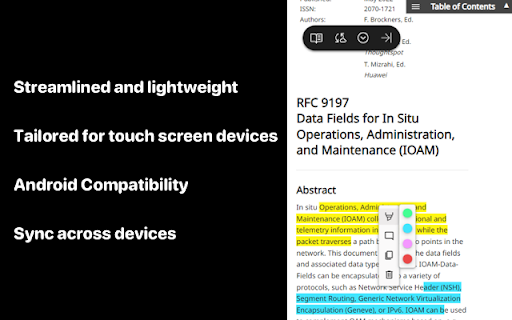
ZetaMarker Lite, the sleeker sibling of ZetaMarker, is tailored for touch screen devices and Android, providing a nimble and efficient solution for highlighting and annotating online articles. Streamlined and lightweight, ZetaMarker Lite ensures a focused experience with a primary emphasis on touch-based interaction.
Key Features:
🚀 Touchscreen Optimized: Tailored for touch screen devices, ZetaMarker Lite offers an intuitive and seamless experience for effortless highlighting and annotation on your touchscreen device.
📄 Mobile Productivity: Boost your productivity on the go with ZetaMarker Lite, designed to cater specifically to Android devices, providing a user-friendly interface for annotation tasks.
📱 Android Compatibility: ZetaMarker Lite is fully compatible with Kiwi browser, a web browser for mobile devices specifically designed for the Android operating system. Known for its speed, privacy features, and support for various web extensions.
How to Install ZetaMarker Lite on Android Cell Phones:
1️⃣ Install Kiwi Browser: Head to the Google Play Store on your smartphone. Search for "Kiwi Browser" and install it on your device.
2️⃣ Open Kiwi Browser: Launch the Kiwi browser on your Android device.
3️⃣ Add ZetaMarker Lite: Visit the current page using the Kiwi browser. Follow the on-screen instructions to add ZetaMarker Lite to your browser.
🖍️ Streamlined Highlighting: Enjoy easy and precise highlighting on web pages, enhancing your reading and research experience.
💬 Simplified Comments: Add comments effortlessly, facilitating research insights and collaboration, directly from your Android device.
📂 Lightweight Design: ZetaMarker Lite is designed to be light on resources, ensuring optimal performance on touch screen devices without compromising functionality.
🚫 PDF-Free Zone: ZetaMarker Lite focuses on the essentials, omitting PDF support to align with the limitations of mobile browsers on Android devices. If you want to highlight on PDF files, install ZetaMarker on your PC or laptop: https://chromewebstore.google.com/detail/zetamarker-pdf-web-highli/ajaboiophmaflodkmglfpngnmiijkkle
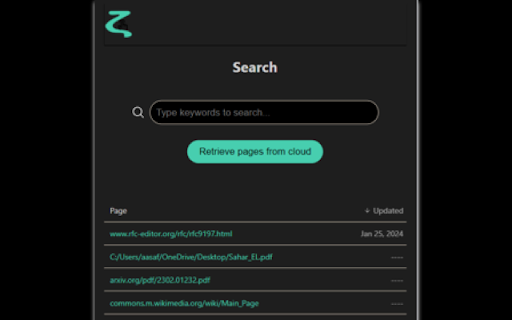
🔄 Sync on the Go: Seamlessly sync your annotations and highlights between your device to ensure a cohesive research workflow. Install the PC version of ZetaMarker on your laptops and PC at https://chromewebstore.google.com/detail/zetamarker-pdf-web-highli/ajaboiophmaflodkmglfpngnmiijkkle, and enjoy the ability to access your annotations and highlights on all your devices.
🌐 Multi-Language Support: Like its predecessor, ZetaMarker Lite is available in multiple languages for a global user base.
🚀 Always Evolving: Expect regular updates and new features as we continue to enhance your annotation experience.
More Info:
📱 No Account Needed: ZetaMarker Lite retains the account-free and permission-free philosophy, ensuring quick and hassle-free access.
🔒 Privacy Assurance: Your data remains under your control, aligning with our commitment to privacy. Learn more: https://zetamarker.com/legal/privacy.
📄 Terms of Service: Installing ZetaMarker Lite means agreeing to our Terms: https://zetamarker.com/legal/terms.
🔍 Web Highlighter, Android Annotation, Touchscreen Optimized, Lightweight Design, Collaboration on the Go, Mobile Productivity, Effortless Highlighting, Privacy-Focused, Sync Across Devices, Free Annotation Tool, Intuitive Interface, Annotation Companion for Android, Account-Free, PDF-Free Annotation. Mobile Annotator, Marker.
Reviews
Loading reviews...
Permissions (2)
Permissions
identityℹ Can use your Google account identity storageℹ Can store data locally in your browser
Details
| Version | 2.0 |
| Updated | Feb 11, 2024 |
| Size | 115KiB |
| First Seen | Mar 29, 2026 |
More by ZetaMarker


Popular in workflow

Adobe Acrobat: PDF edit, convert, sign tools
by Adobe Inc.
331M
★ 4.40
workflow
331M
★ 4.40
workflow

AdBlock — block ads across the web
by AdBlock
62M
★ 4.48
workflow
62M
★ 4.48
workflow

迅雷下载支持
by Shenzhen Xunlei Network Technology Co., Ltd.
59M
★ 2.77
workflow
59M
★ 2.77
workflow

Adblock Plus - free ad blocker
by eyeo GmbH
41M
★ 4.39
workflow
41M
★ 4.39
workflow

Chrome Remote Desktop
by Chrome Remote Desktop Release Managers
38M
★ 3.14
workflow
38M
★ 3.14
workflow
Popular Extensions
Adobe Acrobat: PDF edit, convert, sign tools
by Adobe Inc.
331M
★ 4.40
workflow
331M
★ 4.40
workflow
AdBlock — block ads across the web
by AdBlock
62M
★ 4.48
workflow
62M
★ 4.48
workflow
迅雷下载支持
by Shenzhen Xunlei Network Technology Co., Ltd.
59M
★ 2.77
workflow
59M
★ 2.77
workflow

Grammarly: AI Writing Assistant and Grammar Checker App
by Grammarly
42M
★ 4.50
communication
42M
★ 4.50
communication
Adblock Plus - free ad blocker
by eyeo GmbH
41M
★ 4.39
workflow
41M
★ 4.39
workflow