
Description
📝 Quick Start Guide
This guide will help you quickly and easily autofill your Factorial hours in just a few steps:
⚙️ How to Use
Go to Factorial: Open your browser and navigate to the Time Tracking page within your Factorial account.
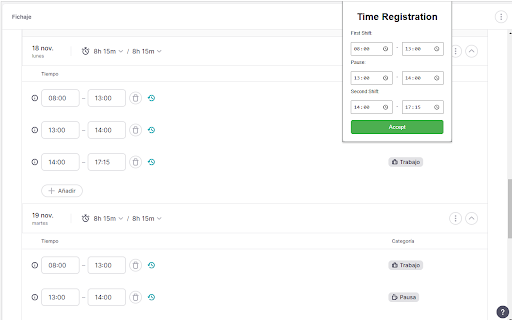
1 - Launch the Extension: Click on the AutoFactorial extension icon in your browser's toolbar.
2 - Define Scope: Select whether you want to load hours for the entire month or just for the current day.
3 - Set Your Hours: Fill in the desired start and end times you wish to register.
4 - Run the Process: Click Confirm to start the automatic hour-filling process.
⚠️ Important Execution Notice
Please Note! To ensure the working hours are registered successfully and without interruption, you MUST NOT interact with the browser window or change tabs while the extension is running. The process may take a few minutes, depending on the number of days being filled.
Reviews
Loading reviews...
Permissions (2)
Permissions
scriptingℹ Can inject scripts into web pages storageℹ Can store data locally in your browser
Details
| Version | 2.7 |
| Updated | Dec 4, 2025 |
| Size | 12.81KiB |
| First Seen | Mar 29, 2026 |
Popular in workflow

Adobe Acrobat: PDF edit, convert, sign tools
by Adobe Inc.
331M
★ 4.40
workflow
331M
★ 4.40
workflow

AdBlock — block ads across the web
by AdBlock
63M
★ 4.48
workflow
63M
★ 4.48
workflow

迅雷下载支持
by Shenzhen Xunlei Network Technology Co., Ltd.
59M
★ 2.77
workflow
59M
★ 2.77
workflow

Adblock Plus - free ad blocker
by eyeo GmbH
41M
★ 4.39
workflow
41M
★ 4.39
workflow

Chrome Remote Desktop
by Chrome Remote Desktop Release Managers
39M
★ 3.14
workflow
39M
★ 3.14
workflow
Popular Extensions
Adobe Acrobat: PDF edit, convert, sign tools
by Adobe Inc.
331M
★ 4.40
workflow
331M
★ 4.40
workflow
AdBlock — block ads across the web
by AdBlock
63M
★ 4.48
workflow
63M
★ 4.48
workflow
迅雷下载支持
by Shenzhen Xunlei Network Technology Co., Ltd.
59M
★ 2.77
workflow
59M
★ 2.77
workflow

Grammarly: AI Writing Assistant and Grammar Checker App
by Grammarly
42M
★ 4.50
communication
42M
★ 4.50
communication
Adblock Plus - free ad blocker
by eyeo GmbH
41M
★ 4.39
workflow
41M
★ 4.39
workflow