
⚠️Not updated in over a year ⚠️Requests 1 sensitive permission
Description
Use GroupsTag™ to Create Raving Fans, Followers, and Buyers On All Live Videos & Posts Inside Your Facebook Groups.
GroupsTag™ is used in Facebook groups to allow Facebook group Admins and Moderators to create Tag Lists within a Facebook group.
Users can add up to 50 Facebook group members to each Tag List. A Facebook group can have an unlimited number of Tag Lists.
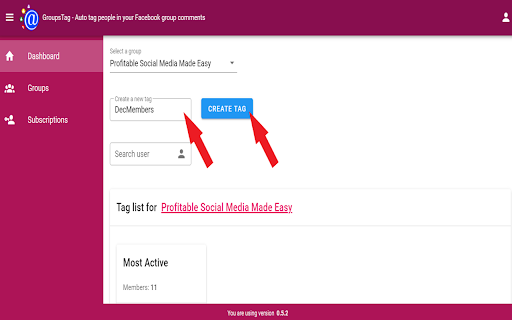
An example Tag List might be {{Jan25 Members}} to identify all group members that joined the Facebook group in January 2025.
From this Tag List users can tag all group members of the Tag List at one time using {{Jan25 Members}} in the comments of any post.
The Tag List group members will then get a notification from Facebook about the post.
____________________
Benefit #1
No more tagging people one at a time on your Facebook live videos and posts.
Benefit #2
More engagement on your posts in your Facebook group.
Benefit #3
More people showing up to your live videos in your Facebook group.
____________________
Here's How GroupsTag™ Helps You Stay Connected With Your Group Members...
Step 1: Install The GroupsTag™ Chrome Extension
You'll receive a link in your email to install the GroupsTag™ extension into your Chrome browser. It's as simple as clicking one button and then logging in with the email you purchased with!
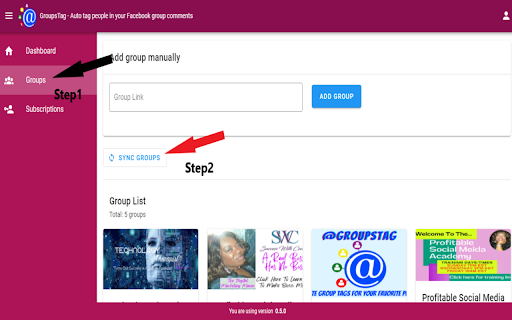
Step 2: Sync all your groups and Create your Tag Lists inside of GroupsTag™
Once you load GroupsTag™ you will be able to sync up all groups where you are the admin in one place. Then you can create Tag Lists for your groups.
Step 3: In Facebook, add group members to your GroupsTag™ Tag Lists
Once your Tag Lists are created for your Facebook group you can add group members to your list with just one click.
____________________
GroupsTag™ will help you get more people to see your offers because they will get a Facebook notification about your post or live.
And unlike normal tagging it won't show up on page or their news feed.
It'll save you from spending time and money tagging group members one at a time on your live videos and posts.
It'll let you sell more of your offers and you can truly be present during your live without worrying about who's showing up.
Most importantly, it'll help you amplify your results and get better participation from your Facebook group.
And you know what makes this even better?...
You'll be able to start seeing results immediately as soon as you start using the software.


Reviews
Loading reviews...
Permissions (6)
Permissions
alarmsℹ Can schedule periodic background tasks contextMenusℹ Can add items to the right-click menu declarativeNetRequestℹ Can block or redirect network requests storageℹ Can store data locally in your browser tabsℹ Can see your open tabs and their URLs webRequestℹ Can observe and analyze network traffic
Details
| Version | 1.0.0 |
| Updated | Jan 14, 2025 |
| Size | 391KiB |
| First Seen | Apr 1, 2026 |
Popular in workflow

Adobe Acrobat: PDF edit, convert, sign tools
by Adobe Inc.
331M
★ 4.40
workflow
331M
★ 4.40
workflow

AdBlock — block ads across the web
by AdBlock
62M
★ 4.48
workflow
62M
★ 4.48
workflow

迅雷下载支持
by Shenzhen Xunlei Network Technology Co., Ltd.
59M
★ 2.77
workflow
59M
★ 2.77
workflow

Adblock Plus - free ad blocker
by eyeo GmbH
41M
★ 4.39
workflow
41M
★ 4.39
workflow

Chrome Remote Desktop
by Chrome Remote Desktop Release Managers
38M
★ 3.14
workflow
38M
★ 3.14
workflow
Popular Extensions
Adobe Acrobat: PDF edit, convert, sign tools
by Adobe Inc.
331M
★ 4.40
workflow
331M
★ 4.40
workflow
AdBlock — block ads across the web
by AdBlock
62M
★ 4.48
workflow
62M
★ 4.48
workflow
迅雷下载支持
by Shenzhen Xunlei Network Technology Co., Ltd.
59M
★ 2.77
workflow
59M
★ 2.77
workflow

Grammarly: AI Writing Assistant and Grammar Checker App
by Grammarly
42M
★ 4.50
communication
42M
★ 4.50
communication
Adblock Plus - free ad blocker
by eyeo GmbH
41M
★ 4.39
workflow
41M
★ 4.39
workflow