
Description

Reviews (33 cached)
It actually do not increases the brightness of your screen. What it actually do is put it more white...I mean, the small light bulbs on your screen doesn't actually bright more...So it doesn't make sense to install this extension.
Weirdly doesnt work for me at all
Doesn't dim videos on Chrome. I wish the developer could include the feature to reduce video brightness instead of just dimming the pages.
Works, but Not... It can make the screen brighter, and some other darker.. nah.. it's not working.. you can't select one site or one widow for it...
dosent work anymore
Doesn't work on some websites,has virus, overall sucks
DO NOT INSTALL/ADD THIS EXTENSION! things it will do: Lag your chrome, lag your computer, cause popups, break webpages, make certain URL's Unusable. Things this will not do: Make your browsing experience any mroe enjoyable. This is literally just a virus.
this suckd
DO NOT ADD THIS EXTENSION. If you download this extension, you will be bombarded with a bunch of viruses.
Adds a bunch of viruses. This app is the worst
Did not work when I used it, just annoying, none of the buttons worked.
No use at all
dont install gives avirus
Does not work on my hp Chromebook. The extension was installed but did not work .
it didnt work. wth; this is ###
1/ I removed it from Chrome, but the brightness stayed low (the browser tab is still dimmed at the time it was set in the extension). 2/ I reinstalled it, but it didnt fix the problem, it looks like the new value is multiplying the old value. At 100% new value the screen is still dimmed at 80% old value.
Doesn't work
It didn't work.
This app BREAKS print viewing. ALL print preview pages will be completely blank, it isn't just cosmetic - printing anything from your browser will result in a blank page with this app on. This app alone was causing the problem. If you are unable to print anything from Chrome, remove this app & restart your browser.
doesnt work for a LOT of PDFs, and does not adjust brightness of the address bar at all
stopped working
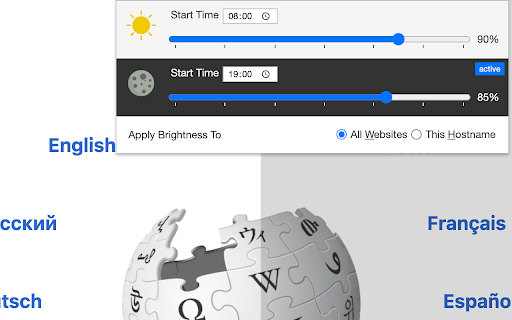
Having 2 separate bars (daytime/nightime) is super annoying. There's no 1 single control. Most importantly, the brightness doesn't apply to fullscreen videos.
it's not working , fix the problem
May be okay for what it was designed for, but I want to change the brightness of the whole display, not just one browser window
It works!
Seems complicated, tried it two ways and don't think it adjusts the brightness at all just puts a grey shade over it, don't like it, may revisit
good but don't deserve 5 starts people are over reacting!
Doesn't work for full screen video players.
[Windows 10, Vivaldi3.6] Beautiful GUI but the button I needed for selecting only the site that I wanted to darken, "Enable Here" was greyed out and did not work. I could set it up to darken every website, but that's not what I wanted.
It’s somewhat helpful, but it seems like it’s in need of a complete rewrite. The buttons break if you press them too much; press the Disable Everywhere button about 4-5 times and then flip between Enable Here and Disable Here a few times and suddenly, no matter which on/off option it’s on, the brightness slider doesn’t work. Fidget around with it a bit more, (closing and opening it and clicking a few buttons) and it "fixes" again. It’s annoying, because it seems like the extention can’t decide whether it’s supposed to be working or not. Suggestions: • Fix the enable/disable problem. • Combine the sliders into one slider, and put the other nighttime, daytime, apply to all or only this domain, and start time functionality in a settings menu. • Modernize the interface.
It does it's job but the caveat is that it's breaking the baseline styles of some sites like Twitter; so for now, you just have to manually turn the plugin off for those domains. Fix this and you get 5 stars.
stopped working properly about a month ago now it doesn't matter what times you set up within the extension it goes dim at midnight every night only way around it is to manually move the slider up to 100% and manually slide it back down when you want it to dim it completely ignores the app's built in scheduling this was a solid 5 stars before this
it will be more dashing
Permissions (5)
Permissions
Details
| Version | 0.3.8 |
| Updated | Dec 9, 2025 |
| Size | 119KiB |
| First Seen | Apr 1, 2026 |
More by joue.quroi




Popular in accessibility





Popular Extensions




