
⚠️Not updated in over 2 years ⚠️Requests 1 sensitive permission
Description
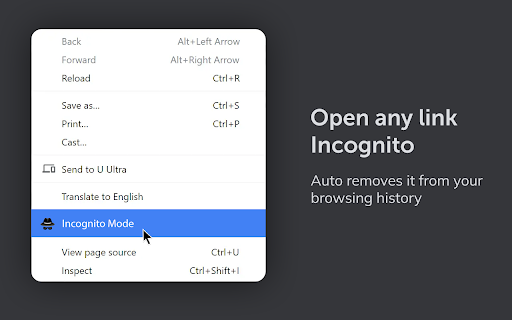
Incognito mode for Chrome browser extension will help you to open the current tab in an incognito mode and remove it from your browsing history.
The Incognito Mode for Chrome browser extension offers several useful benefits:
- Privacy and Anonymity: When you open a tab in incognito mode using the extension, your browsing activity in that tab is not recorded in your browsing history, and cookies and site data from that session are deleted after you close the tab. This ensures a higher level of privacy and anonymity as your browsing habits and sensitive information won't be stored on your device.
- Temporary Sessions: Incognito mode allows you to create temporary browsing sessions separate from your regular browsing. This can be helpful when you want to access a website without leaving any traces, especially if you are using a public or shared computer.
- Avoiding Autofill Conflicts: Incognito mode prevents the browser from using your stored autofill data, such as passwords and usernames. This is useful when you want to log in to a different account on a website without encountering conflicts with the data saved for your regular browsing session.
- Testing and Debugging: Web developers often find incognito mode useful for testing websites without any cached data interfering. It ensures that they are viewing the most up-to-date version of a webpage and helps them identify potential issues that may arise for new or first-time users.
- Research and Sensitive Topics: When conducting research on sensitive or personal topics, using incognito mode can help avoid personalized search results and suggestions. It reduces the risk of biased or targeted information being displayed based on your previous browsing habits.
- Preventing Tracking: Incognito mode can be effective in reducing the extent to which websites and advertisers can track your online behavior. While it doesn't provide complete anonymity or protection from all tracking methods, it does limit the amount of data collected during that specific browsing session.
- Guest Browsing: If you're sharing your device with someone else, using the Incognito Mode extension allows them to browse without accessing your bookmarks, passwords, and other saved data. Once the incognito tab is closed, all browsing activity in that session is discarded.

Reviews
Loading reviews...
Permissions (4)
Permissions
activeTabℹ Can access the current tab when you click the extension contextMenusℹ Can add items to the right-click menu historyℹ Can read and modify your browsing history storageℹ Can store data locally in your browser
Details
| Version | 1.0 |
| Updated | Jul 26, 2023 |
| Size | 24.17KiB |
| First Seen | Apr 1, 2026 |
More by Super Doodle

Popular in workflow

Adobe Acrobat: PDF edit, convert, sign tools
by Adobe Inc.
331M
★ 4.40
workflow
331M
★ 4.40
workflow

AdBlock — block ads across the web
by AdBlock
62M
★ 4.48
workflow
62M
★ 4.48
workflow

迅雷下载支持
by Shenzhen Xunlei Network Technology Co., Ltd.
59M
★ 2.77
workflow
59M
★ 2.77
workflow

Adblock Plus - free ad blocker
by eyeo GmbH
41M
★ 4.39
workflow
41M
★ 4.39
workflow

Chrome Remote Desktop
by Chrome Remote Desktop Release Managers
38M
★ 3.14
workflow
38M
★ 3.14
workflow
Popular Extensions
Adobe Acrobat: PDF edit, convert, sign tools
by Adobe Inc.
331M
★ 4.40
workflow
331M
★ 4.40
workflow
AdBlock — block ads across the web
by AdBlock
62M
★ 4.48
workflow
62M
★ 4.48
workflow
迅雷下载支持
by Shenzhen Xunlei Network Technology Co., Ltd.
59M
★ 2.77
workflow
59M
★ 2.77
workflow

Grammarly: AI Writing Assistant and Grammar Checker App
by Grammarly
42M
★ 4.50
communication
42M
★ 4.50
communication
Adblock Plus - free ad blocker
by eyeo GmbH
41M
★ 4.39
workflow
41M
★ 4.39
workflow