
Prompt Stash: Save & Reuse Prompts for ChatGPT, Claude, Gemini & Grok
v1.1.0 Updated Mar 14, 2026 7.49MiB
✅Recently updated
Description
Stop wasting time retyping the same AI prompts over and over.
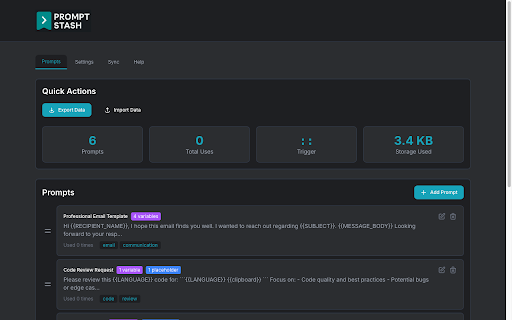
Prompt Stash is a prompt engineering toolkit for Chrome that turns your best prompts into reusable smart templates. Save once, insert anywhere with a keystroke. Works natively in ChatGPT, Claude, Google Gemini, Perplexity, and Grok - or any other website.
WHAT'S NEW IN v1.1.0
- Claude support: Full native integration with Anthropic's Claude
- In-extension feedback form: Share ideas and report issues without leaving the extension
- Bug fixes: Fixed stale closure bug in SaveDialog, Fixed SearchOverlay autofocus timing (100ms → 500ms) for more reliable focus on open, Fixed save button removal on tag field when editing templates
- Improved test coverage and stability
WHY USERS LOVE PROMPT STASH
10x Faster AI Workflows
Type :: to instantly search and insert any saved prompt. No more switching tabs or digging through notes apps. One keystroke, done.
Smart Templates with Variables
Add {{variables}} to make any prompt reusable. Example: "Review this {{language}} code for {{issue}}" adapts to any language or concern. Chain modifiers like {{text | trim | uppercase}} for formatting, URL encoding, and JSON escaping.
Your Data Stays Private
Everything stored locally in your browser. No accounts, no servers, no data collection. Optional Google Drive sync uses your own private appDataFolder. You control your data.
Works Across Devices
Sync your prompt library across Chrome, Firefox, Edge, and Brave with optional Google Drive sync. Access your prompts everywhere you work.
SUPPORTED AI PLATFORMS
- ChatGPT (OpenAI)
- Claude (Anthropic) — NEW
- Google Gemini
- Perplexity
- Grok
- Any website with a text input
WHO THIS HELPS MOST
- Developers: Code reviews, debugging prompts, documentation, API work
- Content writers: Blog posts, social media, marketing copy, editing
- Researchers: Data analysis, literature reviews, comparison frameworks
- Professionals: Email templates, report prompts, presentation outlines
- Students: Study guides, essay frameworks, research help
GET STARTED IN 30 SECONDS
1. Install the extension
2. Save your first prompt from any AI chat or right-click selected text
3. Add {{variables}} to make it reusable
4. Type :: to search and insert prompts anywhere
5. Optional: Enable Google Drive sync for cross-device access
WHAT MAKES PROMPT STASH DIFFERENT
Most prompt tools require creating an account, subscribing to a plan, or trusting a third-party cloud with your data. Prompt Stash requires none of that. Your prompts live locally in your browser by default, and if you want to sync across devices, it uses your own Google Drive — not our servers.
That sync works across Chrome, Edge, Brave, and Firefox, so your prompt library follows you regardless of which browser you use. No other prompt manager offers true cross-browser sync without requiring an account on their platform.
Prompt Stash also works directly inside your AI chats. Save a prompt, add variables and modifiers, and reuse it without ever leaving the page. Template modifiers let you transform values with pipe syntax: {{variable | modifier}}. Available modifiers include uppercase, lowercase, trim, percent-encode, and json-stringify. Chain multiple modifiers for complex transformations.
POWER USER TIPS
- Type :: in any text field to search your prompts instantly
- Click "+ Create New Prompt" in the search overlay to save on the fly
- Right-click any text on any webpage to save it as a template
- Use descriptive variable names like {{programming_language}} instead of {{lang}}
- Tag your prompts for instant filtering and organization
- Export regularly to back up your growing prompt library
PREVIOUS UPDATES
- v1.0.6: Grok duplicate overlay fix, insertMode setting fix
- v1.0.5: Firefox storage quota fix, cross-browser improvements
- v1.0.4: Enhanced Perplexity and Grok integration, UI improvements
- v1.0.3: Context menu integration, sync improvements
- v1.0.2: Added Perplexity and Grok support, Google Drive sync
- v1.0.1: Stability improvements and bug fixes
- v1.0.0: Major UI overhaul and enhanced search
Your prompts are valuable. Stop losing them. Install Prompt Stash and save your first prompt in under 30 seconds.


Reviews
Loading reviews...
Permissions (6)
Permissions
activeTabℹ Can access the current tab when you click the extension contextMenusℹ Can add items to the right-click menu identityℹ Can use your Google account identity scriptingℹ Can inject scripts into web pages storageℹ Can store data locally in your browser unlimitedStorage
Details
| Version | 1.1.0 |
| Updated | Mar 14, 2026 |
| Size | 7.49MiB |
| First Seen | Apr 1, 2026 |
More by Crouton Creations, LLC

Popular in workflow

Adobe Acrobat: PDF edit, convert, sign tools
by Adobe Inc.
322M
★ 4.40
workflow
322M
★ 4.40
workflow

AdBlock — block ads across the web
by AdBlock
62M
★ 4.48
workflow
62M
★ 4.48
workflow

迅雷下载支持
by Shenzhen Xunlei Network Technology Co., Ltd.
59M
★ 2.77
workflow
59M
★ 2.77
workflow

Adblock Plus - free ad blocker
by eyeo GmbH
40M
★ 4.39
workflow
40M
★ 4.39
workflow

Chrome Remote Desktop
by Chrome Remote Desktop Release Managers
37M
★ 3.13
workflow
37M
★ 3.13
workflow
Popular Extensions
Adobe Acrobat: PDF edit, convert, sign tools
by Adobe Inc.
322M
★ 4.40
workflow
322M
★ 4.40
workflow
AdBlock — block ads across the web
by AdBlock
62M
★ 4.48
workflow
62M
★ 4.48
workflow
迅雷下载支持
by Shenzhen Xunlei Network Technology Co., Ltd.
59M
★ 2.77
workflow
59M
★ 2.77
workflow

Grammarly: AI Writing Assistant and Grammar Checker App
by Grammarly
42M
★ 4.50
communication
42M
★ 4.50
communication
Adblock Plus - free ad blocker
by eyeo GmbH
40M
★ 4.39
workflow
40M
★ 4.39
workflow