Image-Details icon

Image-Details

by heithe

v3.0.1 Updated May 31, 2022 23.32KiB
CWS
5K
Users
★ 3.46
26 reviews
#10754
of 207.6K
workflow
#3102 of 31.9K
⚠️Not updated in over 2 years

Description

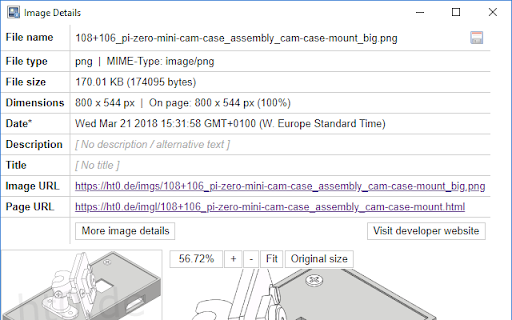
This extension adds a context menu entry that will show image details in a popup window. It will work on images that use the <img> HTML tag and on most images that are included using the CSS background-image property. Shown details are: - File name - File type/extension - MIME type - File size - Image dimensions (width + height on page, natural width + natural height, scaling) - Date (if available) - Description / Alternative text - Title - Image URL - Source page URL The image viewer lets you examine the image using its drag and zoom capability. And you can download the image by clicking the little save icon on the right end of the file name. If you encounter bugs or have a feature request please send me an email. And if you like this extension please consider a donation. Thank you! See https://ht0.de/image-details.html for more information.
Image-Details screenshot 1Image-Details screenshot 2

Reviews (10 cached)

★☆☆☆☆2026-01-05
bvv941152

Not working, show only popup window - null info

★☆☆☆☆2024-09-10
Davide Violante

Stuck in "Waiting for image data...". Available for debugging with the developer.

★☆☆☆☆2022-08-24
John Pravus

Right click pops up window showing the form which would have data, but is empty and greyed out, and shows "Waiting for image data..." in the center of the image indefinitely. Same behavior for several random sites I picked, *and* when loading a JPEG from my camera which I *know* has EXIF data.

★☆☆☆☆2015-02-16
Greg Brailsford

Just shows "Loading" for all fields.

★☆☆☆☆2013-01-22
Nyarlathotep

wtf! only image "load" in image property...

★★☆☆☆2021-07-13
Viktor K

Shows wrong dimentions for retina images when retina display is emulated in developer console.

★★☆☆☆2019-12-02
Infostrates

does not recognize the webp format : show jpg informations instead

★★☆☆☆2019-10-05
luke l

just says "Waiting for image data..." forever.

★★☆☆☆2015-05-09
Pete G. Papadakos

I hate that I could only go with 2 stars, as this could potentially be useful enough to warrant 5, but I'm having the same problem as Greg: while it shows a preview of the selected image, as well as its url, all the other fields display only "Loading"

★★★☆☆2017-06-26
Henry van Megen

I would like it better if the image would be center-aligned (or left-aligned, like all other values). Now I get a rather large horizontal scrollbar when I look at a 1200*400 pixel header image.

Permissions (1)

Permissions

contextMenus Can add items to the right-click menu

Details

Version 3.0.1
Updated May 31, 2022
Size 23.32KiB
First Seen Mar 29, 2026
