
tabVertikal - vertical tabs icon

tabVertikal - vertical tabs

by Brahmastra

v0.2.23 Updated Aug 12, 2024 157KiB
CWS
4K
Users
β˜… 4.30
27 reviews
#11747
of 207.1K
workflow
#3346 of 31.8K
⚠️Not updated in over a year

Description

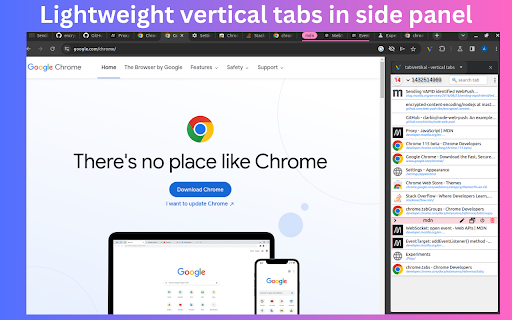
πŸ“’ Lightweight vertical tabs in side panel with tabGroups,auto tab grouping. πŸ“Œ Why you should consider this: βœͺ Switch workspaces βœͺ Tab suspender βœͺ Auto tab suspension βœͺ Native chrome tabgroups support βœͺ Auto tab grouping based on your custom rules not just domain βœͺ Import / export tab in html,json,markdown,csv format βœͺ Set window's title and edit tab's title. βœͺ Remove duplicate & sort tabs βœͺ Dark mode and dozens of themes. βœͺ Multi windows βœͺ Fuzzy search βœͺ Lightweight 52KB βœͺ Pure & clean code that powers fastest performance. βœͺ Negligible memory consumption ~2MB (consume 400% less memory than new tab). βœͺ No third-party library used. βœͺ No tracking & no Ads. πŸ“Œ == FEATURES == 🎯 Manage tab vertically: Remove duplicates,sort tabs and suspend tabs βœ… Switch workspace in one click switch workspaces according to your workflow. Unlimited number of workspaces. opened tabs are saved in current workspace and selected workspace's tabs will open. βœ… Auto tab grouping based on your custom rules not just domain Create custom rule to auto group tabs. Match: 1. Tab titles 2. Top domain (e.g match "google.com" in chromewebstore.google.com) 3. Domain (e.g match "chromewebstore.google.com" in chromewebstore.google.com) 4. First path segment (e.g match "detail" in https://chromewebstore.google.com/detail/) 5. Two path segment (e.g match "en-US/docs" in https://developer.mozilla.org/en-US/docs/Web/API/HTMLInputElement) keyboars shortcuts: Ctrl+Alt+R βœ… Auto tab suspension Auto suspend tab when not using more than x minutes Enable tab suspension on extension's options page βœ… window's title Give name to your window to organize your workflow. Emoji picker provided. βœ… Import⬇️ and export⬆️ tabs Import / export tab in html,json,markdown,csv format πŸ”„ Sort and filter tabs Drag and drop tabs with ease, effortlessly rearranging them to match your workflow and priorities. 🌘 Dark Mode: Dark Mode intelligently aligns with your system theme, ensuring a comfortable browsing experience without any manual adjustments. Two Ways to Open the Extension Sidebar: 1. Click the Extension icon. You need to "Pin" the extension to the browser toolbar. 2. Use shortcut keys. Please set it at "chrome://extensions/shortcuts" by yourself, the default is Alt+V . Set the position of the sidebar: left or right: Browser Settings β†’ Appearance β†’ Side panel ℹ️ Support Join tabVertikal on google groups: https://groups.google.com/g/tabvertikal You can mail us: <tabrailhelp@gmail.com> Note: Recommended chrome version 127+ πŸš€Version 0.2.2 β‡’ zommbie scrollbar removed β‡’ ADDED: Auto group all ungroup tabs feature added in more menu β‡’ ADDED: ungroup all tabs right click popup menu (on extension's action) added β‡’πŸ›FIXED: auto tab group stop working after some time fixed β‡’πŸ› FIXED: workspace bugs fixed
tabVertikal - vertical tabs screenshot 1tabVertikal - vertical tabs screenshot 2tabVertikal - vertical tabs screenshot 3tabVertikal - vertical tabs screenshot 4tabVertikal - vertical tabs screenshot 5

Reviews (4 cached)

β˜…β˜†β˜†β˜†β˜†2025-10-06
Ashish Alexander

not easy UI sometimes buggs out

β˜…β˜…β˜†β˜†β˜†2024-05-07
Luca Benazzi

I am going to remove this extension. The UI is tacky, with lots of unnecessary colours. Don't like how pinned tabs are managed. The main problem, though, is that the currently open tab is almost impossible to distinguish. Lots of customisation options but the selected tab looks always the same, it only has a 1 px wide border around it. Your kidding me?! And the last tab in the list is cut out, when the list becomes scrollable (high number of tabs). These two issues alone make it impossible to use. The thing I like the most is the window management: it sits on the right–hand side as part fo the main window, allows for searching, grouping, and makes it possible to multi–select (although the check box is a bit too tiny). I wish I could choose whether to show or not the url, I would probably go for a more compact view with just favicon and page title, if I could. Thanks for your efforts!

β˜…β˜…β˜…β˜†β˜†2025-03-06
Dmitry Komarov

Can't collapse tab group by just clicking on it's header. Need to click small collapse icon on the left.

β˜…β˜…β˜…β˜†β˜†2023-06-10
AndrΓ© Dock

As of now, it is one of the few vertical tabs for Chrome that actually work, however with a few bugs. Hiding a tab group will hide all next tabs, not just from the group. Shifting tabs might make some of them disappear. UI needs some tidyness. Also, couldn't figure out how to place it on the left side. But it works alright.

Permissions (5)

Permissions

contextMenusβ„Ή Can add items to the right-click menu sidePanel storageβ„Ή Can store data locally in your browser tabGroupsβ„Ή Can organize tabs into groups tabsβ„Ή Can see your open tabs and their URLs

Details

Version 0.2.23
Updated Aug 12, 2024
Size 157KiB
First Seen Mar 30, 2026

More by Brahmastra

Popular in workflow

Popular Extensions