
Email signature generator
v0.0.3 Updated Feb 20, 2024 2.03MiB
⚠️Not updated in over 2 years
Description
🚀 How to make a custom email signature:
1️⃣ Open the email signature generator extension;
2️⃣ Fill in your personal information that you want to include in your footer, such as name and contact info;
3️⃣ Select visual style of your custom email footer;
4️⃣ Copy the generated HTML and paste it into your mail client — we have detailed instructions for all popular clients.
Our Email Signature Generator is the perfect tool for creating personalized and professional email footer that speak volumes about your identity and leave a lasting impression with every mail you send. With a user-friendly interface and a range of customizable features, elevating your mail communication has never been easier.
🎯 How to generate your email signature in a few simple steps:
➤ Access the Generator: open the extension using the pinned button or the extensions menu in the top right corner to launch the Email Signature Generator tool.
➤ Personalize your details: input your name, job title, contact information, and any other details you want to include in your signature.
➤ Design customization: choose from a variety of templates and customize the design to match your personal or business branding.
➤ Add social media links: enhance your email signature by incorporating links to your social media profiles, allowing recipients to connect with you seamlessly.
➤ Preview the result: before finalizing, take advantage of the preview feature to ensure your footer looks just the way you want it.
➤ Install: once satisfied, click the Copy button and follow the instructions to install your new signature in your preferred mail client.
✨ Key features that set our Outlook, Gmail and hubspot signature maker apart from other tools:
❇️ A lot of personalization options
You can enter your name, job title or education degree, contact information, social media links and any additional data that’s important for you. Thus, you can create email signature for college students or for a professional field and make sure you have all the important info in place.
❇️ Professional look and feel, sleek and modern design
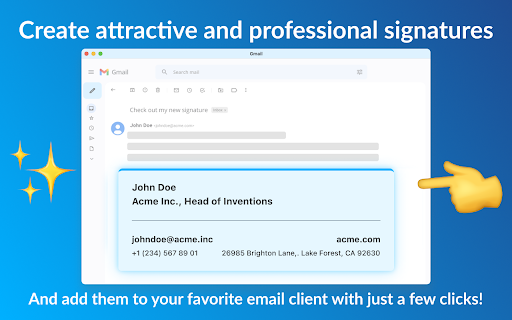
Choose from several professionally crafted email signature template to build a footer that reflects your individuality and professionalism. Your mails will truly exude professionalism and catch the recipient's eye.
❇️ Instant preview
Preview your sign to ensure it aligns with your expectations. Make any necessary adjustments until you achieve the perfect balance of style and professionalism of your hubspot email signature.
❇️ Mobile responsiveness
Our email signatures are optimized for mobile devices, guaranteeing a flawless display on smartphones and tablets for recipients on the go.
❇️ Install to a range of popular mail clients
Once satisfied, copy the generated code of your html email signature template and follow the easy installation instructions for your preferred client – whether it's Hubspot, Outlook, Gmail, or some other one. Now you have a consistent and polished professional image across all platforms.
❇️ HTML Compatibility:
For those who prefer to use plain HTML code, our tool fully supports the creation of HTML email signatures, offering advanced customization options.
❇️ Ease of Use:
With an intuitive interface, our email signature generator is user-friendly, making the process of creating and implementing your sign a breeze.
In today's fast-paced digital world, cool email signatures are the key to leaving a lasting impression. Our online signature generator empowers you to effortlessly create personal email signatures that are eye-catching and tailored to your unique style and professional identity.
❓ Frequently Asked Questions:
❔ Is the gmail signature generator free to use?
✔️ Yes, our tool is completely free to use, providing you with the means to create professional and good looking mail footers without any cost.
❔ Can I update my footer later?
✔️ Absolutely! You can open our email signature maker at any time to make updates and modifications to your cool custom email signature.
❔ Can I create an email signature for multiple mail accounts?
✔️ Yes, because it doesn’t matter how many accounts you have. You can just create an unlimited number of signs and paste them into various mail accounts as easy as a pie.
📧 For any questions or suggestions, please feel free to contact us at email.signature.gen@gmail.com. Enhance your mail communication today with our email signature generator – where professionalism meets simplicity!
Reviews (1 cached)
★★★☆☆2024-10-01
Rob Verhagen
Very basic signature maker, perfect for a personal signature and basic signature template. If you need extra frills like tables, rows and images, it is probably best using another app or writing the HTML 5 code yourself in dreamweaver or other wysiwyg editor you like.
Permissions (1)
Permissions
storageℹ Can store data locally in your browser
Details
| Version | 0.0.3 |
| Updated | Feb 20, 2024 |
| Size | 2.03MiB |
| First Seen | Mar 30, 2026 |
Popular in communication

Grammarly: AI Writing Assistant and Grammar Checker App
by Grammarly
42M
★ 4.50
communication
42M
★ 4.50
communication

Loom – Screen Recorder & Screen Capture
by Loom
8M
★ 4.58
communication
8M
★ 4.58
communication

QuillBot: AI Writing and Grammar Checker Tool
by quillbot
5M
★ 4.69
communication
5M
★ 4.69
communication

DeepL: translate and write with AI
by team-browser-extensions
4M
★ 4.73
communication
4M
★ 4.73
communication

Email Tracker by Mailtrack®
by Mailsuite
3M
★ 4.42
communication
3M
★ 4.42
communication
Popular Extensions

Adobe Acrobat: PDF edit, convert, sign tools
by Adobe Inc.
322M
★ 4.40
workflow
322M
★ 4.40
workflow

AdBlock — block ads across the web
by AdBlock
62M
★ 4.48
workflow
62M
★ 4.48
workflow

迅雷下载支持
by Shenzhen Xunlei Network Technology Co., Ltd.
59M
★ 2.77
workflow
59M
★ 2.77
workflow
Grammarly: AI Writing Assistant and Grammar Checker App
by Grammarly
42M
★ 4.50
communication
42M
★ 4.50
communication

Adblock Plus - free ad blocker
by eyeo GmbH
40M
★ 4.39
workflow
40M
★ 4.39
workflow