
⚠️Not updated in over a year
Description
Enhance your audio experience with Volume Booster by AudioMax, the ultimate Chrome extension for boosting sound, enhancing bass, and managing volume with precision. This powerful tool allows you to amplify the volume of videos, music, and games in any tab by up to 600%, transforming your listening and viewing experience. Whether you're enjoying content on YouTube, Vimeo, Dailymotion, Spotify, or any other platform, our extension ensures that you never miss a beat with its advanced bass booster technology and versatile equalizer settings.
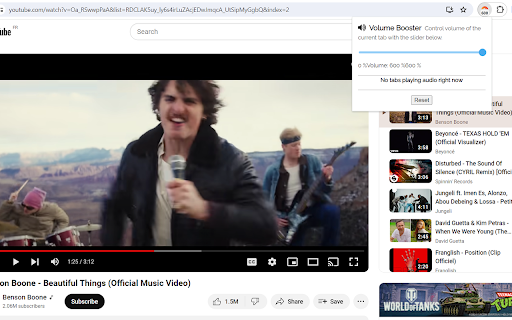
Our user-friendly interface is designed for simplicity and efficiency, allowing you to easily control and customize your audio environment. With Volume Booster, you can fine-tune audio settings to your preference, ensuring brilliant sound quality for your favorite songs and videos. The stylish popup includes an interactive volume switch and a comprehensive list view, making it easier than ever to navigate and adjust audio across multiple tabs without the hassle of switching back and forth.
Getting started with Volume Booster is quick and effortless:
Install the extension and pin it to your toolbar for easy access.
Click on the Volume Booster icon to enable volume boosting with a simple toggle button.
Use the interactive slider to select your desired sound boost range.
Enjoy enhanced sound quality tailored to the genre you're listening to or watching, with our equalizer settings optimized for the Chrome browser.
But that's not all—Volume Booster is also a comprehensive audio management tool that allows you to set individual volume settings for each tab, giving you complete control over your audio landscape. Whether you're looking to increase volume, enhance bass, or achieve the perfect balance with our equalizer, Volume Booster by AudioMax is your go-to solution for a superior audio experience.
We're committed to providing you with the best possible audio enhancement tool. Download Volume Booster by AudioMax now for free, and elevate your audio to new heights. We value your feedback and ratings and are always here to assist with any issues or to help optimize your listening experience.
------------------------------------------
FAQ about Volume Booster
1. What is Volume Booster?
Volume Booster is an innovative app designed to enhance the audio volume of music, videos, and games on your device. It allows users to amplify sound up to 600%, improving the listening experience across various media platforms.
2. How does Volume Booster work?
Volume Booster adjusts the system audio settings to increase the volume beyond the default maximum. It employs advanced algorithms to boost sound while striving to maintain audio quality, minimizing distortion.
3. Is Volume Booster free to use?
Yes, Volume Booster is available as a free download. Some versions or additional features might offer in-app purchases for advanced functionalities.
4. Can Volume Booster enhance bass?
Absolutely! Volume Booster includes a bass boost feature that enhances the depth and richness of bass sounds, providing a more immersive audio experience.
5. How can I install Volume Booster?
Volume Booster can be easily installed from the app store or extension marketplace relevant to your device. Simply search for "Volume Booster," and click on the install button.
6. Is Volume Booster compatible with all devices?
Volume Booster is compatible with a wide range of devices, including smartphones, tablets, and computers. However, compatibility may vary based on the operating system and version. Please check the app requirements before installing.
7. Will using Volume Booster damage my speakers?
When used responsibly, Volume Booster is safe for most devices. However, consistently playing audio at extremely high volumes may put extra strain on your speakers. It is recommended to use the booster judiciously and avoid excessive volumes for prolonged periods.
8. How do I use Volume Booster?
Once installed, open Volume Booster and adjust the slider to increase the volume as desired. For specific features like bass boost or equalizer settings, navigate through the app’s interface to customize your audio experience.
9. Can Volume Booster improve audio quality?
Volume Booster primarily amplifies volume. While it includes features like bass boost and equalizer settings to enhance audio quality, the primary function is to increase volume levels.
10. What should I do if Volume Booster isn’t working as expected?
First, ensure your app is updated to the latest version. Check your device's audio settings and permissions granted to Volume Booster. If issues persist, contact the support team for further assistance.
11. Is it legal to use Volume Booster?
Yes, using Volume Booster is legal. It modifies your device's audio output settings within the scope of user permissions and does not infringe on any copyright laws.
12. How can I provide feedback or report a problem?
Feedback and reports can usually be submitted through the app’s settings menu, where you may find an option to contact the developer or support team. Your input is valuable for improving Volume Booster.
For any further questions or assistance, please reach out to our customer support. We're here to enhance your listening experience!
Reviews
Loading reviews...
Permissions (3)
Permissions
scriptingℹ Can inject scripts into web pages storageℹ Can store data locally in your browser tabsℹ Can see your open tabs and their URLs
Details
| Version | 1.2 |
| Updated | Sep 20, 2024 |
| Size | 146KiB |
| First Seen | Mar 29, 2026 |
More by Codelio


Popular in tools

Browsec VPN - Free VPN for Chrome
by Browsec
8M
★ 4.44
tools
8M
★ 4.44
tools

Zotero Connector
by Zotero
8M
★ 3.96
tools
8M
★ 3.96
tools

AnyDoc Translator - Translate Web and PDF
by www.wps.com
7M
★ 4.58
tools
7M
★ 4.58
tools

WPS PDF - Read, Edit, Fill, Convert, and AI Chat PDF with Ease
by www.wps.com
7M
★ 4.45
tools
7M
★ 4.45
tools

Video DownloadHelper
by Aclap
5M
★ 4.43
tools
5M
★ 4.43
tools
Popular Extensions

Adobe Acrobat: PDF edit, convert, sign tools
by Adobe Inc.
322M
★ 4.40
workflow
322M
★ 4.40
workflow

AdBlock — block ads across the web
by AdBlock
62M
★ 4.48
workflow
62M
★ 4.48
workflow

迅雷下载支持
by Shenzhen Xunlei Network Technology Co., Ltd.
59M
★ 2.77
workflow
59M
★ 2.77
workflow

Grammarly: AI Writing Assistant and Grammar Checker App
by Grammarly
42M
★ 4.50
communication
42M
★ 4.50
communication

Adblock Plus - free ad blocker
by eyeo GmbH
40M
★ 4.39
workflow
40M
★ 4.39
workflow