
⚠️Not updated in over 2 years
Description
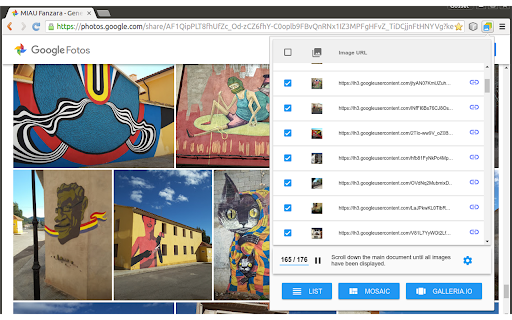
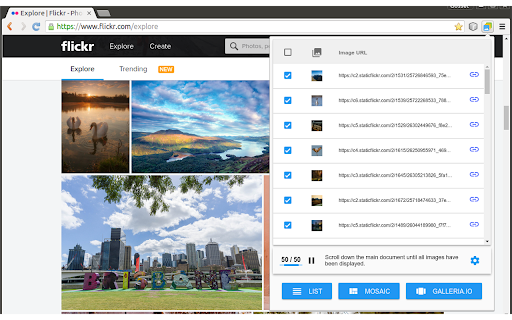
This extension detects the images on the current page and shows them in a list that can be exported in three different formats:
- A simple list of absolute URLs pointing at the images.
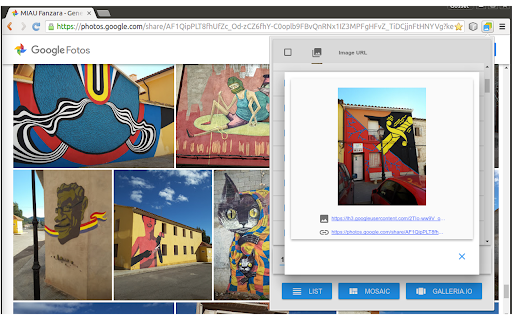
- An HTML snippet with "img" tags forming a mosaic. Images can also export their original links.
- An HTML snippet that creates a carousel of images powered by Galleria.io (http://galleria.io)
In all cases, the data is copied into the clipboard and can be inserted into any text editor by pressing [Ctrl+V]. Mosaic and carousel snippets can be inserted into documents, blog posts, virtual learning environments and any other application based on HTML content. Before pasting the code into a rich-text editor, be sure to set it in "plain text" mode (usually represented by a button with the symbols "<>" or "html").
This is a free software project. You can contribute to improving this browser extension by reporting issues, translating it to a different language or sending pull requests to https://github.com/projectestac/album. Thanks in advance!
Special thanks to the excellent work done by galleria.io (http://galleria.io), the open source engine beneath the image carousel. In addition to the basic free theme used by Album, they provide also with other nice and featured themes at cheap prices.
Note that Album does not copy images nor any type of files: it just deals with URLs pointing at remote resources. Issues with the images (slow loading, file not found...) are often related to problems with the origin of the images.
IMPORTANT NOTE FOR GOOGLE PHOTOS USERS:
Due to changes in the way Google Photos works, the extension is not able to open some images when activated directly within the application.
To solve this you must follow the following steps:
1) Create a Google Photos album, name it, and add photos to it.
2) Create a link to share the album using the "Share" button on the top right.
3) Copy this public link and open it in a new tab or an incognito Chrome window.
4) In this new tab or window, use the extension as normal.

Reviews
Loading reviews...
Permissions (4)
Permissions
activeTabℹ Can access the current tab when you click the extension notificationsℹ Can show desktop notifications scriptingℹ Can inject scripts into web pages storageℹ Can store data locally in your browser
Details
| Version | 2.0.5 |
| Updated | Apr 10, 2024 |
| Size | 70.24KiB |
| First Seen | Mar 31, 2026 |
Popular in tools

Browsec VPN - Free VPN for Chrome
by Browsec
8M
★ 4.44
tools
8M
★ 4.44
tools

Zotero Connector
by Zotero
8M
★ 3.96
tools
8M
★ 3.96
tools

AnyDoc Translator - Translate Web and PDF
by www.wps.com
7M
★ 4.58
tools
7M
★ 4.58
tools

WPS PDF - Read, Edit, Fill, Convert, and AI Chat PDF with Ease
by www.wps.com
7M
★ 4.45
tools
7M
★ 4.45
tools

Video DownloadHelper
by Aclap
5M
★ 4.43
tools
5M
★ 4.43
tools
Popular Extensions

Adobe Acrobat: PDF edit, convert, sign tools
by Adobe Inc.
322M
★ 4.40
workflow
322M
★ 4.40
workflow

AdBlock — block ads across the web
by AdBlock
62M
★ 4.48
workflow
62M
★ 4.48
workflow

迅雷下载支持
by Shenzhen Xunlei Network Technology Co., Ltd.
59M
★ 2.77
workflow
59M
★ 2.77
workflow

Grammarly: AI Writing Assistant and Grammar Checker App
by Grammarly
42M
★ 4.50
communication
42M
★ 4.50
communication

Adblock Plus - free ad blocker
by eyeo GmbH
40M
★ 4.39
workflow
40M
★ 4.39
workflow