
⚠️Not updated in over 2 years ⚠️Very few reviews for its user base
Description
With the increasing prevalence of data breaches, it's more important than ever to use strong, secure passwords to protect our online accounts. However, creating and remembering complex passwords for every account can be difficult. This is where a browser extension like "Generate Strong Password" for Google Chrome comes in.
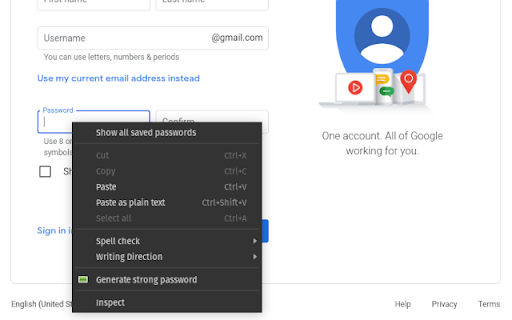
This extension allows users to generate strong, random passwords with a single click from their browser's context menu. When you right-click on a text field where you need to enter a password, you can select "Generate Strong Password" to create a new, random password.
The best feature of this extension is the ability to customize the password by choosing its length and the characters that make it up. You can create passwords ranging from 8 to 32 characters and choose to include numbers, lowercase letters, uppercase letters, and symbols. This ensures that each password is unique and secure.
Another useful feature of the extension is the ability to automatically copy the generated password to the clipboard. This saves the hassle of having to manually select and copy the password, which can sometimes be tedious and error-prone.
In summary, "Generate Strong Password" is a handy and easy-to-use extension for anyone looking to create strong, secure passwords for their online accounts. With the customization of length and characters, as well as the automatic copy function, this extension can help strengthen the security of your personal online data.
Reviews (1 cached)
★★★☆☆2023-08-05
Noah
Hello, this app is good but doesnt work for me ;-;
Permissions (4)
Permissions
contextMenusℹ Can add items to the right-click menu scriptingℹ Can inject scripts into web pages storageℹ Can store data locally in your browser tabsℹ Can see your open tabs and their URLs
Details
| Version | 1.1 |
| Updated | Feb 19, 2023 |
| Size | 10.91KiB |
| First Seen | Mar 30, 2026 |
More by ciriac

Popular in accessibility

360 Internet Protection
by qihoosafe
17M
★ 4.54
accessibility
17M
★ 4.54
accessibility

Screenshot reader™
by Texthelp
7M
★ 2.57
accessibility
7M
★ 2.57
accessibility

Volume Master
by Peta Sittek
6M
★ 4.81
accessibility
6M
★ 4.81
accessibility

Dark Reader
by Alexander Shutau
6M
★ 4.67
accessibility
6M
★ 4.67
accessibility

네이버 동영상 플러그인
by NAVER Corp.
5M
★ 1.42
accessibility
5M
★ 1.42
accessibility
Popular Extensions

Adobe Acrobat: PDF edit, convert, sign tools
by Adobe Inc.
322M
★ 4.40
workflow
322M
★ 4.40
workflow

AdBlock — block ads across the web
by AdBlock
62M
★ 4.48
workflow
62M
★ 4.48
workflow

迅雷下载支持
by Shenzhen Xunlei Network Technology Co., Ltd.
59M
★ 2.77
workflow
59M
★ 2.77
workflow

Grammarly: AI Writing Assistant and Grammar Checker App
by Grammarly
42M
★ 4.50
communication
42M
★ 4.50
communication

Adblock Plus - free ad blocker
by eyeo GmbH
40M
★ 4.39
workflow
40M
★ 4.39
workflow