
Eye-Able Assist - Accessibility Assistant
v1.17.17 Updated Feb 8, 2026 4.82MiB
Description
★ 𝗪𝗵𝘆 𝗶𝘀 𝘁𝗵𝗶𝘀 𝗲𝘅𝘁𝗲𝗻𝘀𝗶𝗼𝗻 𝘂𝘀𝗲𝗳𝘂𝗹 𝗳𝗼𝗿 𝘆𝗼𝘂?
Eye-Able Assist is a Chrome extension whose large variety of features allows you to customize any website according to your needs with one click. We want you to see every website exactly the way you need to.
All people should have easy and barrier-free access to information on the internet.
If you want to learn more about other Eye-Able solutions like accessibility auditing solutions, plain language or translation check out our website at eye-able.com
★ 𝗛𝗼𝘄 𝗱𝗼 𝘆𝗼𝘂 𝗼𝘃𝗲𝗿𝗰𝗼𝗺𝗲 𝗯𝗮𝗿𝗿𝗶𝗲𝗿𝘀 𝗺𝗼𝗿𝗲 𝗲𝗮𝘀𝗶𝗹𝘆 𝘄𝗶𝘁𝗵 𝗘𝘆𝗲-𝗔𝗯𝗹𝗲 Assist?
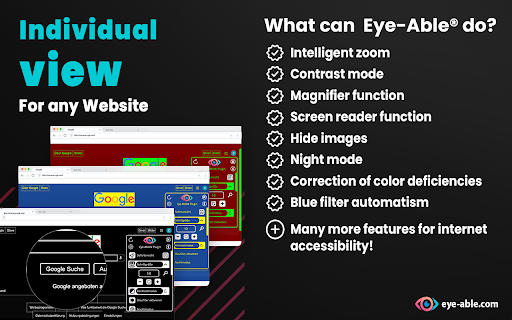
We make websites visible, readable and therefore accessible. With Eye-Able® you can configure every website according to your very own needs. Visual impairments, including color deficiencies and other visual limitations can be compensated for by customizing the content elements as desired. For this purpose we have developed a contrast mode, intelligent font enlargement, a screen reader and several other features.
★ 𝗜𝗺𝗽𝗼𝗿𝘁𝗮𝗻𝘁 𝗰𝗼𝗿𝗲 𝗳𝗲𝗮𝘁𝘂𝗿𝗲𝘀:
✓ Font enlargement
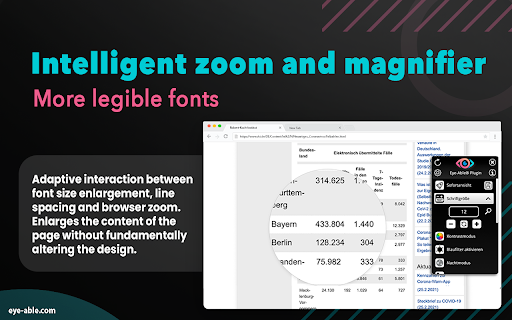
Unlike the normal browser zoom, the intelligent Eye-Able® zoom offers you the possibility to enjoy a website in the same design, only with a larger font. To put it simply: Our zoom recognizes which content should be enlarged, and how much. The original page layout remains the same, but you can read the content with ease.
✓ Contrast mode
In our numerous interviews with users with visual disabilities, we learned which contrast combinations allow the most accessible view. We provide these modes to our users as options for background and font color. You can configure both the foreground and the background of every website just as you need it.
✓ Intuitive screen reader (audio output)
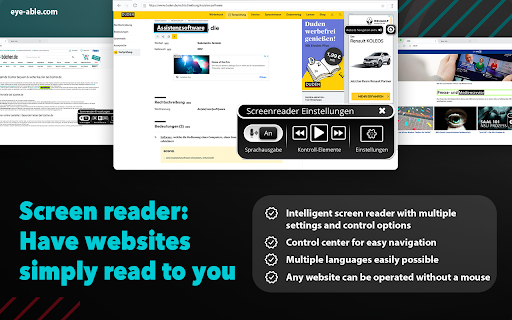
With our intuitive “read-aloud” function you can simply have the text content read to you. You are able to choose which content shall be read, or you can just listen to the whole page at once.
✓ Navigation via keyboard
In combination with our friendly audio output you can browse the internet without using a mouse or a screen. You can decide yourself which content you want to navigate via your keyboard.
★ 𝗠𝗼𝗿𝗲 𝗳𝗲𝗮𝘁𝘂𝗿𝗲𝘀 𝗮𝘁 𝗮 𝗴𝗹𝗮𝗻𝗰𝗲:
✓ Color deficiency compensation (red/green/blue deficiencies, as well as other contrast and color gradation modes)
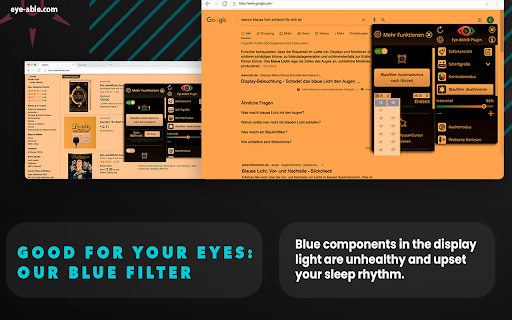
✓ Intelligent blue filter according to position of the sun and time of the day
✓ Magnifier
✓ Hiding all images and animations
✓ Night mode
✓ Enlarged mouse pointer
✓ Accessible fonts for every website
In total, you have over 22 features available to make the internet more accessible for you.
For an extensive test of our tool, we provide our pro version free of charge for a limited period of time. You can use the full version 30 days after your installation.
★ 𝗙𝗲𝗮𝘁𝘂𝗿𝗲𝘀 𝗶𝗻 𝘁𝗵𝗲 𝗳𝗿𝗲𝗲 𝘃𝗲𝗿𝘀𝗶𝗼𝗻:
✓ Tab navigation
✓ Font enlargement
✓ Night mode
✓ Blue filter
★ 𝗪𝗵𝗼 𝗯𝗲𝗻𝗲𝗳𝗶𝘁𝘀 𝗳𝗿𝗼𝗺 𝗘𝘆𝗲-𝗔𝗯𝗹𝗲®?
Accessibility is beneficial to many, for example:
✓ Those with visual impairments
✓ Those with learning disabilities
✓ The elderly
✓ Those who surf online a lot
★ 𝗪𝗵𝘆 𝗶𝘀 𝗶𝗻𝘁𝗲𝗿𝗻𝗲𝘁 𝗮𝗰𝗰𝗲𝘀𝘀𝗶𝗯𝗶𝗹𝗶𝘁𝘆 𝘀𝗼 𝗶𝗺𝗽𝗼𝗿𝘁𝗮𝗻𝘁?
It is our vision to reduce the barriers on the internet significantly. This is exactly why we have developed our tool. In future, its range of features will continue to grow steadily, and of course your license includes all further updates!
𝗙𝗶𝗻𝗱 𝗺𝗼𝗿𝗲 𝗶𝗻𝗳𝗼𝗿𝗺𝗮𝘁𝗶𝗼𝗻, 𝗻𝘂𝗺𝗲𝗿𝗼𝘂𝘀 𝘃𝗶𝗱𝗲𝗼𝘀 𝗮𝗻𝗱 𝗮 𝗱𝗲𝗺𝗼𝗻𝘀𝘁𝗿𝗮𝘁𝗶𝗼𝗻 𝗼𝗳 𝘁𝗵𝗲 𝘁𝗼𝗼𝗹 𝗮𝘁:
eye-able.com
Stop by and give it a try!
𝗦𝘂𝗽𝗽𝗼𝗿𝘁:
If you have any questions, we are happy to help – just drop us a line at info@eye-able.com

Reviews (4 cached)
★☆☆☆☆2024-06-09
Mohamed Anan
you need to be 200IQ to turn it on after it suddenly disappeared!
★☆☆☆☆2022-02-02
Alina Simionescu
Stupidity. You can NOT find infos in english. Only url domain is in english. UNINSTALL
★★☆☆☆2024-05-23
Google User
Overly complex. Not simple or straightforward to disable especially saturation mode which seems to be the most practical function for those who need a darker font or high contrast enhancer.
★★★☆☆2025-05-02
Steve Davis
I'm visually impaired and thought something like this would have obvious controls or settings, but I can't find anything on how to use this extension. The web store refuses to go into dark mode, so I could be missing something.
Permissions (1)
Permissions
storageℹ Can store data locally in your browser
Details
| Version | 1.17.17 |
| Updated | Feb 8, 2026 |
| Size | 4.82MiB |
| First Seen | Mar 26, 2026 |
Popular in accessibility

360 Internet Protection
by qihoosafe
17M
★ 4.54
accessibility
17M
★ 4.54
accessibility

Screenshot reader™
by Texthelp
7M
★ 2.57
accessibility
7M
★ 2.57
accessibility

Volume Master
by Peta Sittek
6M
★ 4.81
accessibility
6M
★ 4.81
accessibility

Dark Reader
by Alexander Shutau
6M
★ 4.67
accessibility
6M
★ 4.67
accessibility

네이버 동영상 플러그인
by NAVER Corp.
5M
★ 1.42
accessibility
5M
★ 1.42
accessibility
Popular Extensions

Adobe Acrobat: PDF edit, convert, sign tools
by Adobe Inc.
322M
★ 4.40
workflow
322M
★ 4.40
workflow

AdBlock — block ads across the web
by AdBlock
62M
★ 4.48
workflow
62M
★ 4.48
workflow

迅雷下载支持
by Shenzhen Xunlei Network Technology Co., Ltd.
59M
★ 2.77
workflow
59M
★ 2.77
workflow

Grammarly: AI Writing Assistant and Grammar Checker App
by Grammarly
42M
★ 4.50
communication
42M
★ 4.50
communication

Adblock Plus - free ad blocker
by eyeo GmbH
40M
★ 4.39
workflow
40M
★ 4.39
workflow