
Simple Invoicing icon

Simple Invoicing

by Simple Business

v1 Updated Oct 30, 2016 6.18KiB
CWS
5K
Users
★ 3.56
75 reviews
#10755
of 207.6K
Other
Category
⚠️Not updated in over 2 years

Description

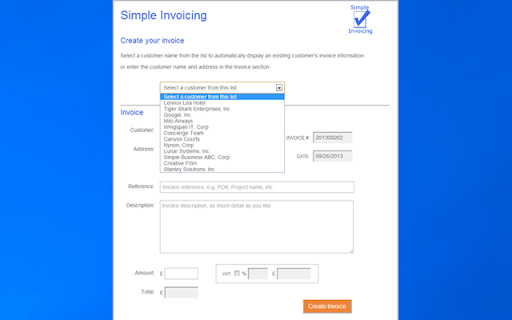
NEW! Simple Invoicing Android app -- get it on Google Play -- https://goo.gl/fziALH -- Professional, FREE and a Google competition semi finalist. Automatically generates your invoices, emails a PDF version of the invoice to you, so you can review and forward to your customer. Simple Invoicing stores your invoices in your Google Drive (you will always have your invoices - other invoicing apps keep your invoices in the vendor's environment). Choose from TAX or VAT tax labels on your invoices. Simple Invoicing is a Google Apps Developer Challenge 2012 competition semi finalist for Small Business Solutions! Visit our website for more information www.simpleinvoicingapp.com Additional features include creating invoices from a list of previously invoiced customers, you can optionally auto-fill customer invoice information (a real time-saver), auto calculates tax and totals and generates invoice numbers. An invoice log spreadsheet is also created in your Google Drive that is automatically updated with all the invoices you have created, enabling you to track who you invoiced and when. User Guide: when you run Simple Invoicing, you are presented with the Invoice Template setup, just one form to enter and maintain your information, such as your company name and address, customizable invoice information lines and a footer for your invoices (good for general invoice information, such as your contact information and payment terms). You can setup your invoices for $, €, or £. Choose your tax label: TAX or VAT. When you have updated the invoice template you are presented with the Invoice form where you enter the invoice information, including the customer, the service or product and cost. Optionally, you can select to add tax, specify the tax percentage and the app will automatically calculate the tax and total amount. Simple Invoicing also presents a list of previously invoiced customers to select from; this saves time entering customer names and addresses, and you can optionally auto-fill invoice information from the customer’s previous invoice, great for recurring or similar invoices. You can also update the invoice template information right in the Invoice form. When you’re ready, click the ‘Create Invoice’ button and Simple Invoicing does the rest. You will then be prompted if you’d like to create another invoice, click the ‘New Invoice’ button to continue creating invoices. When you've finished, you will find the invoice(s) you have created in your Gmail Inbox; you can review and forward the invoice(s) to your customers and get paid much quicker! As you create more invoices, you will find the invoice log spreadsheet valuable; it’s in your Google Drive and contains the data on all the invoices you've created in Simple Invoicing.
Simple Invoicing screenshot 1Simple Invoicing screenshot 2Simple Invoicing screenshot 3Simple Invoicing screenshot 4Simple Invoicing screenshot 5

Reviews (11 cached)

★☆☆☆☆2018-04-23
Mark Willis

Terrible! They want to send emails from MY email address as me?! No way! Avoid this like the plague. Also limited to one item only.

★☆☆☆☆2017-06-09
Meghan Motloch

I was ready to try this app out as I'm needing to type up an invoice but I got to the agreement portion. It asks for you to approve for THEM to send emails from YOUR EMAIL as you! Screw that! Always read the fine print!!

★☆☆☆☆2016-09-23
Bobby Danley

wouldn't get past 1st screen. Read "Can't go at this time.....try again later"

★☆☆☆☆2016-05-28
Langit Amaravati

Well, it's easy and free. But I can't change the currency into another except that three currency. It's better if chrome provide another currency so people around the world can use it.

★☆☆☆☆2014-10-01
Pete h

Unable to enter amount paid. E-mail you the invoice and doesn't generate on the screen.

★☆☆☆☆2014-04-14
Beal Enteprises

A little too simple for what we need. Thanks though. What I really need is something that memorized part number, description, price. So we can enter with a click. But this would be good for a professional on the go who simple bills for time rendered.

★☆☆☆☆2013-12-21
Bob Ravet

not being able to change the invoice date was a deal breaker..maybe it could done..it just was not obvious.

★☆☆☆☆2013-09-30
David Howes

Far too simplistic. Fine for a very simple business model where you are happy to type in every single piece of information other than business name/address for each invoice. No ability to set your own invoice numbering system. You have to add a TAX/VAT line whether you need it or not. No ability to predefine items or prices and select from list. Cannot issue invoices in multiple currencies. Frankly I wouldn't pay £1.99 as a one-off charge, let alone a monthly charge!

★★☆☆☆2016-02-08
Guy AJ Capra

Impossible to take a look at the developper website because the system loads an app needing authorizations, so what if we do want to know who you are and why do you want these authorizations before installing anything ? Please show us you website, who you are, how you work, then maybe we will be able to take a look to know if yes or no we can/want/need use your app. Without this, this "Simple Invoicing" system seems to be a very good idea.

★★☆☆☆2014-07-19
Anthony

Only one Line item? Can't edit previous invoices. Serves better as a template than anything.

★★★☆☆2017-04-09
Jeffrey Tan

A good simple invoice app. exactly what like the name of this app. just a few suggestions 1. please add Peso or PHP in the currency. 2. is it possible to implement multiple product per invoice, because right now it is 1:1. thank you. hoping for your supprt.

Details

Version 1
Updated Oct 30, 2016
Size 6.18KiB
First Seen Mar 30, 2026
