
Description
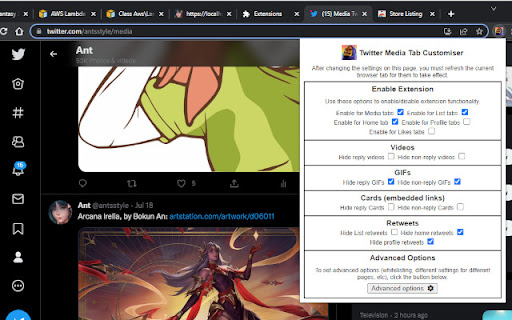
An extension made for customising the Twitter tabs and content panes to your liking. It can also hide metrics from all tweets.
This extension allows you to hide certain types of tweets from most tabs:
- Reply tweets
- Retweets
- GIFs
- Videos
- Cards (embedded links)
Works for the home timeline, Media tabs, Likes tabs, Profile tabs and lists. You can also whitelist users or lists you don't want the extension to hide anything for.
In addition, you can use the Misc configuration options to hide the "Trending Topics" and "Who to Follow" panes that appear on the right of the Twitter webpage, and to hide the Explore link on the left navigation menu.
Note that the extension will only hide these tweets for you, not for other people viewing your Twitter profile (unless they have installed the extension as well). If you want e.g. something that hides all GIFs from your media tab for all Twitter users, the extension is not able to do that; it can only hide tweets for you in your browser.
Version 1.9 changelog:
- Added the option to hide the "Edit image" buttons on top of tweet images. It only hides them for you, not other users.
Version 1.8 changelog:
- Modified the main scripts to run on both twitter.com and x.com, as twitter.com links are being forcibly redirected to x.com recently, breaking script functionality.
Version 1.7 changelog:
- Added option to hide the Grok tab in the Advanced Options -> Misc area.
- Fixed a bug where the saved settings for removing sensitive timeline overlays was not properly reflected in the options checkbox.
Version 1.6 changelog:
- Added an option to remove all sensitive content overlays, in the Advanced Options -> Misc area.
Version 1.5 changelog:
- Metrics can now be hidden from all tweets. The options for this can be found under Advanced Options -> Metrics.
Version 1.4 changelog:
- Added options to hide the "Who to Follow" pane from the right of the Twitter page, and the Explore link in the left navigation menu. These options can be found under Advanced Options -> Misc.
Version 1.3 changelog:
- Added the option to hide the "What's happening" / "Trending topics" pane from the top right of the Twitter page. This option can be found under Advanced Options -> Misc. Additional options will come in future updates.
Reviews
Loading reviews...
Permissions (1)
Permissions
storageℹ Can store data locally in your browser
Details
| Version | 1.9 |
| Updated | Dec 27, 2025 |
| Size | 270KiB |
| First Seen | Mar 30, 2026 |
Popular in tools

Zotero Connector
by Zotero
8M
★ 3.96
tools
8M
★ 3.96
tools

Browsec VPN - Free VPN for Chrome
by Browsec
7M
★ 4.44
tools
7M
★ 4.44
tools

AnyDoc Translator - Translate Web and PDF
by www.wps.com
7M
★ 4.58
tools
7M
★ 4.58
tools

WPS PDF - Read, Edit, Fill, Convert, and AI Chat PDF with Ease
by www.wps.com
7M
★ 4.45
tools
7M
★ 4.45
tools

Video DownloadHelper
by Aclap
5M
★ 4.43
tools
5M
★ 4.43
tools
Popular Extensions

Adobe Acrobat: PDF edit, convert, sign tools
by Adobe Inc.
331M
★ 4.40
workflow
331M
★ 4.40
workflow

AdBlock — block ads across the web
by AdBlock
63M
★ 4.48
workflow
63M
★ 4.48
workflow

迅雷下载支持
by Shenzhen Xunlei Network Technology Co., Ltd.
59M
★ 2.77
workflow
59M
★ 2.77
workflow

Grammarly: AI Writing Assistant and Grammar Checker App
by Grammarly
42M
★ 4.50
communication
42M
★ 4.50
communication

Adblock Plus - free ad blocker
by eyeo GmbH
41M
★ 4.39
workflow
41M
★ 4.39
workflow