
⚠️Not updated in over a year
Description
Are you tired of the repetitive task of copying and pasting multiple (up to 50) YouTube video URLs into NotebookLM? Say hello to NotebookLM YouTube Turbo—the Chrome extension designed to save you time and simplify your workflow. Whether you're a content creator, researcher, or productivity enthusiast, this tool makes managing YouTube videos in NotebookLM easier than ever.
What Does NotebookLM YouTube Turbo Do?
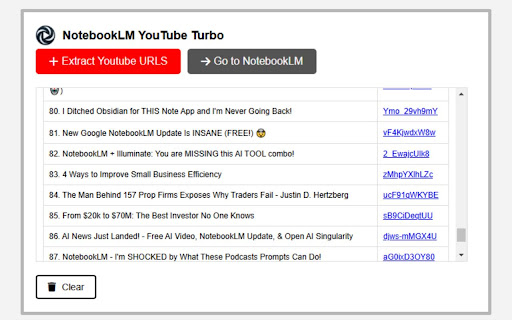
NotebookLM YouTube Turbo streamlines the process of collecting and importing YouTube videos into NotebookLM. With just a few clicks, you can:
-Collect YouTube URLs: Gather multiple video links from playlists, your own videos, or search results with ease.
-Avoid Manual Effort: No more endless tab-switching or tedious copy-pasting.
-Paste Directly into NotebookLM: Quickly add your collected URLs into your NotebookLM project, saving valuable time.
Why Should You Install NotebookLM YouTube Turbo?
-Save Time: Spend less time on repetitive tasks and more time focusing on creating and curating amazing content.
-Boost Productivity: This extension takes the hassle out of importing videos, so you can organize your sources effortlessly.
-Perfect for Content Creators and Researchers: Whether you're preparing a video series, writing research notes, or exploring new topics, this extension will supercharge your workflow.
-Simple and Intuitive: Easy-to-use interface with no steep learning curve—install it and get started right away.
Who Is It For?
NotebookLM YouTube Turbo is ideal for:
-Content Creators: Quickly curate videos for your next podcast, vlog, or social media content.
-Educators and Learners: Build collections of instructional videos to support your learning or teaching.
-Researchers: Organize video resources for your next project without the headache of manual URL management.
How to Use It
1.Install the extension from the Chrome Web Store.
2.Navigate to any YouTube playlist, video search results, or your video library.
3.Use the extension to collect video URLs with a single click.
4.Open NotebookLM and paste the collected URLs directly into your notebook.
5.Enjoy a seamless, time-saving workflow!
Simplify your YouTube-to-NotebookLM process with NotebookLM YouTube Turbo and focus on what truly matters—creating, learning, and sharing valuable insights.

Reviews (3 cached)
★☆☆☆☆2026-02-23
Herbert Boll
does not work
★★★☆☆2025-07-24
Hosein GSD
This needs less effort: https://chromewebstore.google.com/detail/websync-full-site-importe/hjoonjdnhagnpfgifhjolheimamcafok it automatically adds URLs. No need to click one by one!
★★★☆☆2025-05-14
Mukkesh Ganesh
I created a much more customized version: https://chromewebstore.google.com/detail/notebooklm-youtube-link-s/idkdddfdfhlgjleoieidjhmgmopacdli?authuser=0&hl=en / " NotebookLM - Youtube Link (Source) Automator " ^ Please use this instead, it has a lot more automation features and is maintained. Original review: For what it's doing, it's great. Would like more customization options moving forward (remove videos from the list of collected videos, automatic source adding, etc.). 3.5/5 tbh. With the customizations unlocked, this would be an easy 5.
Permissions (3)
Permissions
activeTabℹ Can access the current tab when you click the extension scriptingℹ Can inject scripts into web pages storageℹ Can store data locally in your browser
Details
| Version | 0.0.0.1 |
| Updated | Jan 15, 2025 |
| Size | 75.41KiB |
| First Seen | Mar 28, 2026 |
Popular in tools

Zotero Connector
by Zotero
8M
★ 3.96
tools
8M
★ 3.96
tools

Browsec VPN - Free VPN for Chrome
by Browsec
7M
★ 4.44
tools
7M
★ 4.44
tools

AnyDoc Translator - Translate Web and PDF
by www.wps.com
7M
★ 4.58
tools
7M
★ 4.58
tools

WPS PDF - Read, Edit, Fill, Convert, and AI Chat PDF with Ease
by www.wps.com
7M
★ 4.45
tools
7M
★ 4.45
tools

Video DownloadHelper
by Aclap
5M
★ 4.43
tools
5M
★ 4.43
tools
Popular Extensions

Adobe Acrobat: PDF edit, convert, sign tools
by Adobe Inc.
331M
★ 4.40
workflow
331M
★ 4.40
workflow

AdBlock — block ads across the web
by AdBlock
63M
★ 4.48
workflow
63M
★ 4.48
workflow

迅雷下载支持
by Shenzhen Xunlei Network Technology Co., Ltd.
59M
★ 2.77
workflow
59M
★ 2.77
workflow

Grammarly: AI Writing Assistant and Grammar Checker App
by Grammarly
42M
★ 4.50
communication
42M
★ 4.50
communication

Adblock Plus - free ad blocker
by eyeo GmbH
41M
★ 4.39
workflow
41M
★ 4.39
workflow