
Overload Search - Advanced Google Search
v2.1.0 Updated Jan 16, 2026 104KiB
Description
🔍 Fast Advanced Google Search. Find the results you need fast
Find what you're looking for on Google quickly by filtering search results with advanced Google search operators.
Quickly access and query using the many advanced google search operators with this Google search tool. No need for cheat sheets!
⭐ Site search - Search by the current site or domain
⭐ Query by file type
⭐ Query by Date range
⭐ Query by country & language
⭐ Exclude/filter out keywords
⭐ Shortcut Alt + G to open the search tool
⭐ Perform complex Google search query quickly
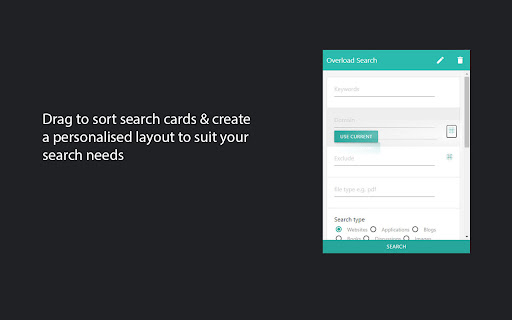
⭐ Drag to Order search parameters to best suit your use case
⭐ Enable & Disable cards to show only the relevant search parameters
⭐ Open a new tab or use the current tab option
⭐ OSINT open source intelligence investigations tool
⭐ Custom search experience
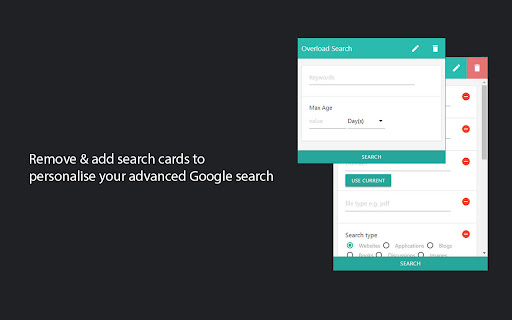
⭐ Remove query parameters you don't need quickly by pressing the bin icon and removing multiple search cards, so you can focus on the filters that matter most to you.
Supported query operators/parameters
▸ Exclude - multiple exclude using space separator
▸ Site search - search current site or search domain - includes use current domain button that will populate the field for you
▸ File type - filter by any file type e.g. pdf, docx, txt, xls, ppt etc
▸ Search type - websites, images, video etc
▸ Keywords within - Any, Page title, Body and Url
▸ Date Range - Before/After
▸ Date Range quick (Max Age of result)
▸ View google's cache of a website
▸ Turn off Google personalised search results
▸ Sites that contain link specified
▸ Related site search
▸ Turn off safe search
▸ Country support - see search results based on country
▸ Search by Language
Customize your Advanced Google search experience and gain higher quality search results.
Perform SEO research techniques quickly using this Google advanced search tool with the available operators/query parameters.
⭐ Find when google last indexed a website with the cache parameter
⭐ Discover hidden opportunities for internal linking by searching for phrases in your domain or website.
⭐ Conduct competitor SEO research, just use the "related sites" search operator followed by a website URL.
Permissions: The tabs permission is necessary for the populate domain and page buttons.
Get in touch! Have an idea or feature request? Contact us, feedback is always welcome!
Twitter: @PartialOverload
🚀 Release Notes
2.0.8
▸performance improvements
2.0.7
▸align radio/ok buttons
1.9.4
▸update style framework
1.9.1
▸Shortcut fix
1.9.0
▸Chrome v3 manifest support
1.8.0
▸ Search the current website quickly with the autofill domain option
1.6.0
▸ Clear query on close option added
▸ The search form will now open with the previous values by default. This can be disabled with the clear on close option
1.5.3
▸ Search by Language. Autocomplete with filter enabled
▸ Start typing in the new language input to quickly select a language from a list of supported languages in Google search
1.4.1
▸ Reduced permissions, previously the tabs permission was needed for domain/url retrieval
1.0
▸ Country support - filter search results based on country!
▸ keep search tool open & use current tab for query option
▸ Tweak your search parameters after submitting!
0.4
▸ Turn off safe search
▸ Related site search
▸ Sites that contain link specified
0.3:
▸ Turn off Google personalised search results


Reviews (2 cached)
★☆☆☆☆2023-07-24
Lorenzo P
"Turn off Safe Search" does not work and this was the only thing I wanted (chrome v115.0.5790.102)
★★★☆☆2025-10-23
Anthony Murawski
I'd be happy to change my review if I am mistaken, but I don't see any functions in the extension that are not already available on Google's advanced search page, which is https://www.google.com/advanced_search?hl=en
Permissions (1)
Permissions
activeTabℹ Can access the current tab when you click the extension
Details
| Version | 2.1.0 |
| Updated | Jan 16, 2026 |
| Size | 104KiB |
| First Seen | Mar 30, 2026 |
Popular in tools

Zotero Connector
by Zotero
8M
★ 3.96
tools
8M
★ 3.96
tools

Browsec VPN - Free VPN for Chrome
by Browsec
7M
★ 4.44
tools
7M
★ 4.44
tools

AnyDoc Translator - Translate Web and PDF
by www.wps.com
7M
★ 4.58
tools
7M
★ 4.58
tools

WPS PDF - Read, Edit, Fill, Convert, and AI Chat PDF with Ease
by www.wps.com
7M
★ 4.45
tools
7M
★ 4.45
tools

Video DownloadHelper
by Aclap
5M
★ 4.43
tools
5M
★ 4.43
tools
Popular Extensions

Adobe Acrobat: PDF edit, convert, sign tools
by Adobe Inc.
331M
★ 4.40
workflow
331M
★ 4.40
workflow

AdBlock — block ads across the web
by AdBlock
62M
★ 4.48
workflow
62M
★ 4.48
workflow

迅雷下载支持
by Shenzhen Xunlei Network Technology Co., Ltd.
59M
★ 2.77
workflow
59M
★ 2.77
workflow

Grammarly: AI Writing Assistant and Grammar Checker App
by Grammarly
42M
★ 4.50
communication
42M
★ 4.50
communication

Adblock Plus - free ad blocker
by eyeo GmbH
41M
★ 4.39
workflow
41M
★ 4.39
workflow