
⚠️Requests 1 sensitive permission ✅Recently updated
Description
✅ Create a self-guided, interactive click through demo of your SaaS app.
✅ We capture a pixel-perfect copy of your web app that looks, feels and behaves as though the viewer is really in your app.
✅ Your prospects and customers will be immersed in a replay that they can scroll around in, hover over elements, select text and type into input boxes.
✅ You can start recording and editing your immersive demonstrations immediately by downloading the HowdyGo browser extension today! :)
⭐️ Interactive screen captures are better than a video or slide deck ⭐️
Before HowdyGo, showing off your app to prospects and leads would require you to share login details, videos and slide decks.
Leads and prospects often don't bother to login, and it can be difficult to fill your sandbox environment with data and context that shows off your app in its best light.
Videos and screenshots don't let them explore the app for themselves and engagement can be quite poor.
With HowdyGo you can capture walk-throughs of your app with demonstration data and descriptive annotations, then share the recording without making them login.
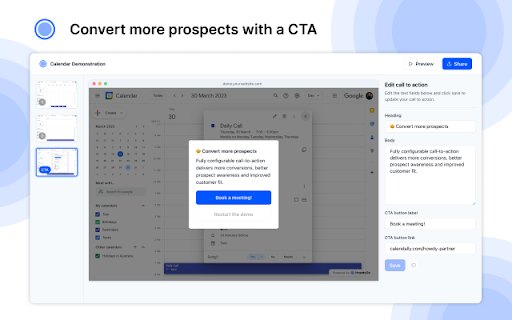
In addition, you can deliver a call-to-action at the perfect moment to carry that prospect/lead to the next stage of the funnel.
⭐️ Easy to use, easy to edit ⭐️
With the HowdyGo browser extension, you simply navigate to the website you want to record and click "Start Recording".
From that point on, every time you click, we create an annotation in your recording.
Once you've finished recording it becomes available in the HowdyGo.com editor. From there you can adjust your annotations and auto-play through steps in the flow that don't need to be explained.
Once you've finished editing, you can publish your demonstration which lets you share the annotated recording with the world. 🌏
⭐️ Call-to-Action: Close more deals! ⭐️
An important element to any marketing funnel is making sure you deliver a call-to-action at the right time.
With HowdyGo, you can easily configure a CTA that displays to your most engaged viewers. Allowing you to link out to any website and close more deals.
⭐️ What happens to my images, videos, styles, fonts, etc? ⭐️
As you record, we perform some magic in the background which stores every image, video, style, font and asset that gets displayed in your recording.
We store these files in a lightning-fast cache which lets us replay a perfect snapshot of your website at that point in time. Even if those files, or your app changes in the background, we will still be able to replay your recording perfectly.


Reviews
Loading reviews...
Permissions (7)
Permissions
activeTabℹ Can access the current tab when you click the extension cookiesℹ Can read and modify browser cookies scriptingℹ Can inject scripts into web pages storageℹ Can store data locally in your browser system.displayunlimitedStorage webNavigationℹ Can monitor navigation events
Details
| Version | 2.8.1 |
| Updated | Mar 30, 2026 |
| Size | 1.04MiB |
| First Seen | Mar 31, 2026 |
Popular in tools

Browsec VPN - Free VPN for Chrome
by Browsec
8M
★ 4.44
tools
8M
★ 4.44
tools

Zotero Connector
by Zotero
8M
★ 3.96
tools
8M
★ 3.96
tools

AnyDoc Translator - Translate Web and PDF
by www.wps.com
7M
★ 4.58
tools
7M
★ 4.58
tools

WPS PDF - Read, Edit, Fill, Convert, and AI Chat PDF with Ease
by www.wps.com
7M
★ 4.45
tools
7M
★ 4.45
tools

Video DownloadHelper
by Aclap
5M
★ 4.43
tools
5M
★ 4.43
tools
Popular Extensions

Adobe Acrobat: PDF edit, convert, sign tools
by Adobe Inc.
322M
★ 4.40
workflow
322M
★ 4.40
workflow

AdBlock — block ads across the web
by AdBlock
62M
★ 4.48
workflow
62M
★ 4.48
workflow

迅雷下载支持
by Shenzhen Xunlei Network Technology Co., Ltd.
59M
★ 2.77
workflow
59M
★ 2.77
workflow

Grammarly: AI Writing Assistant and Grammar Checker App
by Grammarly
42M
★ 4.50
communication
42M
★ 4.50
communication

Adblock Plus - free ad blocker
by eyeo GmbH
40M
★ 4.39
workflow
40M
★ 4.39
workflow