
Description
Supercharge Your Adobe Stock Workflow with the AI Agent — Now Just $10 (Limited-Time Offer!)
Eliminate the repetitive work of titling and keywording your Adobe Stock uploads. The Adobe Stock AI Agent is a powerful Chrome extension that streamlines your contributor workflow using advanced AI, saving you hours of manual work while improving your content's visibility.
Designed with a sleek, Apple-inspired interface, the AI Agent combines smart automation with deep customization — helping both new and experienced contributors scale their portfolios with ease.
🔑 Key Features & Benefits
🚀 AI-Powered Metadata Generation
Automatically generates accurate, relevant titles and keywords for your images using advanced image analysis.
✍️ Seamless Form Filling
Instantly fills metadata fields within the Adobe Stock Contributor portal with a single click — no copy-pasting required.
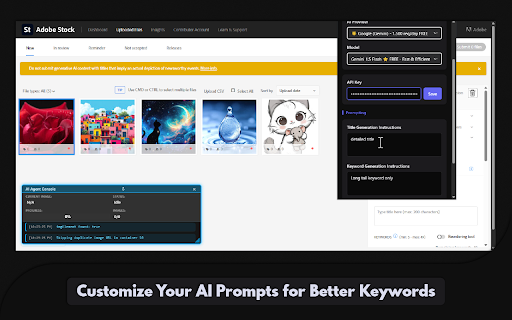
🧠 Custom Prompt Support
Guide the AI’s tone and vocabulary by writing your own instructions for title and keyword generation.
🔢 Control Keyword Quantity
Choose the exact number of keywords you want — from 10 to 49 — for optimal metadata control.
🌐 Choose Your AI Provider
Switch between major AI services in one click — the extension auto-adjusts model settings and fields for you.
🔧 Smart Automation Suite (Updates)
Enhance your workflow with intelligent automation:
✅ Auto File Type Selection – Automatically sets your preferred default (Photo or Illustration)
✅ AI Tagging Detection – Flags generative AI content automatically
✅ People/Property Selector – Auto-selects "No" when applicable for streamlined review
✅ Intelligent Field Skipping – Leaves any manually filled fields untouched
⚡ Performance & Stability Enhancements
⚡ Scan-Once Engine (NEW)
Ultra-fast DOM scanning processes your entire upload queue instantly — no lag or freezing, even on large batches.
🔔 Completion Bell (NEW)
Hear a gentle chime when your batch finishes — perfect for multitasking while the AI works.
🛠️ Improved Stability (NEW)
Centralized state handling, improved message routing, and resilient error management ensure smooth operation at scale.
🧹 Clean, Efficient Backend
Debug mode toggle, minimal console logging, and a single polling loop keep things fast and developer-friendly.
🎨 Modern, Intuitive Interface
Clean, dark theme with neon blue highlights
Built-in live console overlay displays real-time progress and feedback
🔒 Secure, Local-Only Key Handling
Your API keys are stored securely on your device and never sent to third parties.
⏱️ Reliable Batch Processing
Adaptive timing and built-in fail-safes ensure smooth handling of large image uploads.
🚀 How to Get Started
Install the Adobe Stock AI Agent from the Chrome Web Store.
Open the extension and go to the Advanced tab. Select your AI provider and enter your API key.
Customize prompts and other automation settings.
Upload your images to Adobe Stock.
Click Start Processing and let the AI Agent do the rest.
💡 Why Use the AI Agent?
⏳ Save Time – Automate time-consuming metadata entry
🧠 Improve Quality – Get consistent, relevant, search-friendly tags and titles
📈 Boost Discoverability – Increase the chance your images are found
🎯 Focus on What Matters – Spend more time creating, less time tagging
🔐 Your Privacy Matters
All processing happens on your device. Your images are analyzed in real-time — nothing is stored or shared. API keys remain secure and local.
Take your Adobe Stock submissions to the next level.
Try the AI Agent today and experience the difference intelligent automation can make.



Reviews
Loading reviews...
Permissions (4)
Permissions
activeTabℹ Can access the current tab when you click the extension offscreen scriptingℹ Can inject scripts into web pages storageℹ Can store data locally in your browser
Details
| Version | 1.6.1 |
| Updated | Feb 11, 2026 |
| Size | 133KiB |
| First Seen | Mar 31, 2026 |
More by LAYERKIT LTD

Popular in tools

Browsec VPN - Free VPN for Chrome
by Browsec
8M
★ 4.44
tools
8M
★ 4.44
tools

Zotero Connector
by Zotero
8M
★ 3.96
tools
8M
★ 3.96
tools

AnyDoc Translator - Translate Web and PDF
by www.wps.com
7M
★ 4.58
tools
7M
★ 4.58
tools

WPS PDF - Read, Edit, Fill, Convert, and AI Chat PDF with Ease
by www.wps.com
7M
★ 4.45
tools
7M
★ 4.45
tools

Video DownloadHelper
by Aclap
5M
★ 4.43
tools
5M
★ 4.43
tools
Popular Extensions

Adobe Acrobat: PDF edit, convert, sign tools
by Adobe Inc.
322M
★ 4.40
workflow
322M
★ 4.40
workflow

AdBlock — block ads across the web
by AdBlock
62M
★ 4.48
workflow
62M
★ 4.48
workflow

迅雷下载支持
by Shenzhen Xunlei Network Technology Co., Ltd.
59M
★ 2.77
workflow
59M
★ 2.77
workflow

Grammarly: AI Writing Assistant and Grammar Checker App
by Grammarly
42M
★ 4.50
communication
42M
★ 4.50
communication

Adblock Plus - free ad blocker
by eyeo GmbH
40M
★ 4.39
workflow
40M
★ 4.39
workflow