
Description
Memo Notepad: Speedy Notes Inside Your Browser
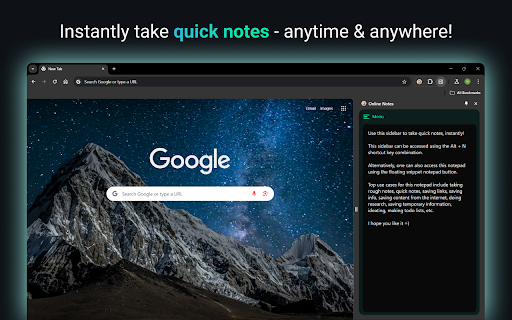
Writing a quick idea should not derail your flow. Memo Notepad lets you jot thoughts without leaving the page. This guide shows how the extension saves time, powers focus, and keeps every note one tap away.
Digital Work Demands Faster Note-Taking
Research by RescueTime shows knowledge workers switch windows 566 times a day. Each switch costs about two seconds. That adds up to 18 minutes lost daily - nearly 100 hours a year. Cutting even half those flips feels like reclaiming a vacation week. A browser-based notepad removes many of those needless jumps.
What Makes Memo Notepad Special?
One-Tap Access
Press Alt + N. A tidy pad slides into the Chrome side panel. No tab hunt, no desktop shuffle.
Context Stays Visible
Your article, spreadsheet, or dashboard remains in view. You type notes while the source material stays on screen.
Feather-Light Code
The package weighs under 150 KB. It loads in under 50 milliseconds on most machines, based on internal benchmarks.
Keyboard First
Every major action has a shortcut. Mouse fans can still click the floating button.
Features
Sidepanel editor
- Write while you read; no window juggling
Auto-save every second
- Never worry about hitting “Save”
Local storage first
- Notes stay on your device for privacy
How To Install and Start Writing
- Open the Chrome Web Store.
- Search Memo Notepad Chrome Extension.
- Hit Add to Chrome.
- Press Alt + N on any page and begin typing.
Tip: Pin the icon to the toolbar for visual reassurance, though shortcuts remain faster.
Use Cases That Shine
Students Burning Through Readings
Highlight a quote, press the shortcut, paste it, add your thought. Stay in the same tab the entire lecture.
Product Managers in Meetings
Keep Jira open, list action items in the side panel, copy straight into tickets later. Zero formatting chaos.
Writers Catching Sparks
Spot a compelling phrase on Twitter? Capture it instantly. The browser note becomes the seed of your next blog.
Everyday Shoppers
Plan a grocery list while browsing recipes. Drag the note into a delivery app when you finish.
Popular Questions
Is Memo Notepad free?
Yes. All core features remain free forever.
Does it slow Chrome?
No. Memo Notepad is super lightweight.
Where are notes stored?
By default, in Chrome local storage on your machine.
Can I change the shortcut?
Open Chrome Extensions → Keyboard Shortcuts and set any key combo you prefer.
Ready To Try It?
Adding Memo Notepad takes less than a minute and could save you hours this year. Write a thought right where it appears. Reduce tab overload. Keep focus sharp.
Install now and let ideas flow without friction.
Reviews
Loading reviews...
Permissions (4)
Permissions
backgroundsidePanel storageℹ Can store data locally in your browser unlimitedStorage
Details
| Version | 1.0.0 |
| Updated | Jun 25, 2025 |
| Size | 156KiB |
| First Seen | Mar 27, 2026 |
More by team_bolt


Popular in tools

Zotero Connector
by Zotero
8M
★ 3.96
tools
8M
★ 3.96
tools

Browsec VPN - Free VPN for Chrome
by Browsec
7M
★ 4.44
tools
7M
★ 4.44
tools

AnyDoc Translator - Translate Web and PDF
by www.wps.com
7M
★ 4.58
tools
7M
★ 4.58
tools

WPS PDF - Read, Edit, Fill, Convert, and AI Chat PDF with Ease
by www.wps.com
7M
★ 4.45
tools
7M
★ 4.45
tools

Video DownloadHelper
by Aclap
5M
★ 4.43
tools
5M
★ 4.43
tools
Popular Extensions

Adobe Acrobat: PDF edit, convert, sign tools
by Adobe Inc.
331M
★ 4.40
workflow
331M
★ 4.40
workflow

AdBlock — block ads across the web
by AdBlock
62M
★ 4.48
workflow
62M
★ 4.48
workflow

迅雷下载支持
by Shenzhen Xunlei Network Technology Co., Ltd.
59M
★ 2.77
workflow
59M
★ 2.77
workflow

Grammarly: AI Writing Assistant and Grammar Checker App
by Grammarly
42M
★ 4.50
communication
42M
★ 4.50
communication

Adblock Plus - free ad blocker
by eyeo GmbH
41M
★ 4.39
workflow
41M
★ 4.39
workflow