
⚠️Requests 1 sensitive permission ✅Recently updated
Description
Web2MD instantly converts any webpage into clean, well-structured Markdown — optimized for AI tools like ChatGPT, Claude, and Gemini.
🚀 KEY FEATURES
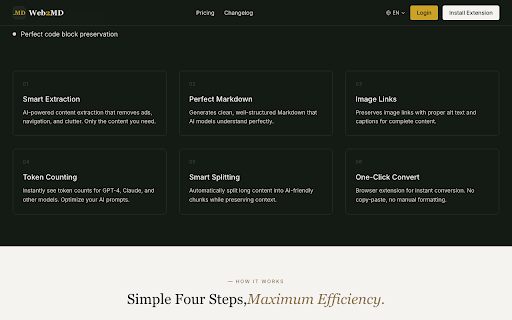
• One-Click Conversion — Convert any webpage to Markdown instantly
• Smart Content Extraction — AI-powered removal of ads, navigation, sidebars,and clutter
• Send to AI — Instantly send converted Markdown to ChatGPT, Claude, or Gemini with one click
• Prompt Templates — Apply summarize,translate, or custom prompts before sending to AI
• Batch Conversion — Convert multiple tabs or URLs at once
• Token Counting — Shows estimated oken count for GPT-4, Claude, and other AI models
• Code Block Preservation — Maintains syntax highlighting for technical content
• Table Support — Properly formats HTML tables to Markdown
• Save to Obsidian — Export directly to your Obsidian vault with YAML frontmatter
• Notion Integration — Clip and save pages directly to Notion
• Auto Copy — Optionally copy result to clipboard automatically
• Feishu/Lark—Support — Extract and convert
💡 PERFECT FOR
• Feeding web content to AI assistants(ChatGPT, Claude, Gemini)
• Complete AI workflow: convert → apply prompt template → send to AI in one click
• Web clipping and saving articles as clean Markdown
• Copy webpage as Markdown for Obsidian, Notion, or Logseq
• Creating documentation from online resources
• Developer workflows — save Stack Overflow, docs, and tutorials
• Research and content teams doing bulk web research
• Exporting Feishu/Lark cloud documents to Markdown
🔑 WHY WEB2MD?
• Removes 65% of unnecessary tokens —save money on AI API costs
• Only tool with complete "webpage →Markdown → AI" workflow
• Batch convert tabs or URLs — unique feature no competitor offers
• No more copy-pasting messy HTML into ChatGPT
• Works on any website — blogs, news,docs, research papers
• Clean Markdown output that AI models understand perfectly
🔒 PRIVACY FOCUSED
• Local conversion for Pro users — no data sent to external servers
• No tracking or analytics
• Open privacy policy
📦 HOW TO USE
1. Navigate to any webpage
2. Click the Web2MD extension icon
3. Click "Convert to Markdown"
4. Optionally apply a prompt template and send to AI
5. Copy or download your clean Markdown
Get 20 free conversions to try it out.Upgrade to Pro for unlimited conversions, batch processing,and cross-device sync.
Website: https://web2md.org
Support: support@web2md.org


Reviews
Loading reviews...
Permissions (8)
Permissions
activeTabℹ Can access the current tab when you click the extension alarmsℹ Can schedule periodic background tasks clipboardWriteℹ Can write to your clipboard contextMenusℹ Can add items to the right-click menu cookiesℹ Can read and modify browser cookies notificationsℹ Can show desktop notifications scriptingℹ Can inject scripts into web pages storageℹ Can store data locally in your browser
Details
| Version | 0.9.3 |
| Updated | Mar 27, 2026 |
| Size | 264KiB |
| First Seen | Mar 27, 2026 |
More by zephyrwhimsy


Popular in tools

Zotero Connector
by Zotero
8M
★ 3.96
tools
8M
★ 3.96
tools

Browsec VPN - Free VPN for Chrome
by Browsec
7M
★ 4.44
tools
7M
★ 4.44
tools

AnyDoc Translator - Translate Web and PDF
by www.wps.com
7M
★ 4.58
tools
7M
★ 4.58
tools

WPS PDF - Read, Edit, Fill, Convert, and AI Chat PDF with Ease
by www.wps.com
7M
★ 4.45
tools
7M
★ 4.45
tools

Video DownloadHelper
by Aclap
5M
★ 4.43
tools
5M
★ 4.43
tools
Popular Extensions

Adobe Acrobat: PDF edit, convert, sign tools
by Adobe Inc.
331M
★ 4.40
workflow
331M
★ 4.40
workflow

AdBlock — block ads across the web
by AdBlock
62M
★ 4.48
workflow
62M
★ 4.48
workflow

迅雷下载支持
by Shenzhen Xunlei Network Technology Co., Ltd.
59M
★ 2.77
workflow
59M
★ 2.77
workflow

Grammarly: AI Writing Assistant and Grammar Checker App
by Grammarly
42M
★ 4.50
communication
42M
★ 4.50
communication

Adblock Plus - free ad blocker
by eyeo GmbH
40M
★ 4.39
workflow
40M
★ 4.39
workflow