
⚠️Not updated in over a year ⚠️Requests 1 sensitive permission
Description
KTool.io
👉 Send news articles and newsletters to Kindle
👉 Reduce screen time. Improve productivity.
You spend too much time on computer screens. It damages our eyesight and hurts our comprehension.
KTool helps you read everything on Kindle instead.
Less eyestrain. More focus 🧘
———
H O W T O U S E
1. Installing this extension will add a KTool button to your Chrome browser
2. Sign up for an account
3. Click the Send to Kindle menu item on an article that you'd like to read on your Kindle.
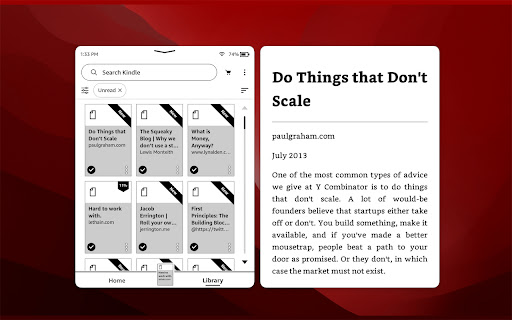
Send long web articles to your Kindle to read later. Read anywhere: on your Kindle e-reader or the Kindle app on your iPhone, iPad, or Android device. Articles are available for offline reading once delivered to the Kindle.
———
F E A T U R E S
✨ New: Added support for comic sites
✨ New: ADHD Reader Mode — helps you read faster by highlighting the beginning of every word of the article
✨ New: Send RSS feeds to Kindle automatically (premium feature)
✨ New: Forward email newsletters to Kindle automatically (premium feature)
✅ Send PDF, Markdown & DOCX documents to Kindle (premium feature)
✅ Send Hacker News discussions to Kindle
✅ On-demand article conversion using Kindle's built-in web browser
✅ Automatically import devices from Amazon.com
✅ Dark Mode
✅ Send ebooks on Standard Ebooks to Kindle
✅ Send Wikipedia articles to Kindle
✅ Preview the article before sending
✅ Browse and search send history
✅ Speedy delivery to your Kindle
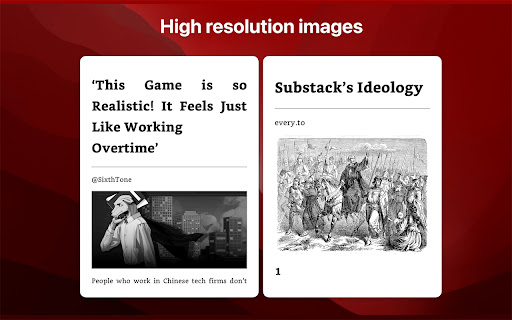
✅ Image support
✅ Emoji support
✅ Keyboard short-cut support
✅ Send Twitter thread to Kindle
✅ Send email newsletters to Kindle
KTool can send to the following devices:
✅ Kindle e-readers sold by Amazon
✅ Android Kindle app
✅ iPhone/iPad Kindle app
———
P R I C I N G
Please check https://ktool.io/pricing for details
———
C O N T A C T
KTool: https://ktool.io
Support: daniel (at) podzim.co
Twitter: https://twitter.com/ktool_io
———
P R I V A C Y
This extension does not do anything unless you click the Send to Kindle button. We do not monitor or inject any scripts into your pages while you browse.
When you click the Kindle icon, this extension sends the contents of the page and its URL to the KTool service. The KTool service then packages the contents into a reader-ready format and delivers it to your Kindle.
Content which you process with the KTool service will be cached on the server for a short period.
More information on our privacy page: https://ktool.io/privacy. Feel free to contact us if you have any questions.



Reviews (1 cached)
★☆☆☆☆2023-03-19
ahmed mohamed
Scam just 30 days trial
Permissions (5)
Permissions
activeTabℹ Can access the current tab when you click the extension contextMenusℹ Can add items to the right-click menu cookiesℹ Can read and modify browser cookies scriptingℹ Can inject scripts into web pages storageℹ Can store data locally in your browser
Details
| Version | 1.9.0 |
| Updated | Nov 20, 2024 |
| Size | 1.96MiB |
| First Seen | Mar 29, 2026 |
Popular in tools

Browsec VPN - Free VPN for Chrome
by Browsec
8M
★ 4.44
tools
8M
★ 4.44
tools

Zotero Connector
by Zotero
8M
★ 3.96
tools
8M
★ 3.96
tools

AnyDoc Translator - Translate Web and PDF
by www.wps.com
7M
★ 4.58
tools
7M
★ 4.58
tools

WPS PDF - Read, Edit, Fill, Convert, and AI Chat PDF with Ease
by www.wps.com
7M
★ 4.45
tools
7M
★ 4.45
tools

Video DownloadHelper
by Aclap
5M
★ 4.43
tools
5M
★ 4.43
tools
Popular Extensions

Adobe Acrobat: PDF edit, convert, sign tools
by Adobe Inc.
322M
★ 4.40
workflow
322M
★ 4.40
workflow

AdBlock — block ads across the web
by AdBlock
62M
★ 4.48
workflow
62M
★ 4.48
workflow

迅雷下载支持
by Shenzhen Xunlei Network Technology Co., Ltd.
59M
★ 2.77
workflow
59M
★ 2.77
workflow

Grammarly: AI Writing Assistant and Grammar Checker App
by Grammarly
42M
★ 4.50
communication
42M
★ 4.50
communication

Adblock Plus - free ad blocker
by eyeo GmbH
40M
★ 4.39
workflow
40M
★ 4.39
workflow