
⚠️Not updated in over a year
Description
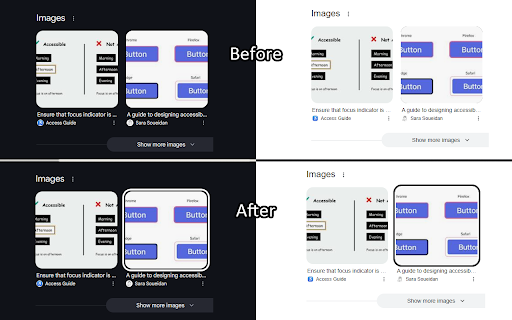
I predominantly use my keyboard to navigate websites, but many sites don't always make it clear where the keyboard is focused. This extension aims to help solve that issue by putting a white or black border around the focused element, depending on whichever results in a higher contrast.
Focus Indicator uses multiple strategies to aim for it to work effectively across all websites, but it can't account for every improper accessibility setup. For example, if a site has a focusable element out of the screen's bounds, it won't show any difference. It also doesn't affect which elements are able to be focused with the keyboard.
It prioritizes function over form. If you'd like, you can disable the extension on certain sites (blacklist them) or you can enable the extension only on certain sites (whitelist them). All settings can be configured by clicking on the extension's icon.
There are two focus indication methods, depending on your preference:
1. Overlay (default, new with version 2)
- Works by having a floating outline above the current focused element's position
- Almost guaranteed to show the outline if it is possible to, EVEN IF the focused element is behind another element
2. On Element
- Works by modifying the current element's focused styles
- The indicator will sometimes end up partly or fully covered up by other elements, but it can be less intrusive
Overlay Mode settings:
- Indicator color mode
- Solid (default) - The outline will be either solid black or solid white
- Hybrid - The outline will be a black and white inversion of whatever is directly behind each individual portion of it
- Outline width (default: 4px) - Adjust the thickness of the outline
- Outline offset (default: 1px) - Set how much space there is between the element and the outline
- Use transition between focused elements (default: off) - Animates focus shifts for better visual tracking
- Use "On Element" mode for text input elements (default: on) - The overlay may cover text while typing in certain text input elements, mainly in online code editors, so "On Element" mode can be used for just those elements instead
Reviews
Loading reviews...
Permissions (3)
Permissions
scriptingℹ Can inject scripts into web pages storageℹ Can store data locally in your browser tabsℹ Can see your open tabs and their URLs
Details
| Version | 2.1.4 |
| Updated | Mar 5, 2025 |
| Size | 25.88KiB |
| First Seen | Mar 29, 2026 |
More by Stefior


Popular in accessibility

360 Internet Protection
by qihoosafe
17M
★ 4.54
accessibility
17M
★ 4.54
accessibility

Screenshot reader™
by Texthelp
7M
★ 2.57
accessibility
7M
★ 2.57
accessibility

Volume Master
by Peta Sittek
6M
★ 4.81
accessibility
6M
★ 4.81
accessibility

Dark Reader
by Alexander Shutau
6M
★ 4.67
accessibility
6M
★ 4.67
accessibility

네이버 동영상 플러그인
by NAVER Corp.
5M
★ 1.42
accessibility
5M
★ 1.42
accessibility
Popular Extensions

Adobe Acrobat: PDF edit, convert, sign tools
by Adobe Inc.
322M
★ 4.40
workflow
322M
★ 4.40
workflow

AdBlock — block ads across the web
by AdBlock
62M
★ 4.48
workflow
62M
★ 4.48
workflow

迅雷下载支持
by Shenzhen Xunlei Network Technology Co., Ltd.
59M
★ 2.77
workflow
59M
★ 2.77
workflow

Grammarly: AI Writing Assistant and Grammar Checker App
by Grammarly
42M
★ 4.50
communication
42M
★ 4.50
communication

Adblock Plus - free ad blocker
by eyeo GmbH
40M
★ 4.39
workflow
40M
★ 4.39
workflow