
Description
功能特性:
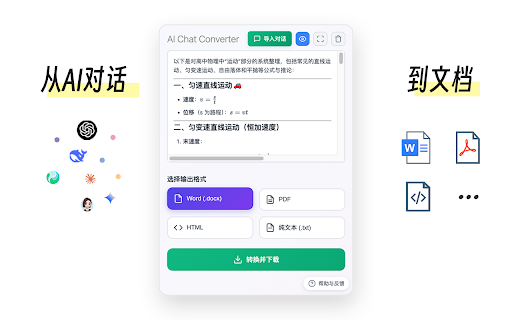
🔄 多格式转换 - 支持转换为 Word (.docx)、PDF、HTML、纯文本 (.txt) 格式
使用方法:
1、点击浏览器工具栏中的 AI Chat Converter 图标
2、在文本框中输入或粘贴 AI 对话内容(Markdown格式)
3、选择想要的输出格式(Word、PDF、HTML、纯文本)
4、点击「转换并下载」按钮
5、文件将自动下载到您的设备
故障排除:
常见问题
Q: 转换失败怎么办?
A: 检查网络连接,确保 Markdown 内容格式正确
Q: 公式无法转换?
A: 确保公式部分用“$$”包裹


Reviews
Loading reviews...
Permissions (4)
Permissions
activeTabℹ Can access the current tab when you click the extension downloadsℹ Can manage and monitor downloads scriptingℹ Can inject scripts into web pages storageℹ Can store data locally in your browser
Details
| Version | 1.0.5 |
| Updated | Sep 16, 2025 |
| Size | 1.14MiB |
| First Seen | Mar 29, 2026 |
Popular in tools

Zotero Connector
by Zotero
8M
★ 3.96
tools
8M
★ 3.96
tools

Browsec VPN - Free VPN for Chrome
by Browsec
7M
★ 4.44
tools
7M
★ 4.44
tools

AnyDoc Translator - Translate Web and PDF
by www.wps.com
7M
★ 4.58
tools
7M
★ 4.58
tools

WPS PDF - Read, Edit, Fill, Convert, and AI Chat PDF with Ease
by www.wps.com
7M
★ 4.45
tools
7M
★ 4.45
tools

Video DownloadHelper
by Aclap
5M
★ 4.43
tools
5M
★ 4.43
tools
Popular Extensions

Adobe Acrobat: PDF edit, convert, sign tools
by Adobe Inc.
331M
★ 4.40
workflow
331M
★ 4.40
workflow

AdBlock — block ads across the web
by AdBlock
62M
★ 4.48
workflow
62M
★ 4.48
workflow

迅雷下载支持
by Shenzhen Xunlei Network Technology Co., Ltd.
59M
★ 2.77
workflow
59M
★ 2.77
workflow

Grammarly: AI Writing Assistant and Grammar Checker App
by Grammarly
42M
★ 4.50
communication
42M
★ 4.50
communication

Adblock Plus - free ad blocker
by eyeo GmbH
41M
★ 4.39
workflow
41M
★ 4.39
workflow