Previews (For Twitch & YouTube & Kick) icon

Previews (For Twitch & YouTube & Kick)

by MarkM

v16.0 Updated Mar 24, 2026 758KiB
CWS
60K
Users
★ 4.76
1.4K reviews
#2347
of 207.3K
fun
#67 of 7.4K
⚠️Requests 1 sensitive permission Highly rated Recently updated

Description

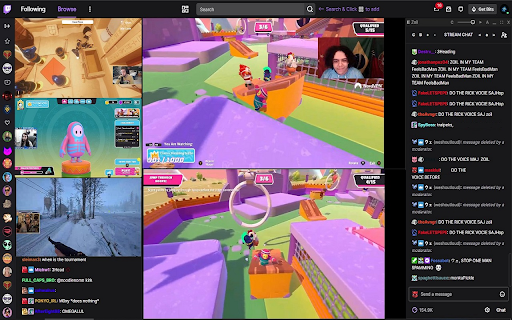
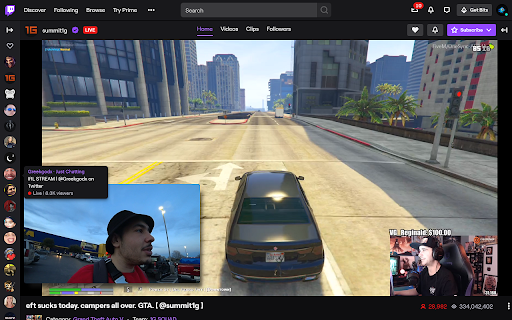
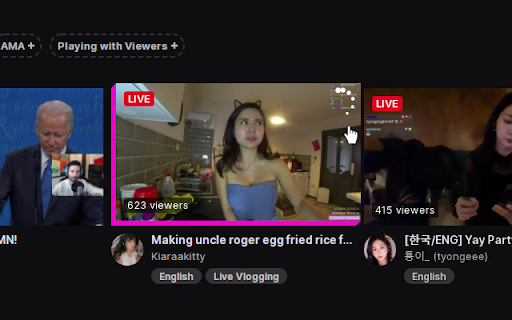
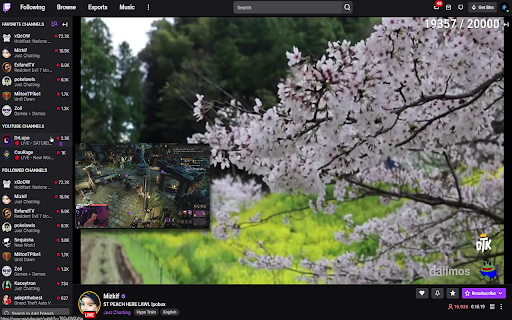
Previews (For Twitch & YouTube & Kick) creates a live video or image preview when hovering over streams and offers a bunch of quality of life improvement features for the three platforms. Check the features list below for more quality of life improvement features. Features: * Twitch: - Image or live video stream previews in the sidebar & directories. - Preview resize & volume control. - Clips Previews. - Streaming: See your own live stream thumbnail as seen by viewers. - Sidebar Favorite Channels List. - Sidebar YouTube Channels List. - Sidebar Kick Channels List. - Multi Stream & Multi Chat. - Voice Typing in chat (Speech Recognition Speech-To-Text into chat). - Auto Set Player Quality. - Transparent / Dynamic Chat Overlay. - Full Screen With Chat Mode. - Auto Channel Points Clicker. - Clip Downloader. - Auto Refresh on player errors (#1000, #2000, #3000, #4000, #5000). - Predictions Notifications when you don't know it's happening (for example if your chat is closed or you are not in the tab or browser). - Predictions Sniper (will participate in predictions for you). - Prevent Automatic Video Quality Change. - Seek Streams Using Keyboard Arrow Keys. - Fast-Forward Stream (with latency display). - Screenshot Stream. - Record Stream. - FlashBang Defender. - Prevent raids or Raid to a Previews Favorite instead. - Clear Chat Button. - Incognito Chat. - Native Picture In Picture in current stream (Browser's PIP feature). - Custom Picture In Picture. - Auto Extend the sidebar to show all live streamers (when sidebar is open). - Sidebar Stream Search: A purple search button at the top of the sidebar to find live streamers easily in the sidebar. - Hide All Sidebar Sections Except The Followed Channels. - Full Sidebar Channel Tooltips. - Mute Auto-Playing Videos In Various Pages. - Advanced Video Embeds. - Hide TTV Extensions Overlays. - Hide Volume Percentage Indicator. - Keyboard shortcuts for applicable features. - Also supports inverted layout (when chat is on the left and streamers on the right). * YouTube: - Image or live video stream previews in the sidebar. - Preview resize & volume control. - Sidebar Favorite Channels List. - Sidebar Kick Channels List. - Auto Set Player Quality. - Theater / Full Screen With Chat Mode. - Multi Stream & Multi Chat. - Transparent / Dynamic Chat Overlay. - Voice Typing in chat (Speech Recognition Speech-To-Text into chat). - Fast-Forward Stream. - Screenshot Stream. - Record Stream. - FlashBang Defender. - Player Playback Speed Controls. - Go Directly To Live Streams From The Sidebar. - Show Live Streamers' View-Count In The Sidebar. - Native Picture In Picture in current stream (Browser's PIP feature). - Custom Picture In Picture. - Prevent Video Click-To-Pause / Play. - Copy URL At Current Time Button. - Auto Theater Mode. - Auto Hide Chat. - Keyboard shortcuts for applicable features. - Also supports Right-To-Left (RTL) layout. * Kick: - Image or live video stream previews in the sidebar & directories. - Preview resize & volume control. - Sidebar Favorite Channels List. - Multi Stream & Multi Chat. - Voice Typing in chat (Speech Recognition Speech-To-Text into chat). - Full Screen With Chat Mode. - Prevent Automatic Video Quality Change. - Seek Streams Using Keyboard Arrow Keys. - Fast-Forward Stream (with latency display). - Screenshot Stream. - Record Stream. - FlashBang Defender. - Player Playback Speed Controls. - Native Picture In Picture in current stream (Browser's PIP feature). - Custom Picture In Picture. - Hide All Sidebar Sections Except The Followed Channels. - Keyboard shortcuts for applicable features. - Hide Volume Percentage Indicator. * To change any feature setting click the extension at the top bar to open the extension's options menu. How to use: 1. Add the extension to your browser. - If you already have a stream tab opened - refresh it. 2. Hover your mouse over a streamer on the sidebar / directories. - A preview will appear next to the hovered stream. Feature Notes: ** Stream Previews - Live image and video previews when hovering over streams in the sidebar and directories. ** Streaming - see your own live stream thumbnail - Shows your own stream's live thumbnail preview, as seen by viewers, when hovering over the logo at the top left. ** Multi Stream & Multi Chat - You can add Multi-Stream and Multi-Chat on the fly to any page you're on directly from the sidebar or via the top search bar (if the Multi-Stream feature is enabled). - There is also a button that is located next to the stream uptime under the stream. - Clicking it will start Multi Stream on a new TTV tab - so you can still enjoy the benefits of the sidebar and the search function at the top bar. - In the new Multi-Stream tab, add a stream from the sidebar or search for a stream at the top search bar and click the Multi-Stream button in the results to add the stream. - You can scroll the page, change background color & transparency, font color, weight, increase/decrease size, fullscreen, drag, resize and minimize the boxes (top bar and bottom right corner of the boxes). - If the Auto Channel Points feature is enabled, it will collect points in the chat box. - If you enable the 'Sidebar YT Channels' features, you can also add their streams to the Multi-Stream and use it cross-platform. ** Full Screen With Chat - The button will show next to the 'theater mode' or 'fullscreen' button in the player controls. - Hovering over it will show two options: Full Screen with Custom chat overlay or Default Chat. - The Custom chat will automatically position itself over the video to the right and stretch to screen height. - You can resize, move it around, align to each side and change styles with the controls at the top of the chat box. - The Custom chat's settings (position, size, colors, etc..) will be saved for the current page session. - Exit the mode by clicking the button again or just by exiting fullscreen. ** Sidebar Favorite Channels - A new Favorites list at the top of the sidebar (for your most favorite streamers). - Add streams to your favorites list by clicking the Favorites button next to the bell under the stream. - The list will show only the currently live streams in your favorites list. - Note: the feature relies on the followed channels list, so it will auto-expand (show more) when the sidebar is opened. if it's closed, the list will still populate but will be partial. - Note: it might take a few seconds for the list to show or update. ** Sidebar YouTube Channels - A new list at the top of the TTV sidebar to show your subscribed YT channels that are currently live. - The list data will update every 15 minutes. - Supported by the Custom Picture-In-Picture and Multi-Stream & Multi-Chat features so you can use the Multi-Stream cross-platform. - You need to be logged in to YT. ** Auto Channel Points Clicker - This feature automatically clicks the green channel points redeem button. - It also works when chat is closed and when the tab or window is in the background. ** Clip Downloader - The button will show in the player controls of clips. ** Sidebar Stream Search - A purple search button on the top of the sidebar to find live streamers easily. - Searches within the currently shown streamers so the sidebar will automatically extend to show all live streamers when you start searching. ** Sidebar Extend - Auto extends the sidebar to show all live streamers (when sidebar is open). ** Hide All Sidebar Sections Except The Followed Channels - Hides all the other sections in the sidebar except the followed channels. ** Mute Auto-Playing Videos In Various Pages - Mutes the auto-playing video players in various pages. ** Native Picture In Picture - The button will show next to the 'theater mode' button in the player controls. - Clicking it will start the browser's Picture In Picture for the current stream. ** Custom Picture In Picture - A small button will appear under the view count when you hover a streamer - click it and a persistent preview window will appear (you can add as many as you like). ** Auto Refresh On Player Error (#1000, #2000, #3000, #4000) - Refreshes the player if an error occurs. ** Prevent Automatic Video Quality Change When In Background - Prevents automatic video quality change when the player is in the background (when switching tabs / tasks). - Prevents 99% of player errors (#1000, #2000). ** Seek Streams Using Keyboard Arrow Keys - Seeks 5 seconds back or forward using the keyboard left/right arrow keys. - Note: the buffer size varies between 0 seconds to two minutes. ** Fast-Forward Stream - Useful if your stream is delayed. - The button will show in the player controls next to the 'play/pause' button. - Click it to fast-forward the stream to the latest point in the buffer. ** Screenshot Stream - The button will show in the player controls. - You can capture multiple screenshots and then save only the ones you like. - The screenshots are captured at the same resolution as the stream. ** Record Stream - Click to start recording, click again to stop recording and save. - Works great with the "Seek Using Keyboard Arrows" feature. ** FlashBang Defender - For when it's late night and the streamer opens a white screen. - Toggles a semi-transparent overlay on top of the stream. - The button will show in the player controls. ** Clear Chat Button - The button will show under the chat. - Clears all the messages in chat. ** Predictions Notifications - Predictions started and Predictions results notifications when you don't know it's happening (for example if your chat is closed or you are not in the tab or browser). ** Predictions Sniper - The predictions sniper will participate in predictions for you. - The sniper will choose the prediction option with the most amount of votes received at the time of entry (x seconds before prediction closes). - If you have your chat open (no need), you will see the prediction menu for a split second when the sniper is entering a prediction. - You can enable the 'Predictions notifications' feature if you want to know what's happening in real-time. - If there is already a bet made on the prediction, the sniper will not add more points. - To change Sniper settings for individual streams, click the Sniper settings button under the chat. -- Default Settings: - Bet % - the percentage of channel points you want the sniper to bet. - Max num of points - the maximum amount of points the sniper is allowed to vote with. - Min vote margin % - a percentage representation of the minimum required vote margin between the two prediction options for the sniper to participate. -- For example: option A- 100 votes, option B- 115 votes, vote spread: A-46.51% B-53.49%, vote margin: 6.98% (53.49% - 46.51%). if the minimum vote margin is lower than 6.98%, the sniper will participate in the prediction. - Seconds - the amount of seconds the sniper will make a prediction before the prediction closes (min 2s). - Remember that this is a statistical tool and wins are not guaranteed. ** Advanced Video Embeds - This applies to the Multi-Stream feature and on-the-fly video embeds (not previews). - Bypasses purple screen. - Adds enabled features to embeds (seek, fast-forward, auto-refresh, picture-in-picture, fullscreen with custom chat, flashbang defender, stream screenshot). - Seeking using the keyboard arrow keys in these embeds will be in 1.5 seconds intervals instead of the normal 5 seconds to allow easier streams synchronization for Multi-Stream. - Note: this feature will use more resources when using said embeds. if you notice performance issues you can turn this feature off. - Note: if you're using a different extension that replaces the main player, you might still experience a purple screen. ** Go Directly To Live Streams From The Sidebar - Goes to a channel's live stream directly from the sidebar instead of the channel's home directory. - Only on live channels. ** Show Live Streamers' View-Count In The Sidebar - Shows live streamers' view-count on their card in the sidebar. ** Player Playback Speed Controls - Increase, Decrease and Reset the video playback speed. ** Prevent Video Click-To-Pause / Play - Prevents the video from pausing / playing when clicking on it. ** Copy URL At Current Time Button - Opens a small box with the URL to the video at the current time. - Useful in live streams where this is not possible by default. © MarkM. - If you are a content creator or a developer in the sphere, have a look at the Affiliates Program -> https://previews-app.com/affiliate - this extension is not affiliated with any of the companies mentioned or any of their related companies.
Previews (For Twitch & YouTube & Kick) screenshot 1Previews (For Twitch & YouTube & Kick) screenshot 2Previews (For Twitch & YouTube & Kick) screenshot 3Previews (For Twitch & YouTube & Kick) screenshot 4Previews (For Twitch & YouTube & Kick) screenshot 5Previews (For Twitch & YouTube & Kick) screenshot 6

Reviews (46 cached)

★☆☆☆☆2026-01-01
MYTHICAL CURT

makes some site crash like kick this add on is super bad and user should report it

★☆☆☆☆2025-11-19
Cannon

new update requires payment to use features that were free before

★☆☆☆☆2025-11-01
Diego

changed a few settings to test them... now youtube is not loading anymore, no video, no comments, nothing is working anymore (yes... I set it back like it was before).

★☆☆☆☆2025-10-01
Jay lay

Why change the hotkeys for "Seek Streams Using Keyboard Arrows Keys"? It was fine using left and right arrow now we unnecessarily need to press shift... Can you add remapping at least? thanks.

★☆☆☆☆2025-07-16
AL

$5 for an app that only works on Twitch? Do you think your Paramount+ or Google Play!?

★☆☆☆☆2025-06-30
휘동이

This extension was useful, but fairly unstable nowadays. Please don't include many functions, just focus on the basic ones.

★☆☆☆☆2025-06-29
Ethan Godwin

The app no longer works. the main focus of the extensions (previews) no longer show when hovering over a screen, making 90% of the reason why people download this app useless. (also, all the other features that have been free since the beginning have now been paywalled for $5 a month, so now the other 10% of the app is also useless)

★☆☆☆☆2025-06-08
Knightalon 13

Used to love this extention but not enought to pay for it. And now that I see that the develiper is behaving like a man child now that people are mad, even if it went back to free I would never come back. Grow up dude.

★☆☆☆☆2025-06-07
zip zap

Greedy dev went full paywall. I cannot wait till someone else make a similar extension so we can all forget about this one

★☆☆☆☆2025-05-31
Zak

Wants almost half the cost of Twitch Turbo or YouTube Premium to re-enable Favourite features & more that were once free.

★☆☆☆☆2025-05-22
Jeff

$5/month for a chrome extension, you must be out of your mind.

★☆☆☆☆2025-05-21
Erik Carboni

The way you went about paywalling this was incredibly poor. The fact that you seem defensive and surprised by recent negative feedback resulting from this demonstrates a complete lack of common sense and business sense. You began by making this app free for a VERY significant amount of time, with full features, then SUDDENLY decided to paywall many of the key features. OF COURSE that is going to leave a terrible impression with people. You went from allowing unlimited favorites for free to 5 AFTER PEOPLE HAD ALREADY CHOSEN THEIR FAVORITES among limiting other key features very suddenly and providing NO WARNING TO USERS WHATSOEVER, and now you are arguing sarcastically with your own users who are, very understandably, not pleased in these reviews. A direct quote from you below, to a user expressing their legitimate grievances: "Oh im sorry, i had no idea i work for you for free." This is childish to the extreme and demonstrates a sense of entitlement. You DO work for free when it is a free app and your stance has always been aligned with that. No one asked you to keep working on this app or adding features. YOU chose to do so, apparently because you saw dollar signs in your future. YOU never clearly communicated that features would eventually be paywalled, allowing users to get used to all features and THEN restricting them by forcing them to either choose their favorites to keep or pay you. THIS IS ALL ON YOU, and I look forward to the flood of negative reviews you are about to receive. I am generally happy to support others, but based on how you went about this and your entitled attitude, you will never get a cent from me. Your app was useful, but not even remotely essential. I'll live without it just fine. Bye!

★☆☆☆☆2025-05-21
Kevin Ruan

when a good app gets pay walled...

★☆☆☆☆2025-04-11
Split Soul

use to be good but now it gets detected by twitch or the streamer and the audio keeps getting automatically muted

★☆☆☆☆2025-03-17
Eetu Kaipiainen

Paywalling the favorite streamers sidebar is horrible and made this extension useless.

★☆☆☆☆2024-12-18
Hayes

Was great at first, but now I'm getting a ton of popups and notifications on it with no way to opt out. Looking for an alternative. Edit: Lately the extension has been intermittently freezing my browser, having to terminate it via task manager. Still getting occasional popups that are *branded* as this extension. No other extensions are installed. Developer appears to claim the extension doesn't create popups. Downgrading to 1 star and removing the extension.

★☆☆☆☆2024-11-24
Hadeks Marow

Previews windows are too big/act more like a mini player (even on lowest scaling settings) and the extension itself is too feature clunky. If you have a product called [SERVICE], then that [SERVICE] is all I'm downloading it for. Not all this extra BS. No one likes having to go into settings to enable or disable stuff just for the app to do what the name says without any bloat.

★☆☆☆☆2024-09-21
Dylan

The favorites side bar was my favorite feature this had but now it's locked behind a paywall after only 5. It was a good run.

★☆☆☆☆2024-08-23
Hichem

lol asking to pay for features go to the trash instantly

★☆☆☆☆2024-05-30
Brandon Lockaby

The actual previews haven't worked for me in years, but I keep it around for the "fast forward" button. What does work is the nag pop-ups. The other day this extension had the gall to randomly pop up a window something trying to say I needed to pay for some reason: "Clips previews free-tier limit reached (30) Subscribe to unlock this and other subscriber-only features!" This and similar pop-ups are unlike anything I've seen from other extensions, it's quite disgusting. Especially considering the "previews" part of the extension doesn't even work. Again, I still have this extension only for the fast-forward button!

★☆☆☆☆2024-03-18
Joseph Novak

Only use this extension to see YT/Twitch live channels and a few favorites. Favorites is now locked behind a paywall after 5. Time to move on.

★☆☆☆☆2024-02-15
Matze

i added a bunch of favorites, now i get a prompt i can add only 5? what is this? it just worked until a few hours. so i got paywalled i guess. bad to put this feature away by limiting the favorites

★☆☆☆☆2023-12-28
Miguel Silva

cool update (now its all paid)

★☆☆☆☆2023-12-26
Jagvinder Sian

When I press the preview button, the top bar of the window is hidden behind my bookmark bar. This leaves me unable to change language, minimize or close the window, unless I zoom out first. OS: Windows 10 Browser: chrome Browser Version: 119.0.6045.200 Extension Version: 9.4

★☆☆☆☆2023-11-08
Oliver Jay Aaby

GREAT... at not block Stream Previews.

★☆☆☆☆2023-03-08
Javier Lim

Recent update locked features behind a paywall. i.e. Embedding more than 4 streams/chats. Features that MultiTwitch provides for free are now locked behind a paywall. There were also signs that the developer got more invasive in pursuing for subscription/donation with popups, which was acceptable since they can be dismissed after a few seconds. Unlike how other third-party Twitch extension like BTTV, FFZ, 7TV, which implemented new features for the subscription models e.g. animated profile picture, chat badge, etc. leaving existing features untouched. Whereas this developer got greedy and locked existing features behind a paywall. Features that was the reason that many of us used the extension for are now locked behind a paywall. I understand that the developer wants to monetise it, but could've implemented new features and lock them behind the subscription model thus it wouldn't affect the current user who uses it.

★☆☆☆☆2023-02-28
Archimedes68

Previews doesn't work! (Trash commercial for 15 sec)

★☆☆☆☆2022-12-23
Salep

after last update extention wants to read your data for other sites too not only twitch. no longer trustworty

★☆☆☆☆2022-12-10
Michael

I don't care if you update this. Stop giving me the stupid popup. Uninstalled, leave people alone idiot.

★★☆☆☆2025-03-17
J Mar

This would be good, if the so called ads didn't pop for every channel, WHEN THEY ARE NOT EVEN PLAYING AN AD, EVEN ON CHANNELS THAT DO NOT HAVE ADS.......that one thing makes this a horrible app....In response to your comment below, I have been IN channels in my favorites list, while there are no ads playing and hover over that same channel to preview it and it plays the "preparing your channel" blank ads. So if there are no ads playing in the channel, why does your program do it? What is happening when your program pulls the channel into a preview? Especially because Twitch does not play "blank" ads.....I can hover over a channel in the list and it'll play a "blank" ad and if I move it off and back on after a few seconds it does it again over and over until you let the whole ad run. I Tried it with a free week of twitch turbo for no ads and it does not do it. The issue is not the ads themselves it is the frequency in which they pop up in previews, it does not follow the same frequency as twitch ads themselves on channels that do run them, so why is it different for your app? Also blaming twitch and posting a twitch support link is an extremely poor response and for sure will not gain any kind of response to a "Third Party" extension complaint. Even if it is twitch (which I can believe) your extension acts as if I am not logged into twitch and haven't actually let any ads run its course and restarts all the timers each time I hover another channel. Honestly at the end of the day if twitch hadn't removed the categories video previews I wouldn't even need an app like this. I tried to give this another shot but honestly your app has more ads than twitch itself many, many more ads. Your previews even play ads when the channel itself isn't playing ads, so I am removing this app, it's useless when every single time I hover over a channel to preview it plays either a 15 sec ad or a 3 min add. It's easier to just to go to the channel. If this app would at least match the ad spacing that twitch actually uses on peoples channels it wouldn't be soooo annoying. You say it's twitches fault and to go complain to them when your app plays more ads than they do. No, no thank you.

★★☆☆☆2024-03-19
Kentucky “dfsdfsdf” Sally

This extension keeps losing features over time. At first you were able to add as many favourite channels as you wanted to, but now it's a paid feature. I would not mind paying once for it as it is a decent product, but a monthly subscription is a bit too much.

★★☆☆☆2022-12-09
Crew Sayder

Used to love this ext but the coming changes will make me remove it. Do what is intended which is NOT connecting to other servers and sending "live data". Time to fork this ext. "i'm adding permissions to communicate with the extension server (previews-app.com domain) which is important for fetching live data and adding new features."

★★☆☆☆2022-11-27
Johnny Lam

Started showing ads before the preview, might as well remove the extension and open the streamers channel in another tab again.

★★☆☆☆2022-09-10
Avi Wasserman

Great features, but nearly every time I hover over a stream thumbnail I need to wait 15 sec

★★☆☆☆2022-08-07
Kona Bird

This extension puts a little Twitch link over my youtube user icon, making it almost impossible to click it. I couldn't find any option for turning this on and off so that is why my rating is two stars.

★★☆☆☆2022-02-10
Roy Worang

Only reason I installed was for the facebook integration and that doesn't work

★★★☆☆2025-05-21
Radio

Used to be a great extension but locked their best features behind a paywall now unfortunately.

★★★☆☆2025-02-21
John Brown

Not bad, but this causes your chat messages not to appear in YouTube lives, and sometimes in Twitch chats.

★★★☆☆2024-04-11
cheetahma08 tiger

the sound doesnt work on it

★★★☆☆2023-06-11
Sʜɪɴᴏʙᴜ Sᴇɴsᴇɪ

I love this extension but there's a bug which freeze the Preview Window sometimes and i have to refresh the page. If they'll fix that bug, i'll give 5 stars for sure.

★★★☆☆2022-12-14
Stanislav Drab

idk if its some bug now but the stream player controls just instantly disappear after i switch to other chrome tab and go back ... the controls still work if i click around the area where the certain button is but otherwise they cant be seen ... refreshing brings them back and it repeats again ... disabling this extension fixes the issue tho

★★★☆☆2022-05-30
Robin K.

It does what it advertises. And it does very good so. You also get a lot more useful features that you can choose to enable or not. Props to the developer(s) of this awesome extension! Edit: Since a few months, previews are pretty useless for me. When a broadcaster flags its channel for adults only, no preview is shown (https://i.imgur.com/0E1rvN2.png) Most of the streamers I follow do this. Is there a way to disable this warning?

★★★☆☆2022-05-20
Francesco Paolo “FrancP976” Calvaruso

After the last update, the channels selected as favorites no longer appear in the sidebar

★★★☆☆2022-05-18
James Kowalski

I feel like this would be a good app, but for some reason having it enabled causes everything I hover over (to preview) to cause the webpage to immediately refresh.

★★★☆☆2021-11-13
HP

Videos downloaded with this program cannot be played helpme!!

★★★☆☆2021-08-25
Void

Please fix fast-forward button almost always not showing when Twitch loads (it requires another refresh to show)

Permissions (3)

Permissions

cookies Can read and modify browser cookies scripting Can inject scripts into web pages storage Can store data locally in your browser

Details

Version 16.0
Updated Mar 24, 2026
Size 758KiB
First Seen Mar 26, 2026