
⚠️Requests 2 sensitive permissions
Description
Introducing CurateIt - the ultimate all-in-one Chrome extension for Your Second Brain for AI Research, Productivity and to Showcase your work
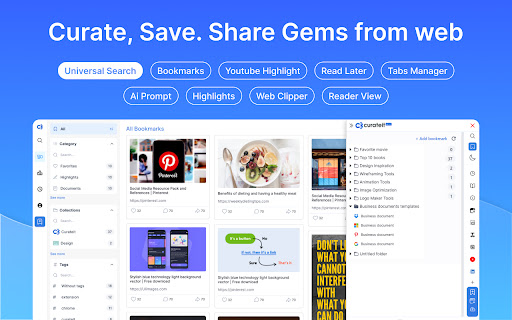
Organize and save your favorite ideas, articles, and inspirations from across the web. With CurateIt, you can keep track of all the exciting recipes, style ideas, DIY projects, and more, ensuring that you never lose access to the content you love.
With CurateIt, you can easily import and connect to various platforms such as Pocket, Raindrop, and Kindle. Save content directly from Twitter, upload bookmarks, and even save highlights from text, images, PDFs, code, and YouTube videos.
CurateIt’s extensive list of features includes:
1. Import and Save Features
- Import from Pocket
- Import bookmarks from Raindrop
- Upload bookmarks
- Save tweets (bookmarks, likes, tag @savetocurateit)
- Save for later (Read later)
- Highlight text (like weava, liner)
- Save any image like Pinterest
- Save Code snippets
- Save or download any images
- Save or annotate PDFs
2. Organization and Management Features
- Bookmark manager
- Web clipper
- Text Expander
- AI Prompts
- Spotlight Universal search
- Smart search assistant (using Gems & History)
- Tabs Manager (like workona, toby)
3. Reading and Accessibility Features
- Reader view mode
- Dark reader mode
- Read aloud (Text-to-speech)
- Text Highlights
- YouTube highlighter
- Import your Kindle highlights
4. Advanced Features and Utilities
- Image Screenshot (full page screenshot, select image area or component or annotate)
- Image OCR to copy text or code (including language identification and code convert)
- Site info on any page (company details, technology stack, brand, traffic, etc.)
CurateIt also offers a unique browsing experience with its Spotlight Search and Reader’s View, making it easier to discover content tailored to your interests. Simply hover over an image, code and click to explore save you’re passionate about on CurateIt.
Download CurateIt today and experience the convenience and simplicity of this easy-to-use Chrome extension!


Reviews
Loading reviews...
Permissions (12)
Permissions
activeTabℹ Can access the current tab when you click the extension bookmarksℹ Can read and modify your bookmarks browsingDataℹ Can delete browsing history and data contextMenusℹ Can add items to the right-click menu cookiesℹ Can read and modify browser cookies historyℹ Can read and modify your browsing history scriptingℹ Can inject scripts into web pages search storageℹ Can store data locally in your browser tabGroupsℹ Can organize tabs into groups tabsℹ Can see your open tabs and their URLs unlimitedStorage
Details
| Version | 8.4.1 |
| Updated | Sep 26, 2025 |
| Size | 20.83MiB |
| First Seen | Mar 31, 2026 |
Popular in tools

Zotero Connector
by Zotero
8M
★ 3.96
tools
8M
★ 3.96
tools

Browsec VPN - Free VPN for Chrome
by Browsec
7M
★ 4.44
tools
7M
★ 4.44
tools

AnyDoc Translator - Translate Web and PDF
by www.wps.com
7M
★ 4.58
tools
7M
★ 4.58
tools

WPS PDF - Read, Edit, Fill, Convert, and AI Chat PDF with Ease
by www.wps.com
7M
★ 4.45
tools
7M
★ 4.45
tools

Video DownloadHelper
by Aclap
5M
★ 4.43
tools
5M
★ 4.43
tools
Popular Extensions

Adobe Acrobat: PDF edit, convert, sign tools
by Adobe Inc.
331M
★ 4.40
workflow
331M
★ 4.40
workflow

AdBlock — block ads across the web
by AdBlock
63M
★ 4.48
workflow
63M
★ 4.48
workflow

迅雷下载支持
by Shenzhen Xunlei Network Technology Co., Ltd.
59M
★ 2.77
workflow
59M
★ 2.77
workflow

Grammarly: AI Writing Assistant and Grammar Checker App
by Grammarly
42M
★ 4.50
communication
42M
★ 4.50
communication

Adblock Plus - free ad blocker
by eyeo GmbH
41M
★ 4.39
workflow
41M
★ 4.39
workflow