
⚠️Requests 1 sensitive permission
Description
Export Facebook Comments in One Click – Instantly Save as CSV or JSON
Facebook Comments Export is the fastest and easiest way to download comments from any Facebook post, directly to your computer. Built for marketers, researchers, influencers, and anyone who needs to analyze or store Facebook engagement data, this powerful Chrome extension gets the job done in seconds.
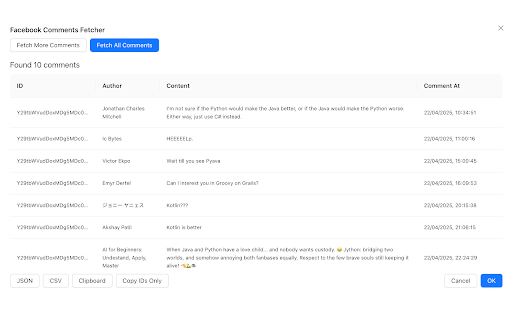
No more copy-pasting or endless scrolling. With a single click, you can bulk export all comments — including the commenter's name, timestamp, comment etc — to clean CSV or JSON files. Perfect for data analysis, sentiment tracking, lead generation, or reporting.
✅ Top Features:
1) Bulk Export Facebook Comments – Supports both posts and ads.
2) Clean CSV/JSON Format – Ready for analysis in Excel, Google Sheets, or any tool.
3) Includes Timestamps & User Info
4) Fast & Easy to Use – One-click export with no coding or API setup.
5) No Facebook Login Required (unless accessing private posts you can view)
🧑💼 Ideal for:
1) Social Media Managers analyzing engagement.
2) Performance Marketers collecting feedback on ad campaigns.
3) Researchers & Analysts mining user insights.
4) Business Owners & Brands responding to customer questions or concerns.
🔒 Privacy & Security First
We respect your privacy. No data is ever stored or shared. All comment exports happen locally in your browser, and nothing is sent to our servers.
💡 Why Choose Facebook Comments Export?
No subscriptions needed – try it free!
Compatible with all Facebook post types: timeline posts, public pages, and sponsored ads.
Get started in seconds. Download Facebook Comments Export and take full control of your comment data today.
Disclaimer: Facebook™ is a registered trademark of Meta Platforms, Inc. This extension is not affiliated with, endorsed, or sponsored by Facebook™.


Reviews
Loading reviews...
Permissions (4)
Permissions
identityℹ Can use your Google account identity identity.email storageℹ Can store data locally in your browser webRequestℹ Can observe and analyze network traffic
Details
| Version | 1.5.0 |
| Updated | May 6, 2025 |
| Size | 422KiB |
| First Seen | Mar 31, 2026 |
More by thelanders.club

Popular in tools

Zotero Connector
by Zotero
8M
★ 3.96
tools
8M
★ 3.96
tools

Browsec VPN - Free VPN for Chrome
by Browsec
7M
★ 4.44
tools
7M
★ 4.44
tools

AnyDoc Translator - Translate Web and PDF
by www.wps.com
7M
★ 4.58
tools
7M
★ 4.58
tools

WPS PDF - Read, Edit, Fill, Convert, and AI Chat PDF with Ease
by www.wps.com
7M
★ 4.45
tools
7M
★ 4.45
tools

Video DownloadHelper
by Aclap
5M
★ 4.43
tools
5M
★ 4.43
tools
Popular Extensions

Adobe Acrobat: PDF edit, convert, sign tools
by Adobe Inc.
331M
★ 4.40
workflow
331M
★ 4.40
workflow

AdBlock — block ads across the web
by AdBlock
63M
★ 4.48
workflow
63M
★ 4.48
workflow

迅雷下载支持
by Shenzhen Xunlei Network Technology Co., Ltd.
59M
★ 2.77
workflow
59M
★ 2.77
workflow

Grammarly: AI Writing Assistant and Grammar Checker App
by Grammarly
42M
★ 4.50
communication
42M
★ 4.50
communication

Adblock Plus - free ad blocker
by eyeo GmbH
41M
★ 4.39
workflow
41M
★ 4.39
workflow