
⚠️Not updated in over 2 years
Description
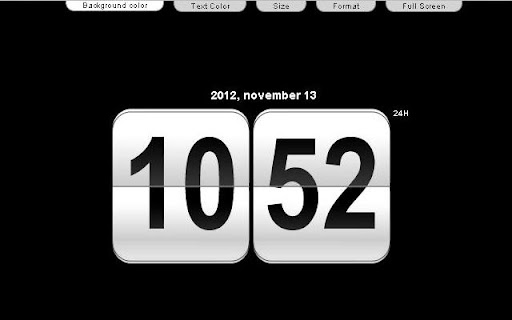
Retro Clock is a wonderful free clock with a retro design.
You can change the background color and text color. Change the size of the clock and the 24 hour format is possible.
The fullscreen mode is perfect if you want use it like a screen saver. The page's title display the time.
Please give me your feedback and I will improve it.



Reviews (4 cached)
★☆☆☆☆2015-12-01
ruiz R
doesnt open
★☆☆☆☆2013-12-10
jean Billips
I wanted this for my computer not as a page on my browser. How can I uninstall it?
★★☆☆☆2016-04-05
Haggard Melon
I don't want to view this in a page, I thought it would appear in the Chrome taskbar someplace. It's easier to just look at the Windows clock instead.
★★★☆☆2016-10-09
David J Gill
I'm perplexed. I want a clock on my desktop or toolbar. This appears to be a webpage with a clock on in. Is there some instruction missing that is obvious to some people....?
Details
| Version | 1.0.0 |
| Updated | Nov 15, 2012 |
| Size | 7.83KiB |
| First Seen | Mar 31, 2026 |
Popular Extensions

Adobe Acrobat: PDF edit, convert, sign tools
by Adobe Inc.
322M
★ 4.40
workflow
322M
★ 4.40
workflow

AdBlock — block ads across the web
by AdBlock
62M
★ 4.48
workflow
62M
★ 4.48
workflow

迅雷下载支持
by Shenzhen Xunlei Network Technology Co., Ltd.
59M
★ 2.77
workflow
59M
★ 2.77
workflow

Grammarly: AI Writing Assistant and Grammar Checker App
by Grammarly
42M
★ 4.50
communication
42M
★ 4.50
communication

Adblock Plus - free ad blocker
by eyeo GmbH
40M
★ 4.39
workflow
40M
★ 4.39
workflow